Most chat buttons inside apps get tapped once, out of curiosity, and never again. The user types "hi", gets a paragraph of polite filler, and goes back to the search bar. We wanted the opposite for the Qooty app: an assistant that shoppers open because it answers a real question faster than anything else on the screen.
Short answer: an in-app AI assistant gets used when it does one job better than the existing UI, answers with your app's own components instead of paragraphs, and is honest about what it found. Give it a narrow scope, a personality driven by real results, hard cost and abuse limits, and a clear list of things it refuses to do.
The business problem
A founder asking for "an AI chatbot in our mobile app" pictures a feature. What they buy is a running cost and a brand voice that can go wrong in public. The failure modes are predictable:
- Nobody finds it, or nobody comes back. A floating bubble with "How can I help?" gives no hint of what it is good at.
- It answers with walls of text. On a phone, five sentences about prices are harder to use than one product card with a price and a store logo.
- It sounds confident when it found nothing. One wrong answer and users stop trusting the rest of the app.
- It costs money per message with no ceiling. One script can run up a real bill.
- It collects data you didn't plan to hold. Stored photos and chat logs become a privacy question.
None of these is a model problem. They are product decisions, cheaper to make before the first prompt than after launch.
What you are actually choosing
| Option | What the user gets | Running cost | Main risk |
|---|---|---|---|
| Better search and filters, no AI | Fast, predictable answers | None beyond hosting | Weak on vague or multi-item requests |
| Scoped helper without an LLM | Search plus smart fallbacks in one context | None beyond hosting | Only handles simple requests |
| Generic chatbot on a general model | A text box that talks about anything | Per message, unbounded | Off-topic answers, invented facts, no link to your data |
| Grounded in-app assistant | Your own UI components, chosen by a model that calls your APIs | Per message, capped in code | Needs product design, limits and testing |
Our view: if plain search answers the questions users actually ask, improve search. A model earns its cost when the input is messy (a spoken list, a dialect phrase, a photo) and the answer must come from your own data.
How we built it in Qooty
Qooty is a weekly offers and flyers platform for Saudi Arabia, with a website, a Flutter app and a partner portal on one backend. Its assistant is Qatty (قطّي), the brand's cat mascot. This article covers the product and business side. For the technical loop (function calling, dialect handling, matching and receipt math), read how we built the Arabic voice shopping assistant.
Why a character at all
A deals app competes on trust and habit. A mascot gives the assistant a recognizable face, a warm Saudi-dialect tone, and a way to show state (listening, searching, found it, found nothing) without extra text.
The character is not a single sticker. The mobile app has three head moods used for animation (happy, playful, surprised) and a set of full-body poses cut from the brand sheet (cheer, think, point, cart, phone, sleep and more). The poses fill empty states such as the cart and notifications, and the website uses the same art on its 404 page. The chat is just one place Qatty shows up.
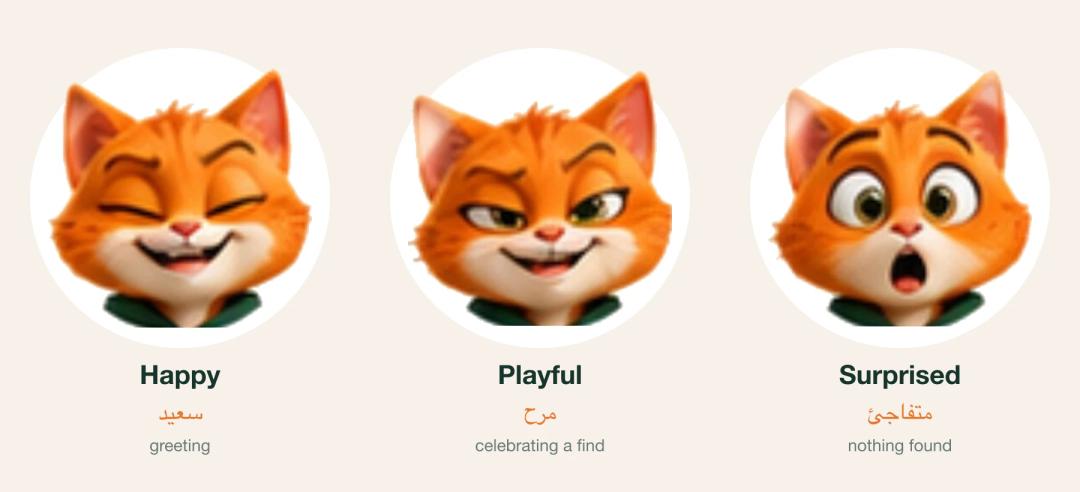 Qatty mascot moods side by side: happy, playful (celebrating) and surprised (nothing found)
Mood comes from results, not decoration
The rule we cared about most: after a reply, the cat looks happy only if the search found something. The model is asked to return a mood, but the backend overrides it from what the tools actually returned:
// Mood is decided from what actually happened, not trusted to the model.
function computeMood({ toolsCalled, results, modelMood }) {
  if (toolsCalled) return results.some(hasResults) ? "happy" : "surprised";
  // No search ran: the model may only pick "playful" (greeting, off-topic).
  return modelMood === "happy" || modelMood === "surprised"
    ? "playful"
    : modelMood || "playful";
}
The app then maps the same facts to sound and motion. A found result plays a chime, makes Qatty jump and fires a short burst of stars and coins. A search that came back empty plays a sad mew. A greeting gets a meow. While it waits, he purrs.
final searched = reply.results.isNotEmpty;
final found = reply.results.any((g) => g.top != null);
if (found) {
  QattySounds.play(QattySound.found);
  qatty?..celebrate()..burst();      // jump + stars and coins
} else if (searched) {
  QattySounds.play(QattySound.sad);  // honest "nothing matched"
} else {
  QattySounds.play(QattySound.meow); // small talk, no search
  qatty?.celebrate();
}
talkBriefly();                       // mouth moves for ~1.3 s
The sounds are synthesized by a small Python script in the repo from a pitched source and two vowel formants, so there are no licensed samples. On iOS they play in the ambient audio category, which Apple documents as respecting the Ring/Silent switch and mixing with other audio, so a meow never pauses someone's podcast. One speaker toggle in the chat header turns them off, the same sound never repeats within 700 ms, and every sound is skipped while the microphone records.
He breathes, blinks, bounces while talking and dozes off after 30 idle seconds. With reduced motion turned on, he stays still and only the mood changes.
The design changed in week one
The first version, shipped with the rebrand, read every reply aloud with the phone's text-to-speech engine. On many devices there was no Arabic voice installed, so Arabic replies came out with English pronunciation. A week later we removed spoken replies. In the commit's words, "Qatty talks in cat, not the system voice": a short mouth animation, the matching sound, and the text on screen. Lesson for any Arabic product: test voice output on your customers' real phones before you promise it.
Cards, not paragraphs
The model writes one or two short sentences. Everything else on screen is a product card built directly from the tool results: product photo, price in SAR with the old price struck through, size and price per unit, store name, and an orange "Cheapest" badge on the top pick, with up to three alternatives in a horizontal row. Each card opens the product page. If an item wasn't found, the card says so ("No offer found for «…»") instead of leaving a gap.
After each tool round the backend reminds the model that "the app shows the product cards itself", so the reply stays a caption. Users scan it in two seconds, and the model never retypes a price it could get wrong.
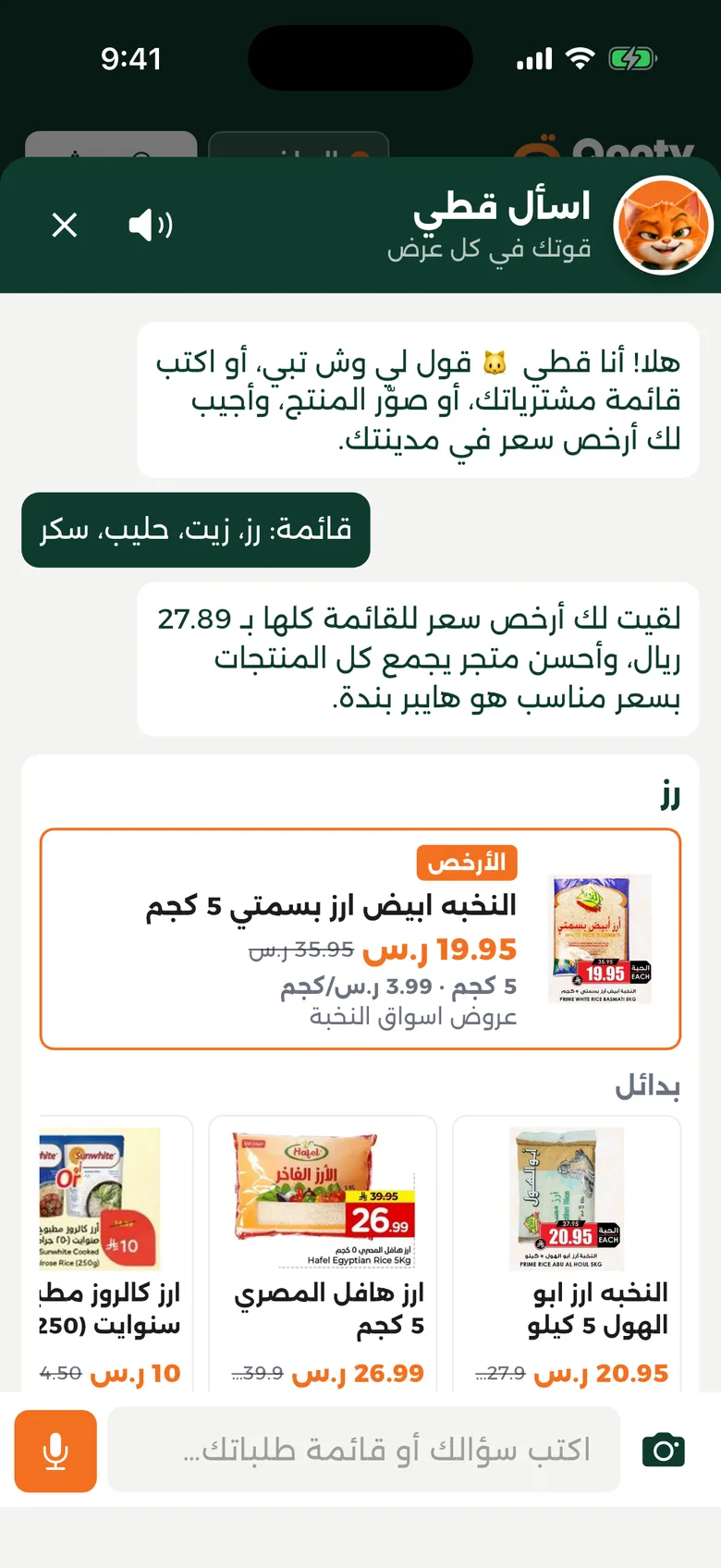 A Qatty reply: one short line of text, then product cards built from the tool results
First run, empty states and suggested prompts
An assistant nobody discovers is wasted money. Qatty introduces himself from the bottom bar in a typed speech bubble, up to three times per session, and never again once the user opens him.
Inside the chat, the opening message names exactly what he can do: tell him what you need, write a shopping list, or snap a product photo. Under it, four suggestion chips show a real example of each: a four-item list, "Where's Almarai milk cheapest?", a photo button and a receipt scan. The chips disappear after the first message.
The best entry points appear when the normal UI fails. An empty search offers "Ask Qatty about «your query»", which opens the chat with the query already sent. The cart has "compare my list".
The flyer-scoped Qatty uses no LLM
Inside a flyer, the question is simpler: "is milk in this flyer?" So the flyer version of Qatty is a search box with a mic and the same cat, and no language model at all:
user opens a flyer ─► taps Qatty ─► types or says "milk"
        │
   search positions inside THIS flyer
        │
   found? ── yes ─► close sheet, scroll to the page, frame matches in orange
        │
        no ─► search the city's other flyers, rank by price per kg/litre/piece
        │
   "Not in this flyer, but I found it at <store>" ─► Open flyer on that product
The cat looks surprised only when the item is in no flyer at all. This version costs nothing per use and answers in the time of a normal search. The global Qatty handles what search can't: lists, photos and open questions. Most in-flyer questions never needed a model. Our article on turning PDF flyers into interactive flyers covers the pipeline that makes those in-flyer product positions exist.
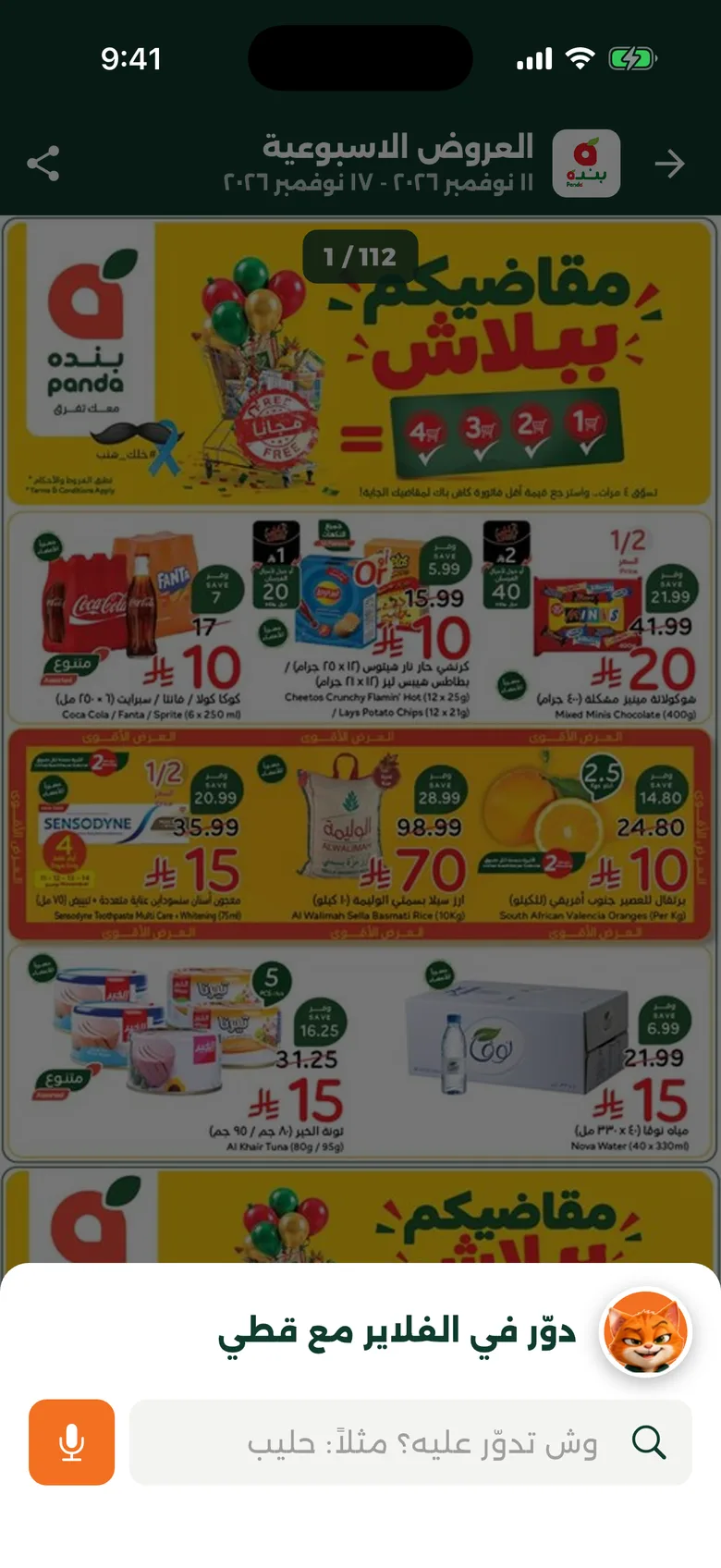 flyer-scoped Qatty sheet opened on top of a flyer
Under the hood: cost, abuse and privacy
A ceiling on every conversation
Every message has a worst case we can calculate. The limits sit in code, not in a dashboard:
- At most two tool rounds per message, then one forced text answer: three model calls maximum, each with a 15-second timeout and one retry.
- History is the last 10 messages, each trimmed to 2,000 characters. Replies are capped at 400 output tokens and 600 characters.
- Tool results go to the model in a compact form without IDs or image URLs. A shopping list is capped at 15 items.
- Photos are resized to 1,024 px on the phone, rejected above 1.5 MB on the server and sent in low-detail mode.
- Provider, model and reasoning effort are environment variables, so a cheaper or faster model is a config change and a restart, with no app release.
At the time of writing (November 2026), OpenAI's vision docs note that low detail "does not always use fewer tokens than high" on every model, so check the one you run. Our multi-provider AI notes cover keeping the provider swappable without a rewrite.
Abuse and rate limits
- The chat endpoint requires a signed-in user and a city, so every request is tied to an account and scoped to that city's offers.
- A per-user sliding window allows 30 chats an hour and, separately, 10 receipt scans an hour. Over the limit, the API returns 429.
- Only user and assistant messages are accepted from the client, so the app cannot slip in its own system instructions.
- The system prompt limits Qatty to shopping. Politics, homework, medical or coding questions get one polite sentence and a nudge back to deals.
- When the model fails or times out, the app shows "Qatty got tired, please try again" with the surprised cat, never a raw error.
Privacy by not keeping things
Product photos and receipt images are processed in memory and never stored. The receipt endpoint logs only counts (items read, items matched). The conversation lives in the open chat sheet: the app sends the recent history with each message, and the server doesn't save chats. Holding less data is the easiest privacy policy to keep.
What to measure, and when not to add an assistant
Decide up front what success looks like: sessions per entry point, the share of replies that found results, card taps, weekly repeat use, rate-limit hits and cost per active user. Message count alone means little; confused users send many.
Don't add an assistant when:
- Your data isn't clean or current. The model can only be as right as the catalogue behind it.
- Users ask a handful of predictable questions. Build those as buttons and filters.
- You can't put a per-user limit and a monthly budget on it.
- The answer has legal, medical or financial weight and you can't review every output.
Checklist: before you add an AI assistant to your app
- List the ten questions it must answer, and check which ones plain search already handles.
- Give it one job. Write down what it refuses to do.
- Render answers with your own components, built from tool results, with one short line of text.
- Derive the assistant's visible state (mood, sound, empty result) in code from what actually happened.
- Design the first run: an introduction that stops once used, an opening line that lists its skills, and example prompts.
- Add entry points where the normal UI fails, such as empty search results.
- Use a model only where needed. A scoped helper can be plain search.
- Cap tool rounds, history, output tokens and image size, and keep the model in configuration.
- Rate-limit per user, separately for expensive features like image scans.
- Decide what you will never store, and make the code match. Test sound and motion on real devices with silent mode and reduced motion on.
Frequently asked questions
How do I add an AI chatbot to my mobile app without it inventing answers?
Give the model tools that query your own database and make them the only source of facts. Render results as cards from the tool output, and derive "found" or "not found" in code, so the interface never looks confident when nothing matched.
Does an in-app assistant need a mascot?
No. A character helps when your brand already has a playful tone and you want users to read state at a glance. It works when its expressions are tied to real outcomes. A mascot that smiles at every answer is decoration, and users learn to ignore it.
How much does an in-app AI assistant cost to run?
It depends on the model, message length and volume, so set a ceiling instead of guessing. Cap model calls per message, history, output tokens and image size, add a per-user hourly limit, and keep the model in configuration. Check provider pricing at build time; it changes often.
Should the assistant speak its replies aloud?
Only if your users' phones have a good voice in their language. For Arabic, many devices lack one, and the result sounds foreign. We kept voice for input and gave Qatty short cat sounds plus on-screen text instead.
Is it safe to send receipt photos to an AI model?
It can be, if you limit what you keep. In Qooty, receipt and product images are processed in memory, never stored, and only item counts are logged. Tell users what happens to their photos, and check your provider's data-retention terms.
Next step
Before choosing a model, write down the one job your assistant should do. The Qooty case study shows the platform around Qatty. If you want a second opinion on whether your app needs an assistant or better search, send us a short brief and our team will give you an honest answer.