Every Wednesday, a supermarket chain in Saudi Arabia publishes a 20-page PDF with a few hundred discounted products in it. A shopper can scroll it. Google can't read it, nobody can search "Almarai milk 2 liters" inside it, and the retailer has no idea which product anyone looked at.
Short answer: an AI pipeline can turn each PDF page into a set of structured products (name in Arabic and English, price, old price, brand, size) plus the exact box where each product sits on the page. That makes the flyer tappable, searchable and indexable. On Qooty we run this nationally, and a hybrid design cut the projected extraction bill by 77%.
The business problem: a flyer is a picture of data
Retailers make flyers for print and for WhatsApp. The format is fine for a human flipping pages and useless for everything else:
- Search engines see one image per page. A product that sells for 9.95 SAR this week has no page of its own, so it can't rank for its own name.
- Shoppers can't search or compare. "Where is rice cheapest this week?" requires reading every flyer from every store.
- There are no product-level analytics. You know the flyer was opened. You don't know that people kept tapping the coffee machine on page 7.
The obvious fix is manual data entry, and it works for one store. Qooty's volume, documented in our design notes, is roughly 100 flyers a week, around 100 pages each, about 10 products per page: on the order of 100,000 products every week. Typing that is a full team, and the data is stale before it's finished because the offers expire weekly.
The same shape of problem sits inside many businesses that never think of themselves as "flyer" companies: supplier price lists, product catalogs, restaurant menus, spec sheets. If your important data lives in PDFs, you are paying someone to retype it, or you are not using it.
Your options, and what each one costs you
| Option | Good for | What it costs you |
|---|---|---|
| Manual entry | A few documents a week | Headcount that grows with volume; typos; delays |
| Plain OCR (text only) | Searching text inside a PDF | No structure: OCR can't tell which price belongs to which product |
| One large vision model per page | Fast prototype, low engineering | Higher per-page cost; product boxes are often loose on dense pages |
| Object detector + vision LLM per product | High accuracy, tight boxes | One model call per product adds up fast |
| Detector + batched small vision LLM (what we use) | National volume at low cost | More engineering: batching, validation, fallbacks |
The real decision is not "AI or no AI". It's how much you pay per product and how you know the numbers are right. A wrong price on a shopping platform is worse than a missing one, so accuracy guarding is part of the cost, not an extra.
How we built it in Qooty
Qooty is a bilingual weekly-offers platform for the Saudi market, with a public website, a mobile app, an admin dashboard and a partner portal for retailers. Flyers arrive three ways: an admin uploads a PDF, pastes a link, or the system collects them from a store's site. Retailers can also upload their own offers from the partner portal.
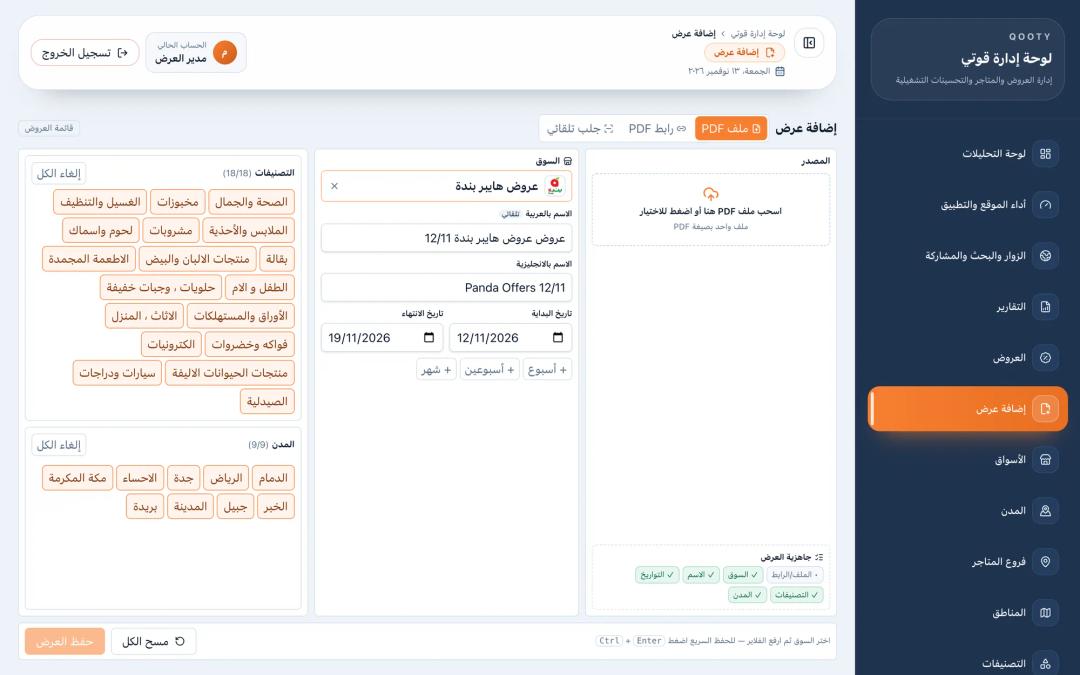 admin "create offer" page with the PDF upload, link and scraping options
From there the flow is:
PDF / link / scrape
      |
      v
BullMQ queue (Redis) ---> worker: render pages at 300 dpi
                                  watermark, 1200px WebP + thumbnail
                                  push notification "new offer"
      |
      v
extraction (method chosen in admin settings)
   detector finds product boxes on each page
   crops -> vision model -> structured fields
      |
      v
clean-up: non-product filter, categorizer, price sanity, brand match
      |
      v
products saved with page number + normalized box (x1, y1, x2, y2)
      |
      v
web + app: tap a spot on the page -> the product under your finger
Rendering is a background job, so a 100-page PDF never blocks the admin screen or the shopper-facing API. Each page is rendered at 300 dpi, watermarked, and saved as a 1200-pixel-wide WebP at quality 90, with a 400-pixel thumbnail for the cover. When the job finishes, app users get a push notification about the new offer.
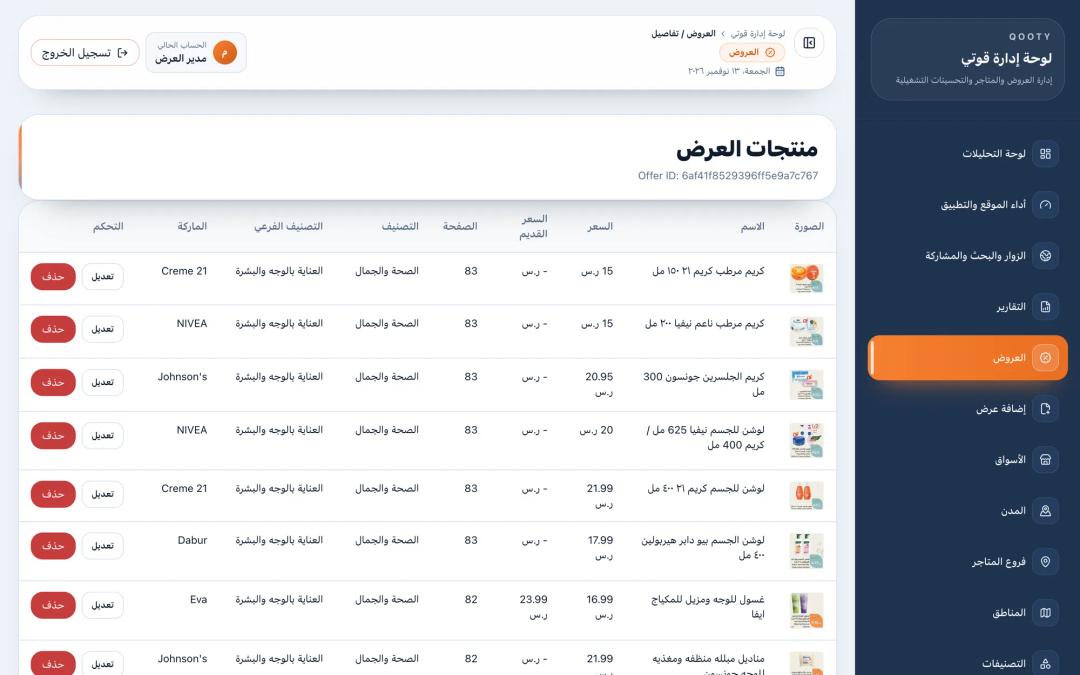 admin dashboard showing the products extracted from one offer, with crops, prices and categories
Under the hood: three extraction methods, one switch
We didn't get to the cheap version first. Qooty has three extraction methods side by side, and an admin setting picks which one runs. That switch turned out to be the most useful design decision in the pipeline, because it let us compare methods on real flyers and keep a fallback.
Method 1: detector, then one call per product. A self-hosted object detection model (a YOLO/DETR-style service) finds every product card on the page and returns tight boxes. Boxes below 0.40 confidence are dropped. Each crop goes to GPT-4o-mini on its own to read the fields. Quality was excellent. Cost was the problem: about $150 a month for Saudi Arabia alone, with plans to add four more countries.
Method 2: one big model call per page. A single Gemini call reads the whole page and returns boxes and fields together. It's simple and needs no detector, but on dense grids the boxes come back loose. A loose box means the tap target clips the neighbor, or the crop misses the price.
Method 3: keep the detector, batch the reading. This is the hybrid. The detector still produces the tight crops. Instead of one model call per crop, we send eight crops in one request to Gemini Flash-Lite, a smaller and cheaper model. Our cost model put this at about $35 a month for the same volume, a 77% reduction, and around 88% if the work moves to Google's Batch API, which bills at half the interactive rate at the time of writing (November 2026).
Batching creates a new risk: the model has to know which answer belongs to which picture. We solve it physically. Before sending, each crop gets a small black "#N" badge stamped in its top-left corner, sized relative to the crop so it stays legible. The eight crops travel as separate image parts, not one tiled collage, and the prompt says to use the badge number as the index field.
// Stamp "#N" on a crop (in memory; the file on disk is untouched)
async function stampIndex(srcPath, index) {
  const img = sharp(srcPath);
  const { width, height } = await img.metadata();
  const badgeH = clamp(Math.round(Math.max(width, height) * 0.12), 40, 120);
  const svg = badgeSvg(`#${index}`, badgeH); // black box, white bold text
  return img.composite([{ input: Buffer.from(svg), top: 0, left: 0 }])
            .png().toBuffer();
}
The static part of the prompt (the rules and the full category list) is stored with Gemini's context caching, so we don't pay for it again on every batch. The response is forced into a JSON schema at temperature 0.
The failure modes, and how we guard accuracy
Cheap models fail in specific ways. These are the ones we hit and what handles them now.
Runaway output. A small model sometimes gets stuck repeating itself. In production we saw a unit field filled with "100PCS Each" again and again until the JSON was cut off. The fix lives in the schema, not the prompt: every string field has a hard maxLength.
const ITEM_SCHEMA = {
  type: "object",
  properties: {
    index:          { type: "integer" },
    label:          { type: "string", maxLength: 100 },
    ar_label:       { type: "string", maxLength: 100 },
    price:          { type: "number", nullable: true },
    original_price: { type: "number", nullable: true },
    unit:           { type: "string", nullable: true, maxLength: 30 },
    barcode:        { type: "string", nullable: true, maxLength: 20 },
  },
  // newer models skip optional fields silently, so these are required
  // but nullable: "not on the card" is still expressible
  required: ["index", "label", "ar_label", "price", "original_price", "unit"],
};
One bad crop poisoning a batch. If a response still fails to parse, we first salvage every complete product object from the truncated text. Then we retry only the missing crops. If a whole batch fails, it splits in half and each half retries, recursively, down to a single crop. The worst case is losing one product, never eight.
async function recurse(batch) {
  try {
    return await parseOnce(batch);
  } catch (err) {
    if (batch.length === 1) return []; // isolate and drop one crop
    const mid = Math.floor(batch.length / 2);
    const [a, b] = await Promise.all([
      recurse(batch.slice(0, mid)),
      recurse(batch.slice(mid)),
    ]);
    return [...a, ...b];
  }
}
Things that aren't products. Flyers contain loyalty-points banners, "download our app" QR codes, installment ads and delivery notices. Cheap regex rules (with Arabic letter normalization) catch the obvious ones. The rest go to a categorizer that classifies 40 products per call into the platform's subcategories and may answer NON_PRODUCT or NO_FIT instead of forcing a wrong category. On our own labeled evaluation set, the Flash-Lite model scored about 99% against about 97% for the GPT model we compared it with.
Misread prices. OCR-style mistakes look like "85" read as "715". Price sanity rules swap prices that are in the wrong order and drop the old price if the implied discount is above 75%. A fake 90%-off badge does more harm than no badge.
Brands. The model returns a brand hint ("almarai", "pampers"). We match it against existing brands with fuzzy matching before creating anything new, so "Al-Marai" and "Almarai" end up as one brand page.
The cutover gate. Method 3 doesn't replace Method 1 on trust. The plan was to run both on the same 20 flyers from at least three retailers, hand-check about 100 products per method, and require Method 3 to reach at least 95% of Method 1's accuracy on every field: English name, Arabic name, price, old price, discount, brand, unit, pack size and category. Method 1 stays available as a per-flyer fallback.
Making the flyer tappable
Every product is saved with its page number and a box stored as fractions of the page (0 to 1), not pixels. That makes the same data work on a phone, a tablet and a desktop at any zoom.
In the web viewer, a tap is converted to the same 0–1 coordinates. The page image is displayed "contained", with empty bands around it, so we compute the rectangle the image actually paints and ignore taps on the empty margin. The lookup waits about 300 ms, so the first tap of a double-tap-to-zoom doesn't open a product. The backend then runs a plain query: find the product on this page whose box contains the point.
Products.findOne({
  offer: offerId, page,
  x1: { $lte: x }, x2: { $gte: x },
  y1: { $lte: y }, y2: { $gte: y },
});
The viewer also plays a page-turn sound when you swipe, which is a small detail people notice. Because every product is now a record, it also gets its own page, search entry and sitemap entry, which is what makes the flyer content visible to search engines.
 public flyer viewer with a product tapped and its detail sheet open
Checklist: before you automate PDF extraction
- Measure your volume in products, not documents. Cost scales per item read, so count pages × items per page × documents per week.
- Decide which fields must be exact. Price and barcode need validation rules. A marketing blurb can be approximate.
- Keep the box, not just the text. Coordinates are what make a document interactive later.
- Store coordinates normalized (0–1) so every screen size and zoom level uses the same data.
- Build a labeled sample before choosing a model. A hundred hand-checked items will tell you more than any benchmark.
- Put hard limits in the output schema (lengths, enums, required fields), not only in the prompt.
- Plan for partial failure. A bad item should cost you one item, not a batch.
- Keep the expensive method as a fallback behind a switch, and tag every record with the method that produced it.
Frequently asked questions
Can AI extract products and prices from a PDF catalog accurately?
Yes, when it's combined with checks. Modern vision models read Arabic and English product cards well, but they still misread digits and occasionally invent values. Schema limits, price sanity rules and a hand-checked sample before rollout are what make the output safe to publish.
How much does AI document extraction cost?
It depends on how many items you read and how. In Qooty's case, about 100,000 products a week, our cost model went from about $150 a month with one model call per product to about $35 a month with batched calls to a smaller model. Model prices change often, so recalculate with the provider's current pricing page.
What is an interactive flyer?
An interactive flyer looks like the original PDF but each product on the page is a tap target. Tapping opens the product with its name, price, store and related offers. It works because every product was saved with the exact box it occupies on the page.
Is OCR enough to convert a PDF price list into data?
Usually not on its own. OCR gives you text, but not which price belongs to which product when the layout is a grid of cards. You need detection (where each item is) plus structured reading (what each item says) to get clean rows.
Does this work for menus and supplier catalogs too?
Yes. The pattern is the same: render pages, detect each item, read fields into a schema, validate, and keep the coordinates. Menus and price lists are often simpler than retail flyers because the layout repeats.
Next step
If your business sits on PDFs (catalogs, price lists, menus) and you want them searchable or connected to your systems, start by counting the items per week and listing the fields that must be exact. Then describe the project in our brief and we'll tell you which extraction approach fits your volume. For a wider view of where AI pays off first, read our digital transformation roadmap for SMEs, and see how the same platform serves web and mobile from one backend.