A shopper in Riyadh taps the cat icon, holds the mic and says "رز، زيت، حليب، سكر". A few seconds later a cartoon cat purrs, jumps, and shows four product cards with the cheapest offer for each item and the one store that covers most of the list. Nobody typed a search query or picked a filter.
Short answer: an AI shopping assistant earns its place when the model never answers from memory. It listens, turns what the user said into calls to your own search functions, and only rephrases what those functions return. Prices, stores and products come from your database. The model handles language, dialect and intent. Without that split, all you have is a chatbot that invents prices.
The business problem
Most "add AI to the app" requests end in a chat window that talks well and knows nothing about the business. In a deals app that is worse than nothing: if the assistant says a 5 kg bag of rice costs 39 riyals and the flyer says 45, the shopper stops trusting every price on the screen.
The real need in a deals app is narrower:
- People shop with a list. Comparing ten items across five supermarkets by hand is tedious enough that most people give up.
- Many shoppers would rather speak than type Arabic on a phone keyboard, and they speak in dialect: "وش أرخص زيت؟", not formal Arabic.
- Offers expire weekly. An answer that was true on Monday can be wrong on Thursday.
So the risks are made-up prices, a bill that grows with every curious user, an assistant that drifts off topic, and a voice that sounds foreign to your own customers.
When an AI assistant adds value, and when it is a gimmick
Before building anything, decide which of these you are actually buying:
| Option | What it does | Good for | Risk |
|---|---|---|---|
| Plain search with voice input | Speech to text into your existing search box | Single-product lookups | Weak on lists and vague requests |
| Free chat with a general LLM | The model answers from its own knowledge | Marketing demos | Invented prices, off-topic answers, no link to your stock |
| Grounded assistant (function calling) | The model calls your search and comparison functions, then summarizes the result | Lists, vague questions, photos of products | Needs careful tool design and limits |
| Batch AI on a fixed task (e.g. reading a receipt) | One model call extracts structured data; your code does the math | High-value one-shot features | Extraction errors need validation |
Our rule of thumb: if a deterministic search already answers the question, don't put an LLM in front of it. The assistant earns its cost when the input is messy (a spoken list, a dialect phrase, a photo) and the output has to be your data.
We applied that rule inside the same app. The in-flyer helper takes voice input but uses no LLM: it searches the open flyer, and if the item isn't there, suggests it in another flyer, cheapest per kilo or litre first. Only the main assistant, which takes lists, photos and open questions, calls a language model.
How we built it in Qooty
Qooty is a weekly-flyers and offers platform for Saudi Arabia, with a website, a Flutter mobile app and a partner portal on one backend. A vision pipeline already reads flyer images into a structured catalogue of products, prices, sizes and stores. That made a useful assistant possible: the hard part, clean and current offer data, existed before the first prompt.
The assistant is called Qatty (قطي), the app's cat mascot. In the mobile app it has three entry points:
- Chat sheet. Type, speak (speech to text in
ar_SAoren_US, matching the app language), or attach a product photo from the camera or gallery. - Flyer helper. The search-only version above.
- Receipt scan. Photograph a receipt and see what the same basket costs in current offers.
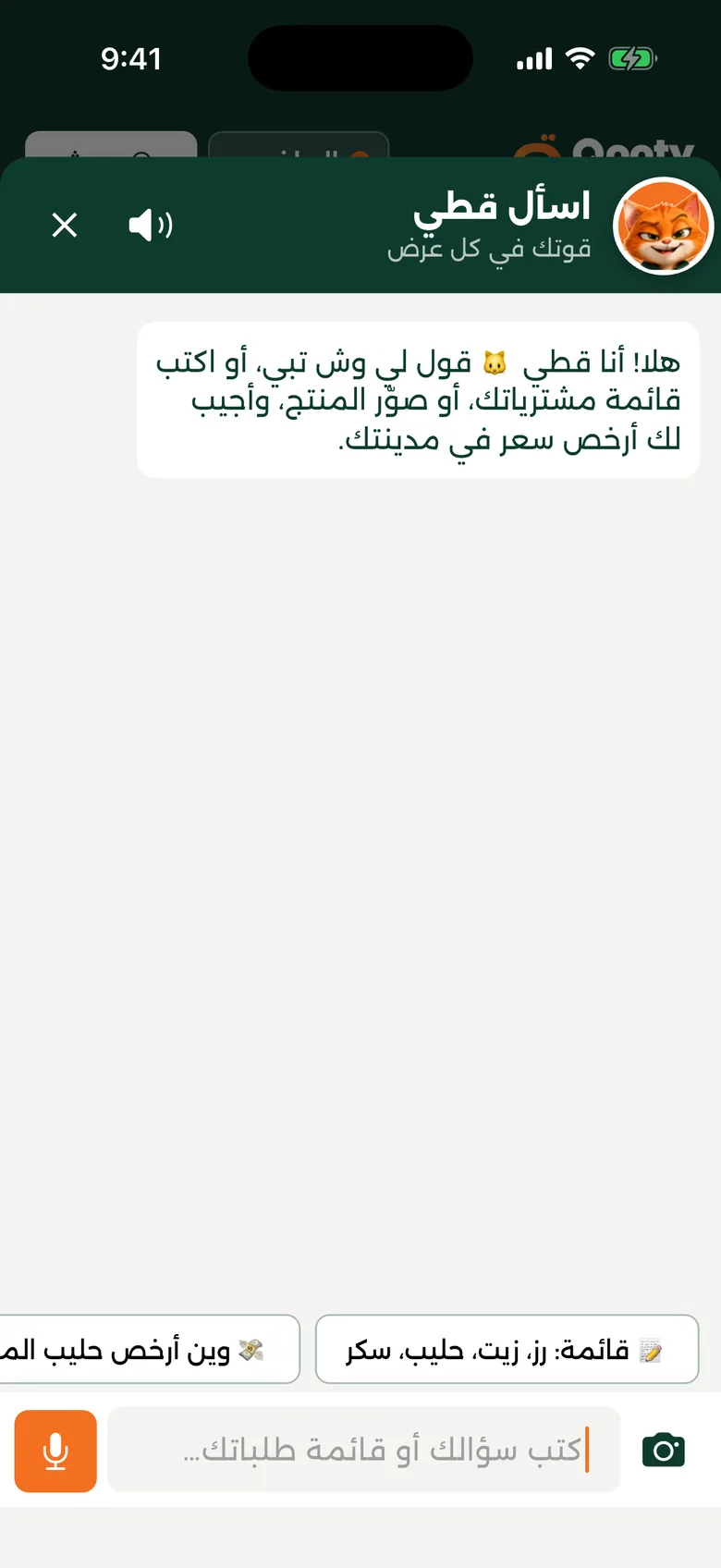 Qatty's chat sheet in the Qooty app: the mascot, the mic button and suggested prompts
Qatty's personality lives in the app, not the model. The mascot breathes, tilts its head, dozes off, bounces when it talks and jumps when it finds a deal, all procedural animation on a few flat mood images. Its sounds (meow, purr, a "found it" chirp, a sad mew) are synthesized by a small Python script from two vowel formants, so there are no licensed samples. They play as ambient audio: the silent switch mutes them, they never interrupt the user's music, and one setting turns them off.
Under the hood: the grounded loop
voice / text / photo
        |
   Flutter app ── POST /chat {messages, image?, city}
        |
   backend: sanitize, rate-limit, build prompt
        |
   LLM round 1 ──> tool calls ──> search_products / compare_shopping_list
        |                              |  (MongoDB: active offers in user's city)
   LLM round 2 <── compact JSON results
        |
   {reply, mood} + result cards (straight from the tools, not from the model)
The model gets two tools and nothing else. Simplified:
const TOOLS = [
  { type: "function", function: {
      name: "search_products",
      description: "Search current active offers in the user's city for ONE product. " +
                   "Returns the cheapest match and up to 3 alternatives. Prices in SAR.",
      parameters: { type: "object", additionalProperties: false, required: ["query"],
        properties: {
          query: { type: "string", description: "Short flyer-style query, e.g. \"رز بسمتي\"" },
          limit: { type: "integer", description: "1-4" } } } } },
  { type: "function", function: {
      name: "compare_shopping_list",
      description: "Price a shopping list: cheapest product per item, cheapest total, " +
                   "and the store covering the most items.",
      parameters: { type: "object", additionalProperties: false, required: ["items"],
        properties: { items: { type: "array", items: { type: "string" } } } } } },
];
The system prompt is blunt. The tools are "the ONLY source of truth for products and prices". The model must "NEVER invent products, prices, stores, discounts or dates", and "if you did not call a tool, do not mention any price". A result only counts if it is "the same KIND of product the user asked for": an air freshener returned for an air conditioner means not found. Off-topic questions get one polite sentence and a nudge back. Arabic replies use a friendly Saudi register (هلا، أبشر، لقيت لك) in one to three sentences.
The prompt alone is not the safety net. The code is built so that a misbehaving model can't put a wrong price on screen:
- Product cards come from the tool results, not the model's text. The backend sends every result group to the app beside the reply. The model writes a short caption above data it can't edit.
- The mood is decided by what happened. Found products: happy cat. Searched and found nothing: surprised. The model's own mood counts only when no search ran.
- Broken output never reaches the user. If the JSON reply is truncated, or the model echoes raw tool JSON, the backend drops it and uses a fixed fallback line in the user's language.
Matching is the real work
A model that calls tools perfectly is still wrong if the search behind it is weak. Most of the engineering went into matching:
- Arabic normalization and synonyms. Spelling variants (أ/ا, ة/ه) are folded, and a synonym table maps "رز" to "أرز" and "rice", "موية" to "مياه", "فراخ" to "دجاج", so Gulf and Egyptian wording both resolve.
- Head word vs modifier. "زيت" in "تونة في زيت" (tuna in oil) is not oil, and "حليب" in "شوكولاتة بالحليب" is not milk. The search keeps the product type the user meant.
- Unit price, not shelf price. Sizes are parsed from names ("1.5 لتر", "6 × 200 مل"), and "cheapest" means per kg, litre or piece, so a bigger pack can win. TVs and other non-consumables compare by shelf price.
- Misread sizes are dropped. A milk at 1 riyal per litre, when comparable milks cost 5 to 7, is a misread flyer size. Anything below a third of the median unit price of at least four comparable products can't win "cheapest".
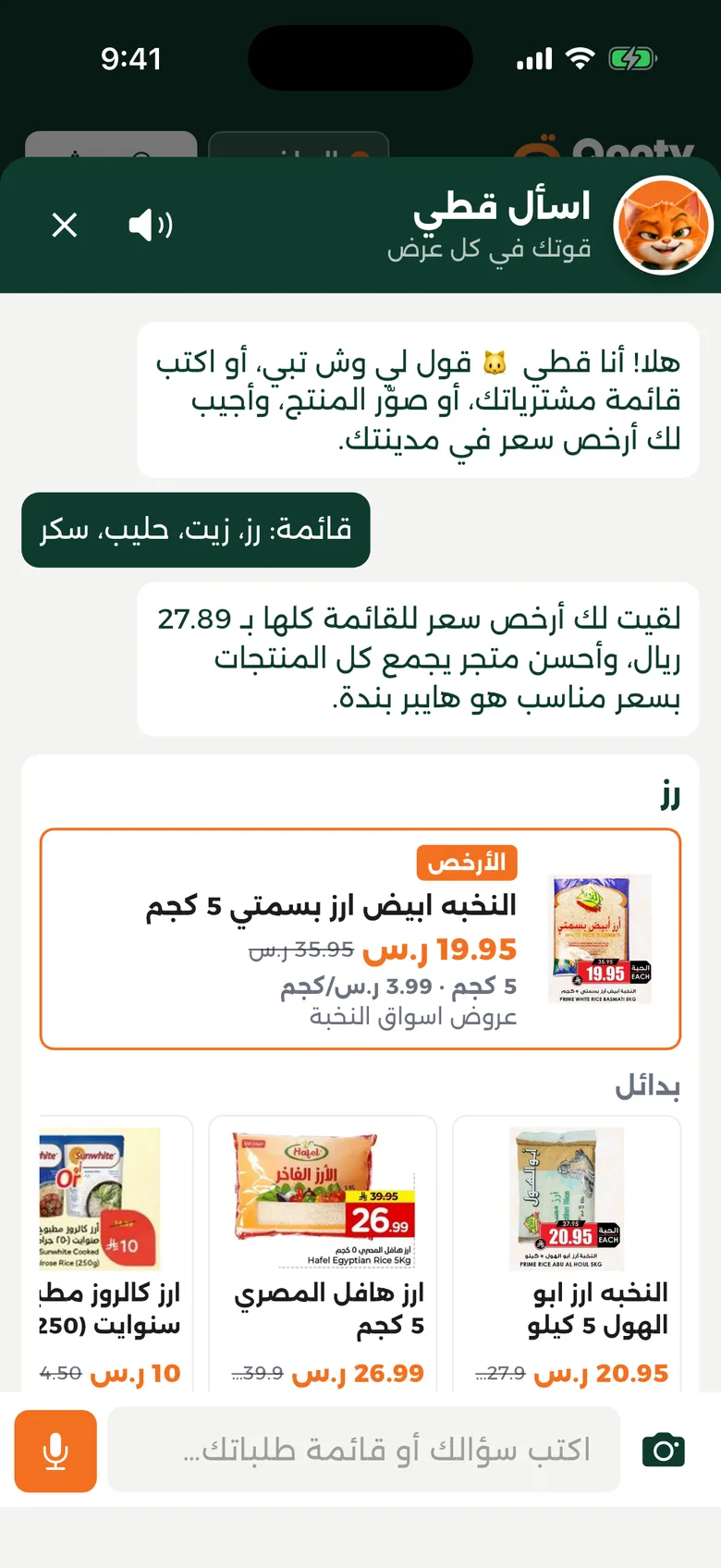 Qatty answering a four-item list in one Saudi-dialect line, with the cheapest product card per item and the best single store
Cost control
Every chat costs money, so the limits are in code:
- At most two tool rounds per message, then a forced text answer. That is three model calls in the worst case, each with a 15-second timeout and one retry.
- Short history: the last 10 messages, each capped at 2,000 characters. Replies are capped at 400 output tokens.
- Tool results sent to the model are compact (name, price, store, size, unit price), with no IDs or image URLs.
- Photos are resized to 1,024 px on the phone, capped at 1.5 MB on the server, and sent to the model in low-detail mode.
- A per-user rate limit: 30 chats and 10 receipt scans an hour.
The provider is a setting. The backend uses the OpenAI SDK, and one environment variable routes the same calls through Google's OpenAI-compatible Gemini endpoint (https://generativelanguage.googleapis.com/v1beta/openai/) with the same tools, image input and JSON replies. Model name and reasoning effort are environment variables too. With Gemini, "minimal" reasoning roughly halved reply time in our tests, from about ten seconds to five. Comparing providers is a config change and a restart.
The voice decision
Voice input uses the speech_to_text Flutter plugin, which wraps the phone's own recognizer and listens in Saudi Arabic or US English to match the app language. The device decides what works: on iOS recognition is a network service with usage limits, and some Android devices need a language pack first. If the recognizer isn't available, the text box still works.
Voice output is where we changed our minds. The first version read replies aloud with the system text-to-speech engine (flutter_tts, set to ar-SA). Many devices had no Arabic voice installed, so replies came out with English pronunciation, which is worse than silence. Qatty now "talks in cat": a short mouth animation, the matching cat sound, and the text on screen. For any Arabic voice product, check Arabic voice availability on real devices in your market before promising spoken replies.
One iOS detail cost us time: starting any sound player switches the shared audio session to playback, which silently cuts the microphone. All cat sounds are muted while the mic is recording.
Receipt scan: "you could have saved"
The receipt feature uses the same model client for a narrower job. One vision call (temperature 0, high detail) reads the photo into JSON: store, date, lines with quantities and totals, discounts. Then deterministic code takes over:
- VAT, subtotal, cash, change, card and loyalty lines are removed even if the model lists them as items. Negative lines and coupons move to discounts.
- Quantity × unit price must match the line total within 2%, or the total wins.
- Each line is searched against current offers with the same matching as the chat, then filtered to the same kind of product. A whole chicken is never compared with chicken breasts.
- A match costing less than 30% of what was paid is treated as a different product, not a deal.
The result shows what the user paid, the cheapest mix across stores, the cheapest single store for the items it covers, and the total they could have saved. The photo is never stored, and only item counts are logged.
// A "deal" that is too good is almost always a different product.
const MIN_PLAUSIBLE_RATIO = 0.3;
const MAX_PLAUSIBLE_RATIO = 3;   // only applied when the receipt line has no size

const plausible = options.filter((o) => {
  const r = o.cost / item.unitPaid;
  return r >= MIN_PLAUSIBLE_RATIO && (hasSize || r <= MAX_PLAUSIBLE_RATIO);
});
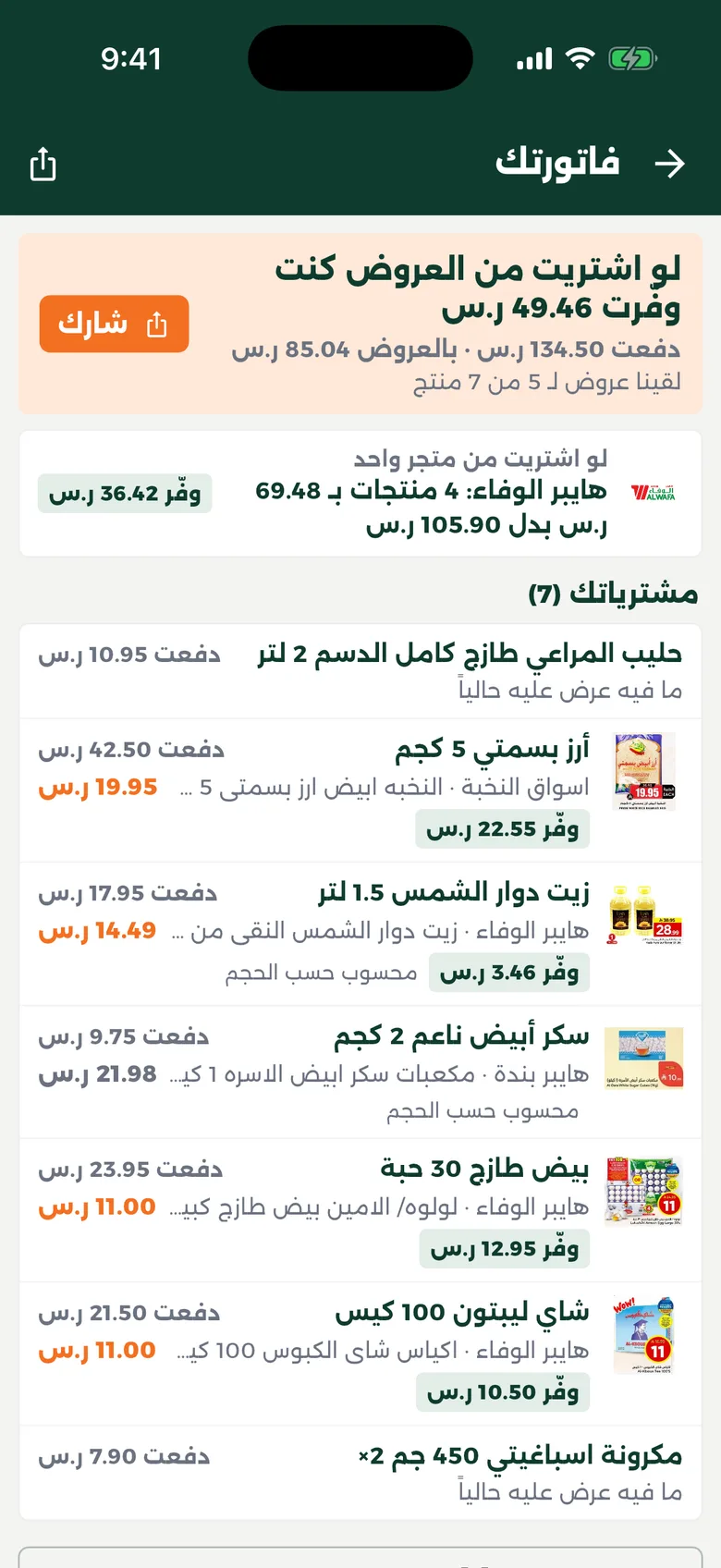 receipt scan result: paid total, cheapest mix, best single store, per-line "could save"
Checklist: before you add an AI assistant to your app
- Write down the questions it must answer. If plain search answers them, ship voice input on search and skip the LLM.
- Give the model tools over your own data, and make the tools the only source of prices, stock and availability.
- Render product data from tool results, not from the model's text.
- Decide the assistant's state (found, not found, off-topic) in code, from what the tools returned.
- Validate every structured output and keep a fixed fallback reply per language.
- Invest in matching: normalization, synonyms, unit price and outlier filtering. It matters more than the choice of model.
- Cap tool rounds, history, output tokens, image size and per-user requests from day one.
- Keep the provider and model in configuration.
- Test speech recognition and text-to-speech for your dialect on your customers' real phones.
- For receipts and documents, let the model extract and your code calculate.
Frequently asked questions
Can an LLM shopping assistant give wrong prices?
Yes, if it answers from its own knowledge. A grounded assistant only gets prices from function calls to your database, and the app renders product cards from those results, not from the model's text. The model can still phrase a summary badly, so replies are kept short and malformed output is dropped.
Does speech recognition work in Saudi Arabic on mobile?
Usually, through the phone's built-in recognizer, which Flutter plugins such as speech_to_text wrap. Availability depends on the device and its installed languages, and on iOS it is a network service with usage limits. Always build a text fallback.
How do you control the cost of an AI assistant in an app?
Put hard limits in code: a maximum number of tool rounds per message, short history, capped output tokens, small images and a per-user rate limit. Keep the model and provider configurable so you can move to a cheaper option without shipping a new app version.
Can I switch between OpenAI and Gemini without rewriting the assistant?
Often, yes. At the time of writing (November 2026), Google offers an OpenAI-compatible Gemini endpoint that accepts the same chat, tools and image formats. In Qooty, switching is one environment variable. Retest tool calling after any switch, because models differ in how closely they follow instructions.
Should the assistant speak its answers aloud in Arabic?
Only if your users' phones have a good Arabic voice. Many don't, and the system engine then mispronounces Arabic. We show text with a short cat sound and keep voice for input, where it saves the most effort.
Next step
If you are weighing an AI feature, start with the data it must be grounded in and the few questions it has to answer. The Qooty case study shows the platform behind this assistant, and our notes on Flutter vs native for MENA MVPs and one backend for every device cover the app architecture around it. When you're ready, send us a short brief and our team will tell you honestly whether an assistant is worth building or better search will do.