A technician finishes a lift repair, taps "summarize for the customer", and gets an error. Nothing is wrong with the app. The AI provider's account ran out of credit an hour ago, and every AI button in the product now fails until someone tops it up.
Short answer: treat the AI provider as a replaceable part. Put Claude, OpenAI and Gemini behind one internal call, try them in an order the customer controls, and move to the next one when a provider fails. Let each customer bring their own encrypted API key so they pay for their usage. Pick the cheapest model that passes a measured test for each task.
The business problem
Adding an AI feature to a product is easy in a demo. Running it for paying customers raises four questions that a demo never asks.
What happens when the provider says no? Every AI provider has rate limits, spend caps and prepaid credit that runs out. When that happens, the API returns an error and the feature stops. The provider is not down for everyone; your account is simply exhausted. If your product depends on one provider and one key, the feature is down for all your customers at once.
Who pays, and how much? AI cost grows with usage, not with seats. One customer who summarizes 2,000 jobs a month costs you far more than one who summarizes 20, on the same subscription price. If you bundle AI into the plan, your margin depends on how heavily customers use a feature you do not control.
Where does the data go? Every prompt you send leaves your servers. Customers in regulated industries, or with their own agreements with a provider, may want their data to go only to an account they own.
Can you switch models safely? Providers release new models and retire old ones constantly. A cheaper model is tempting, but switching without measuring quality is how a feature quietly gets worse.
Your options
| Approach | Who pays | When a provider fails | Good fit for |
|---|---|---|---|
| One provider, your key, bundled in the plan | You | Feature is down for everyone | Prototypes, low usage |
| Several providers, your keys, automatic fallback | You | Next provider answers | Products where AI is core and usage is predictable |
| Customer brings their own key (BYOK) only | The customer | Down for that customer only | B2B buyers with existing AI accounts |
| BYOK first, your keys as an optional backup | The customer, then you if they allow it | Their keys, then yours | B2B SaaS that wants both control and convenience |
The last row is what we built. It costs more engineering up front, but it answers all four questions: a failed provider is skipped, heavy users pay for their own usage, data can stay inside the customer's own provider account, and the model per provider is a setting rather than a code change.
How we built it in MONTRA ERP
MONTRA ERP is our own multi-tenant SaaS for maintenance companies, elevators first. It uses AI in two places today:
- Troubleshooting advice for technicians. When a fault comes in, the system first looks at history with plain SQL: how many faults this asset had in the last 90 days, and which causes and parts were recorded on similar finished jobs in the last year. If AI is set up, it passes those facts to a model and asks for at most six short, practical bullet points: likely causes to check first, then parts that may be needed. The history-based suggestions work without AI; the AI advice is an extra layer on top.
- Customer-facing job summaries. After the technician writes the report, the model turns the finding, cause, work done, parts replaced and checklist result into three to five plain sentences for the customer, in Arabic or English depending on the company's language. The prompt forbids prices and jargon and tells the model to use only the facts given. The summary is saved on the job and shown on the customer's page.
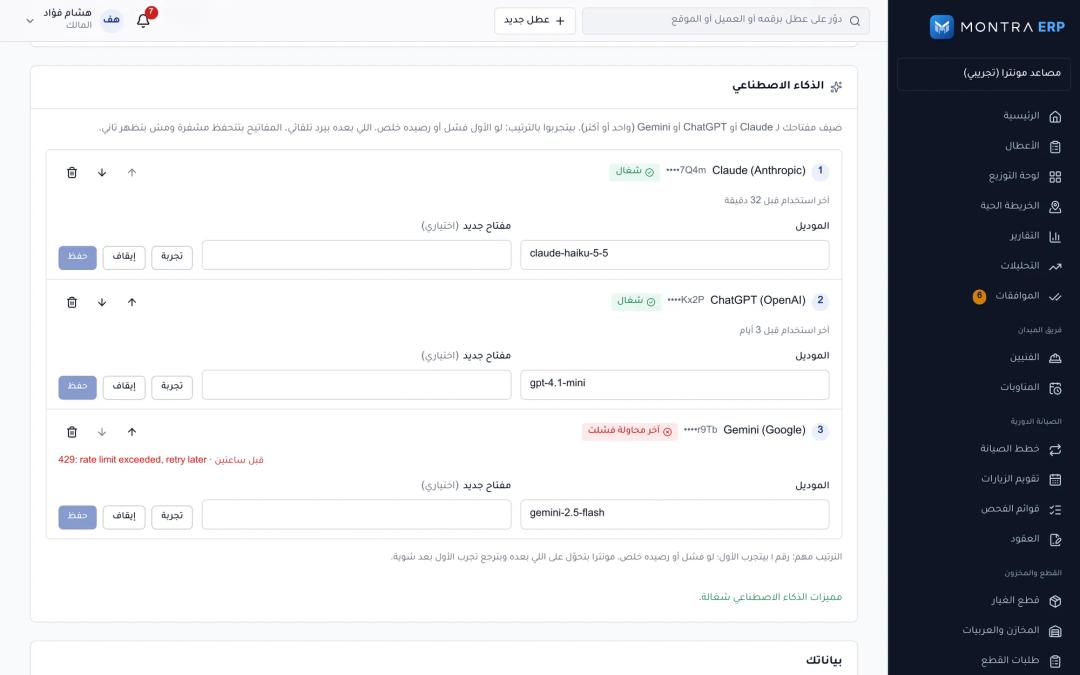 AI settings page: provider list (Claude, OpenAI, Gemini) in priority order with up/down arrows, masked key showing only the last 4 characters, model field, last error, "Test" button and the "use server keys as backup" switch
Behind both features sits one service. Each company (tenant) can add its own key for Claude, OpenAI or Gemini, pick the model for each, and move them up or down into the order it wants. The server's own keys are a backup that a company can switch on or off. Every AI request walks that list until a provider answers.
Because each tenant's data is already isolated at the database level (we described that in our Postgres Row-Level Security write-up), the stored keys inherit the same protection: one company's settings page can never read another company's keys.
Under the hood
The request path looks like this:
feature (summary / advice)
        |
        v
ai.complete(tenant, system, prompt)
        |
        v
candidates = company keys (by priority) + server keys (if allowed)
        |
        v
reorder: healthy providers first, "resting" providers last
        |
        v
try each in turn --- success --> clear rest, record last used, return text
        |
      failure
        |
        v
classify: exhausted -> rest 10 min | bad key -> rest 60 min
record last error on the key, log, try the next one
        |
   all failed --> AI_UNAVAILABLE (the app tells the user to check Settings → AI)
Here is the loop, simplified from the service:
async complete(tenantId: string, system: string, prompt: string) {
  const all = await this.candidates(tenantId); // company keys by priority, then server keys
  const now = Date.now();
  const resting = (c: Candidate) => (this.resting.get(this.restKey(tenantId, c)) ?? 0) > now;
  const ordered = [...all.filter((c) => !resting(c)), ...all.filter(resting)];

  for (const c of ordered) {
    try {
      const text = (await CALLERS[c.provider]({ ...c, system, prompt })).trim();
      if (!text) throw new AiProviderError(c.provider, 200, 'Empty response');
      this.resting.delete(this.restKey(tenantId, c));
      return text;
    } catch (err) {
      const e = asProviderError(c.provider, err);
      if (e.exhausted) this.resting.set(this.restKey(tenantId, c), now + REST_EXHAUSTED_MS);     // 10 min
      if (e.unauthorized) this.resting.set(this.restKey(tenantId, c), now + REST_UNAUTHORIZED_MS); // 60 min
      this.logger.warn(`${c.provider} (${c.source}) failed with ${e.status}; trying the next provider`);
    }
  }
  throw new AppException('AI_UNAVAILABLE', 'All AI providers failed');
}
Resting a provider instead of hammering it
Retrying an exhausted account on every request wastes time: each user waits for a failure before the fallback kicks in. So a provider that runs out of credit or hits a rate limit "rests" for 10 minutes, and one with a rejected key rests for an hour. Resting providers move to the end of the list rather than disappearing, so if everything else fails they still get a chance. The first success clears the rest.
The rest key has a detail that matters in multi-tenant SaaS. A company's own key rests only for that company. A server key rests for everyone, because it is one account shared by all tenants. One customer's exhausted key never slows down another customer.
Deciding what "exhausted" means
The providers do not report running out of money in the same way. At the time of writing (November 2026), Anthropic's API documents 429 for rate limits and spend caps and 402 for billing problems; OpenAI returns 429 for both rate limits and quota or spend-limit errors such as insufficient_quota; Gemini documents 429 RESOURCE_EXHAUSTED for rate or quota limits and 402 for depleted prepaid credit. So we classify on status and on the message text:
get exhausted(): boolean {
  return this.status === 429 || this.status === 402 ||
    /quota|insufficient|exceeded|credit|billing/i.test(this.message);
}
get unauthorized(): boolean {
  return this.status === 401 || this.status === 403;
}
Anything else (a 500, a timeout after 45 seconds, an empty answer) still moves on to the next provider; it just does not trigger a rest.
Bring your own key, stored properly
A company's key is encrypted with AES-256-GCM before it reaches the database, using a server-side SECRETS_KEY. The API never sends the key back: the settings page sees only the last four characters, the model, the last error and when the key was last used. Saving a key writes an audit entry that records "key changed", never the key. A "Test" button sends a tiny request ("Reply with the single word OK") so an admin finds a bad key in settings, not in front of a customer.
One lesson from running this: if SECRETS_KEY changes, every stored key becomes undecryptable. The service skips those keys with a warning instead of crashing, and the fallback carries on with whatever still works. Treat that secret like a database password and rotate it with a re-encryption step.
Small edge cases that bite
Gemini's newer models spend part of the output budget on reasoning before they answer. With a tight token limit, the reply came back empty. Our Gemini call allows four times the requested output budget so the answer still fits. An empty answer is also treated as a failure, so it falls through to the next provider rather than showing a blank summary.
Choosing cheap models per task: lessons from Qooty
Fallback protects you from outages. It does not control cost. For that, the work we did on Qooty, a deals and weekly-flyers platform for the Saudi market, is the better example. Qooty runs AI at volume: reading products and prices from flyer images, sorting each product into a subcategory, and powering Qatty, an in-app shopping assistant.
Measure before you switch. The product categorizer has its own evaluation script that scores any model against a labelled set of real products, including run-to-run agreement. On that set, a Gemini Flash-Lite model scored about 99% with 98.5% agreement between runs, against about 97% for gpt-4.1-mini. A larger Gemini Flash model was as accurate but hit rate limits on our quota tier, so the smaller one won on both cost and reliability. The script also prices every call from the token counts, so the comparison is accuracy and cost side by side.
Set a quality gate in writing. For flyer extraction we designed a third method: a local detector crops each product, then a batch of eight crops goes to Gemini Flash-Lite in one call instead of one call per product. The design projected about 77% lower monthly cost than the original per-crop method. The rule for making it the default was explicit: on a hand-checked sample of about 100 products from 20 flyers, the new method had to reach at least 95% of the old method's accuracy on every field (names, price, old price, brand, unit, pack size, subcategory). The older methods stay available per flyer as an escape hatch.
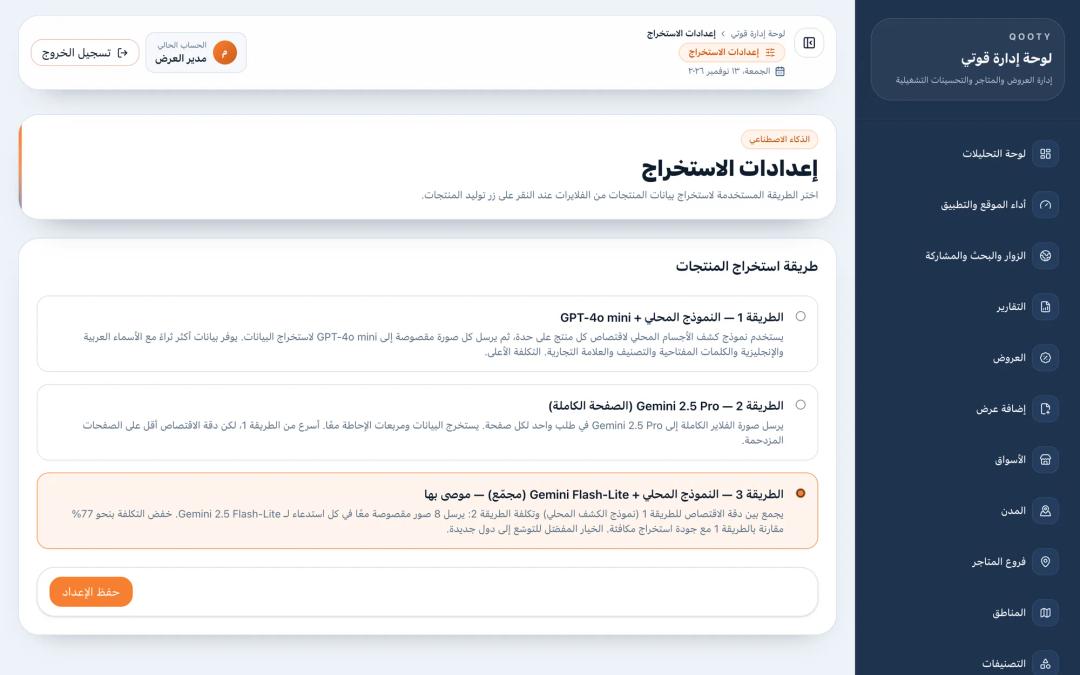 dashboard extraction settings: the three extraction methods with descriptions, method 3 (local detector + batched Gemini Flash-Lite) marked as recommended
Use compatible endpoints to keep switching cheap. Gemini offers an OpenAI-compatible endpoint, so Qatty and the categorizer use the same OpenAI SDK for both providers. Switching Qatty to Gemini is an environment variable, not a rewrite. Setting Gemini's reasoning effort to "minimal" for Qatty halved its reply time, from about ten seconds to about five, with the same answers.
 Qatty answering a price-comparison question with product cards from live offers
Checklist: before you ship an AI feature in a SaaS product
- Wrap every provider behind one internal function. Features should never import a provider SDK directly.
- Support at least two providers, and decide the default order per tenant, not only globally.
- Classify failures: exhausted, bad key, transient. Rest exhausted providers so users stop paying the latency of a known failure.
- Decide who pays. Offer BYOK for heavy users, and make your own keys an explicit, switchable backup.
- Encrypt stored keys, never return them to the browser, never write them to logs or audit trails, and give admins a "test key" button.
- Show the last error and last success per key in settings so customers can fix their own billing.
- Make the feature degrade honestly: keep the non-AI part working and say clearly when AI is unavailable.
- Build an evaluation set from real data before choosing a model, and set a written accuracy threshold before switching.
- Log tokens and cost per call so you know what each feature costs per customer.
Frequently asked questions
What is multi-provider fallback for AI features?
It means your product can send the same request to more than one AI provider. If the first provider fails because of a quota limit, a bad key or an outage, the system automatically tries the next one. Users see a slightly slower answer instead of an error.
Should a SaaS product let customers bring their own AI API key?
For B2B products with heavy or uneven AI usage, yes. BYOK moves the usage cost to the customer, lets them use an account that already has their data agreements, and keeps one customer's quota problem from affecting the others. Many customers still prefer convenience, so a bundled backup is worth offering.
How do you store customer API keys securely?
Encrypt them at rest with an authenticated cipher such as AES-256-GCM and a key that lives outside the database. Never return the full key to the front end; show only the last few characters. Keep keys out of logs and audit trails, and record only that a key was changed.
Is a cheaper AI model good enough?
Often, for narrow tasks like classification or extraction. The only way to know is to test it on a labelled sample of your real data and compare accuracy and cost with the model you use now. Decide the minimum acceptable accuracy before you run the test, not after.
Does switching AI providers mean rewriting the integration?
Less than it used to. Gemini offers an OpenAI-compatible endpoint, so code written for the OpenAI SDK can call Gemini models with a different base URL and key. Prompts and output quality still need re-testing on the new model.
Next step
If you are planning AI features for a product, write down three things first: which tasks need AI, who pays for usage, and what the screen should do when AI is unavailable. Those answers shape the architecture more than the choice of model. If you want a team that has shipped this in production, send us a short brief and we will reply with how we would approach it. For how we scope a first version, see how we build a SaaS MVP in 30 days.