A maintenance technician in Giza photographs a door operator's nameplate and sends it to Montra on WhatsApp with one line: "محتاج موتور باب لأسانسير 630 كيلو" (I need a door motor for a 630 kg lift). The goal is that he ends up with a correct, paid order without anyone at Montra typing a reply, and without the bot ever making up a price.
Short answer: a WhatsApp ordering bot should not take the order inside the chat. It should understand the request, find the right parts with prices and stock read from your system, then send one ready cart link. The customer pays on your real checkout, and the same bot answers "where is my order?" from the order record afterward.
The business problem
For technical parts, WhatsApp is where the order starts. The customer does not know your catalog names. He writes in dialect, sends a blurry photo, asks if it fits his machine, and wants a price now.
Handled by hand, this breaks as volume grows. The answer depends on who picks up the phone, prices quoted in chat drift from the real price list, and the order lives in a thread nobody can audit. We wrote about that breaking point in why WhatsApp ordering breaks when your business grows.
An AI bot fixes the speed problem cheaply. It makes the price problem worse if you let it: a language model will invent a price, a stock level or a delivery date with full confidence. The design question is where the model stops and the system takes over.
Your options
| Approach | What the customer does | Risk |
|---|---|---|
| Staff answer every message | Waits for a person, gets a quote by text | Slow at night, quotes drift from the price list |
| Bot takes the whole order in chat | Confirms items, address and payment by messages | Every rule of your checkout has to be rebuilt in chat, and the model can state wrong totals |
| Bot finds parts, hands off a cart link | Chats to identify parts, opens one link, pays on your site | One extra tap; the checkout must work well on a phone |
| Plain menu bot (press 1, press 2) | Navigates fixed options | Cannot handle free text, photos or fitment questions |
We chose the third option for Montra. The decision predates WhatsApp: when we designed Montra's first web chatbot in June 2026, "a full order and payment inside the conversation" was written into the spec as a non-goal. The checkout already knew delivery zones, live prices, payment rules and the receipt flow; rebuilding that in chat would create two sources of truth for money.
How we built it in Montra
Montra is our own B2B marketplace for elevator spare parts in Egypt: many suppliers, one storefront, prepaid orders. Its WhatsApp channel runs on a self-hosted gateway and the same NestJS backend as the store. The plumbing (signed webhooks, de-duplication, the paced outbox, account linking) is covered in our WhatsApp integration case study. This post is about the ordering funnel on top of it.
Every inbound message goes through a fixed routing order before any AI runs:
inbound message
  1. contains a MONTRA-XXXXXXXX link code?  → link the account, confirm
  2. exactly "إيقاف" / "stop"?              → opt out, confirm
  3. conversation in human mode?           → alert staff, bot stays silent
  4. "موظف" / "خدمة العملاء" / agent?        → switch to human mode, acknowledge
  5. photo (JPEG/PNG/WebP by file bytes)?  → bot reply with the image
  6. otherwise                             → bot reply with text
The bot itself is the same assistant as the web chat, with a WhatsApp addendum to its system prompt and a different tool set. It runs on our OpenAI-compatible LLM layer (gpt-4o-mini by default; the first version ran on Gemini 2.5 Flash, and the provider sits behind one interface).
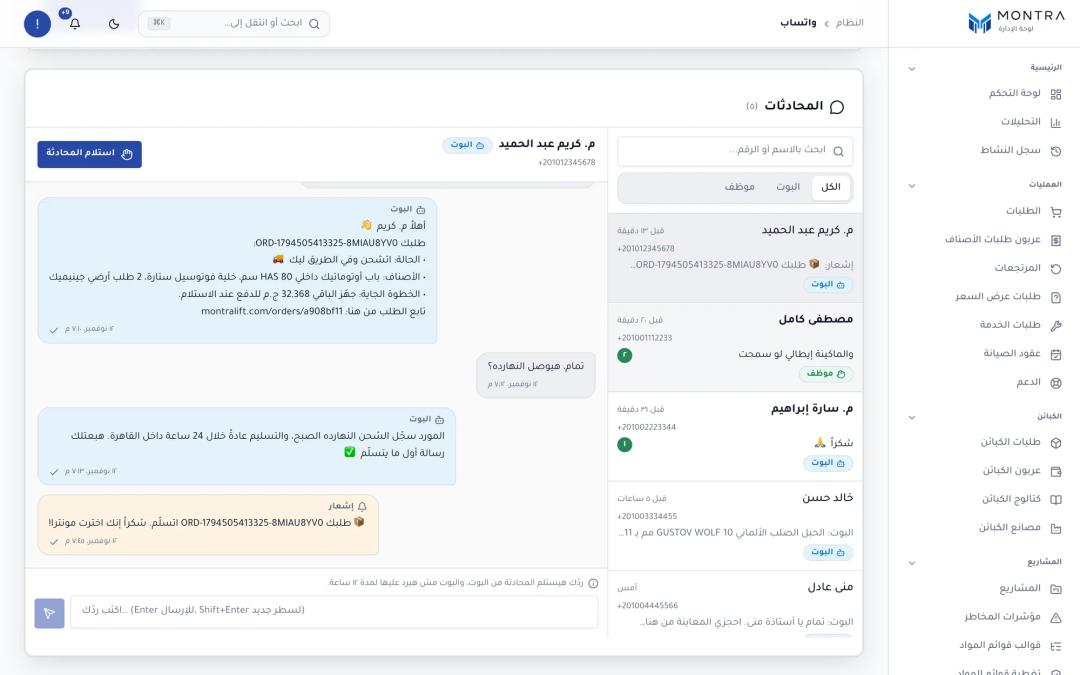 admin WhatsApp dashboard: conversation list, a bot/human mode toggle, and a thread with an order-status reply
Step 1: understand the request
"Door motor for a 630 kg lift" is a common way to ask, and it is not enough to pick a part. Rated load does not choose a door operator; door type, opening width and the existing operator's brand do. So the bot has a part encyclopedia: about 45 part types, each with dialect aliases ("أوبريتور الباب" for door operator), key specs, common failures and the questions to ask before recommending. For the door operator: the elevator and motor brand, a photo of the motor's nameplate, and whether the fault is on opening or closing.
The prompt tells the model to fetch that entry with get_part_knowledge and ask those questions first, the way a good counter salesman would.
Step 2: search the real catalog
The model never writes a product name from memory. It calls search_parts with a query rewritten from the customer's words, plus an optional category and brand. The tool searches active items only and returns up to five parts, priced by the storefront's own pricing engine, with an in-stock flag. get_part_details adds description, brand and lead time.
The grounding rules in the prompt are short and blunt. Translated: "Do not recommend any part unless it actually came back from search_parts or get_part_details. Do not invent parts or prices." And: "Never name a supplier or manufacturer by name: the customer deals with Montra only."
Step 3: photos
Since October 2026 a customer can send a photo instead of typing. The gateway file is downloaded (capped at 6 MB), its type is decided from the bytes rather than the declared MIME type, and it is sent with the newest turn only; the bytes are never stored. The WhatsApp prompt says: say briefly what you see (part type, any brand or number printed on it), search by that description, and if the photo is unclear, ask for a clearer one from another angle, the printed number or the elevator brand before matching. The bot must not claim a match unless the description is clear. A safety rule sits next to it: the bot never asks a customer to open a control panel or enter the machine room or shaft; those photos come from the building's technician.
Step 4: the cart link
When the technician has agreed on parts and quantities, the bot calls build_cart_link. This is the hand-off point, and the place where we kept the model on the shortest leash. The declaration, simplified:
{
  name: 'build_cart_link',
  description:
    'Prepare a ready cart link with the agreed parts and quantities. ' +
    'Use itemId from search_parts or get_part_details only. ' +
    'Unpriced or unavailable parts are dropped automatically.',
  parameters: {
    type: 'object',
    properties: {
      items: { type: 'array', items: { type: 'object',
        properties: { itemId: { type: 'string' }, qty: { type: 'number' } },
        required: ['itemId'] } },
    },
    required: ['items'],
  },
}
The model passes ids and quantities. Nothing else. No price, no total, no customer. The backend treats those lines as untrusted input:
export function normalizeCartShareLines(raw: unknown): CartShareLine[] {
  if (!Array.isArray(raw)) return [];
  const out = new Map<string, number>();
  for (const r of raw) {
    const itemId = (r as any)?.itemId;
    if (typeof itemId !== 'string' || !ID_RE.test(itemId)) continue;
    const q = Number((r as any).quantity ?? (r as any).qty ?? 1);
    const qty = Number.isFinite(q) ? Math.min(999, Math.max(1, Math.floor(q))) : 1;
    if (!out.has(itemId) && out.size >= 20) continue;          // at most 20 lines
    out.set(itemId, Math.min(999, (out.get(itemId) ?? 0) + qty)); // merge duplicates
  }
  return Array.from(out, ([itemId, quantity]) => ({ itemId, quantity }));
}
Each line is then checked against active items with a real price from the pricing engine; anything else is dropped and counted. The link is a database row whose id is a 128-bit random token, valid for seven days. It stores ids and quantities only. Prices are never stored in the link: every time it is opened, the lines are re-validated and re-priced, so a link sent on Sunday shows Thursday's price if the price changed.
One more guard: after the model writes its reply, the code checks that the exact URL is in the message, and appends it as the last line ("🛒 سلتك جاهزة: …") if the model paraphrased or dropped it. That line is never truncated.
Step 5: what the customer sees, and the checkout
The link opens a page titled "سلتك الجاهزة" (your ready cart): each part with its photo, quantity and today's price, a total, and a warning if some lines are no longer available. One button adds everything to the cart and goes to checkout. Opening the link twice sets the quantity rather than doubling it.
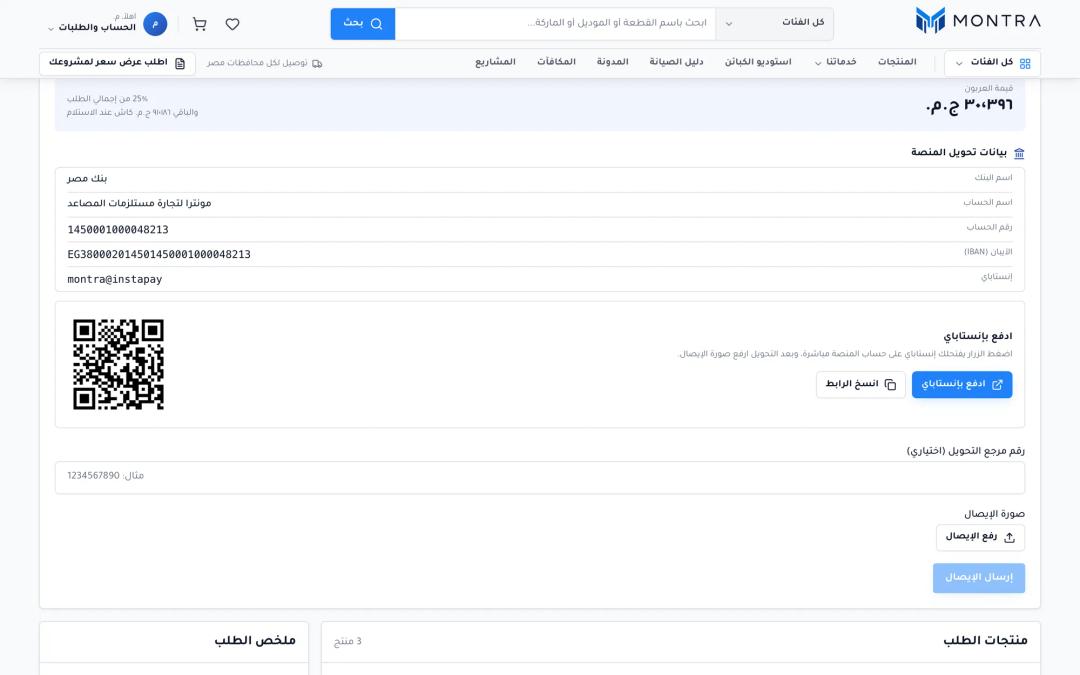 checkout payment step with FULL / DEPOSIT choice, InstaPay pay button and QR beside the bank details
Checkout is where the ordering system takes over. Prices are refreshed on arrival, and the server refuses the order with a "price changed" response if anything moved. Since late September 2026 every Montra parts order is prepaid by bank transfer or InstaPay, the instant payment app on the Central Bank of Egypt's network. If deposits are enabled in the admin settings, the customer chooses FULL or DEPOSIT (a configured percentage, balance at delivery).
Behind the button, the order follows the same path as any web order. The supplier planner prefers one supplier for the whole cart and uses the customer price as a ceiling, and no supplier is committed until an admin confirms the transfer receipt; only then are sub-orders created. That split is explained in how we split multi-supplier orders, and the money side in B2B payments in Egypt with InstaPay and escrow.
Whole-building jobs are a different funnel. When someone asks for a full installation, the bot points to the projects flow, where a bill of materials is generated and Montra publishes one quotation for the project.
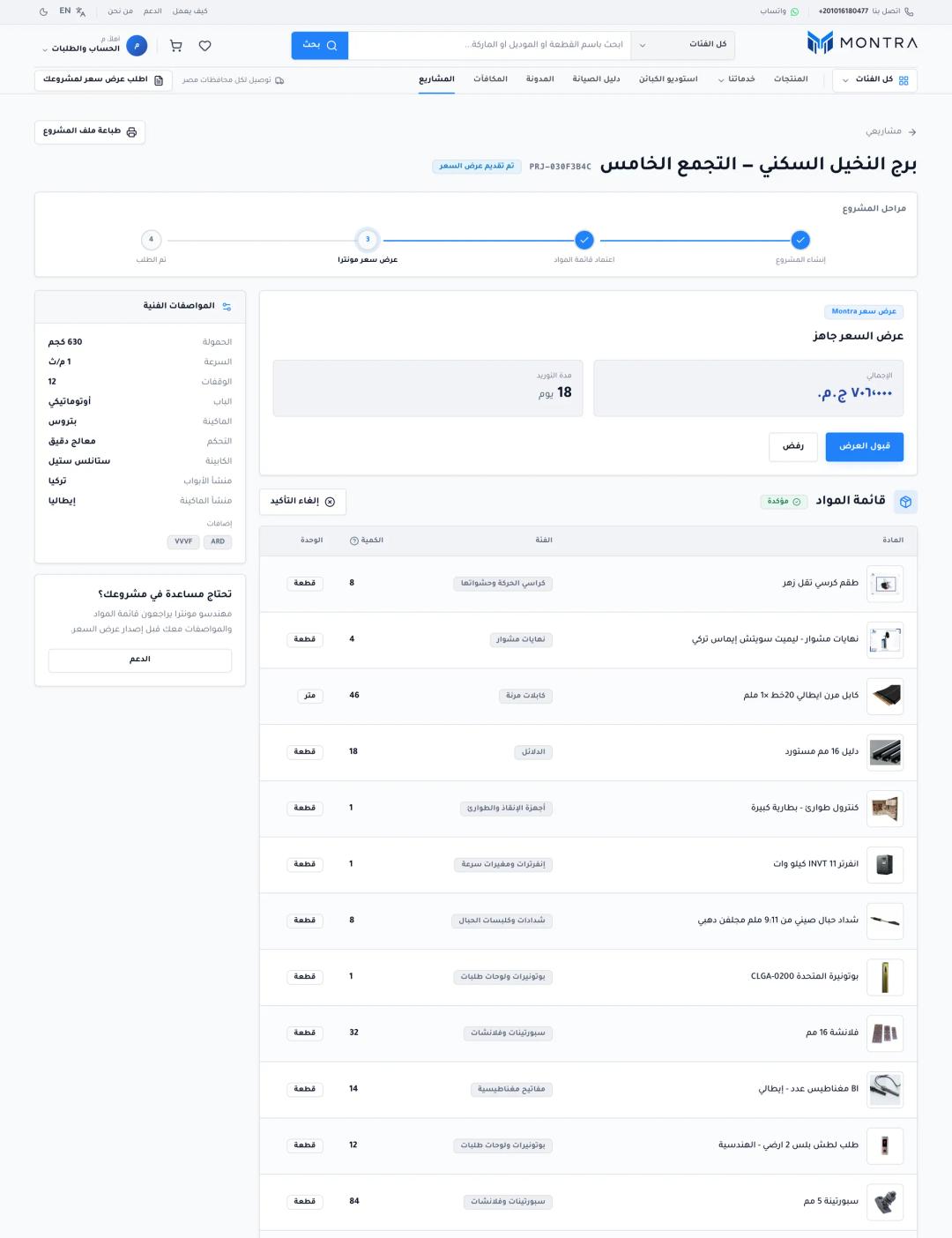 client project page showing the generated BOM lines and the published Montra quotation with price and delivery days
Step 6: after payment
Once the customer has linked WhatsApp to his account, get_my_orders reads its last five orders and returns a status, the total, a link and one next step: "transfer the amount and upload the receipt", "we received your receipt and are reviewing it", or, when shipped, what is due at the door. The identity comes from the linked chat, never from the model.
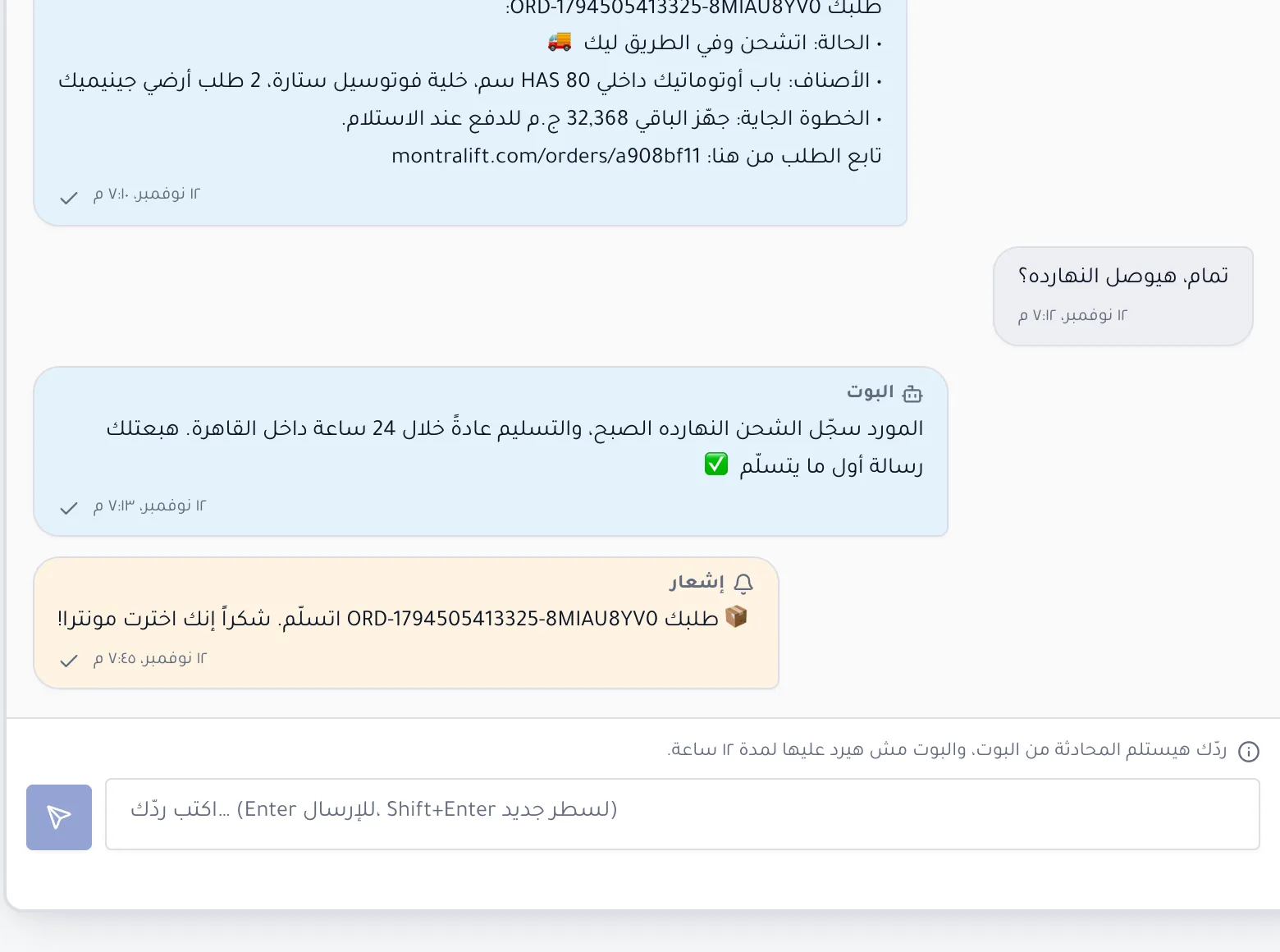 WhatsApp chat where a linked customer asks about an order and the bot replies with status, next step and order link
An illustrative conversation
This transcript is illustrative, written to show the flow; part names are realistic, prices are left as placeholders because the bot only shows what the catalog returns.
Customer: محتاج موتور باب لأسانسير 630 كيلو
Bot:      تمام. عشان أرشّحلك الصح: ماركة المصعد والموتور الحالي إيه؟
          ولو تقدر ابعت صورة اللوحة التعريفية للموتور. والعطل في الفتح ولا الغلق؟
Customer: [photo of the operator nameplate] العطل في الغلق، الباب سنتر
Bot:      شايف لوحة موتور باب أوتوماتيك، والمكتوب عليها ماركة ورقم موديل.
          دول الأقرب في الكتالوج:
          • موتور باب أوتوماتيك سنتر بانفرتر — [price from catalog]
          • كارتة تحكم موتور باب — السعر عند الطلب
Customer: هاخد الموتور، وعايز معاه 2 سير
Bot:      [search_parts → build_cart_link]
          🛒 سلتك جاهزة: https://…/cart/share/…  (صالحة 7 أيام)
Customer: (two days later) طلبي فين؟
Bot:      [get_my_orders] الإيصال وصلنا وبنراجعه، وهنبلغك أول ما يتأكد.
Under the hood: guardrails and what we changed
Channel-specific tools. The web widget has add_to_cart; WhatsApp has no cart widget, so the tool is filtered out, and a call to a tool the channel did not offer is refused even if the model emits it.
Unpriced parts. At launch most of the catalog had no live offer, and early replies printed "0 ج.م", which reads like a real price. Now an unpriced part reads "السعر عند الطلب" (price on request) and the cart link drops it.
Memory. The model sees the last eight messages plus a stored summary (500 characters at most, phone numbers stripped, expiring after seven silent days). A September prompt rule fixed gpt-4o-mini telling a customer it "could not retrieve" messages that were in its context.
Rate and pacing. More than 20 AI replies in an hour to one chat hands it to a human. Replies leave through the paced outbox, and proactive order notices respect quiet hours (23:00 to 08:00 Cairo time).
Money facts. The bot states payment rules only from a live company card built from the settings checkout reads, so it cannot promise cash on delivery that checkout no longer offers. In October every "shipped" reply also started naming the courier's shipping fee, which is billed on a separate invoice even for fully prepaid orders.
What to measure
- Conversations that reach a search result.
- Cart links built, and how many are opened.
- Links that become orders, and orders that get a confirmed receipt.
- Handoff rate, split by cause: the customer asked, or the hourly cap.
- Searches that return nothing: your catalog backlog.
For number 3, store the conversation id on the cart link so each order traces back to its chat.
Checklist: if you are building a WhatsApp ordering bot
- Decide where the model stops. Ours stops at a cart link; payment and confirmation stay in checkout.
- Read every price and stock flag from your pricing system at answer time, and again when the link is opened.
- Let the model pass item ids and quantities only. Validate, clamp and merge them in code.
- Give the bot the questions an expert would ask before recommending a part.
- Handle photos by bytes, never store them, and ask for a clearer photo when unsure.
- Never print a zero or missing price as a price.
- Bind order lookups to a linked account, not to the phone number or the model.
- Give a one-word path to a human, and silence the bot in human mode.
- Cap AI replies per chat per hour, pace what you send, and track links that became paid orders.
Frequently asked questions
Can a WhatsApp bot take orders automatically?
Yes, but taking payment and confirming totals in chat means rebuilding your checkout rules as a conversation. A safer pattern is a bot that identifies the products and sends a ready cart link, so the order is paid on your real checkout at live prices.
How does an AI bot know prices and stock?
It should not know them. It should call a tool that reads them from your pricing and inventory system each time, and show only what the tool returned.
Can customers order by sending a photo of a part?
Yes. The bot describes what it sees in the photo, searches the catalog by that description, and asks for a clearer photo or the printed part number when it is not sure. It should not claim an exact match from an unclear image.
What happens when the bot cannot help?
The customer types a handoff word such as "موظف", the conversation switches to human mode, staff are alerted, and the bot stays silent until a person hands it back. A bot that has answered too often in an hour hands off on its own.
Does a WhatsApp ordering bot work with prepaid payment?
Yes, and it fits well. The bot hands off to checkout, where the customer chooses full payment or a deposit and pays by bank transfer or InstaPay. Afterward the same bot tells a linked customer whether the receipt is under review, confirmed or shipped.
Next step
Before choosing a model, write down the questions your best salesperson asks before quoting a part, and list where your prices and stock live today. Those two lists decide most of the bot's design. If you want a team to build the funnel and the ordering system behind it, send us a short brief and we will tell you what we would build first.