A customer in Cairo places an order for elevator parts, then opens WhatsApp and types "طلبي فين؟" (where is my order?). If the answer comes from a person scrolling an admin panel, it takes an hour. If it comes from the system, it takes seconds and it is correct.
Short answer: a WhatsApp integration for a business system has two halves. Outbound: status messages triggered by real events, sent through a queue that respects opt-in, pacing and Meta's template rules. Inbound: a verified webhook that stores every message once, then routes it to a human or an AI bot that can only see the sender's own data.
The business problem
In Egypt and the Gulf, customers already live in WhatsApp. They ignore email, and many treat SMS as the channel for bank codes. When a business has no WhatsApp integration, the same thing happens everywhere: staff answer "where is my order?" by hand from a personal phone, customers who never get an update call the office, and nobody can see later what was promised to whom.
The cost is not the messages. It is the hours of staff time spent on questions the database already knows the answer to, and the trust lost when an order ships and the customer only finds out when the courier calls.
A proper integration fixes three things:
- Proactive updates. The customer hears "confirmed", "shipped", "delivered" without asking.
- Self-service answers. "Where is my order?" gets answered by the system, at 2 a.m. too.
- A record. Every message lives in your database, attached to the customer and the order, and is visible to your team.
Your options: official API or a self-hosted gateway
There are two ways to connect software to WhatsApp, and the choice matters more than any feature.
| WhatsApp Cloud API (official, Meta) | Self-hosted gateway (e.g. WAHA) | |
|---|---|---|
| How it works | Meta hosts the API; you send over HTTPS with a verified business number | Runs a real WhatsApp Web session on your server, linked to a phone by QR code |
| Starting a conversation | Only with pre-approved message templates outside the 24-hour window | Technically possible; not sanctioned by WhatsApp |
| Cost | Per delivered message, by category and country (see below) | No Meta fees; you run the server |
| Account risk | Governed by Meta's business policies and quality rating | WhatsApp's terms prohibit unauthorized automated access and bulk or auto-messaging; accounts can be suspended |
| Best for | Business-initiated updates at scale, multi-tenant products | Conversational channels where customers write first, with strict self-imposed limits |
On pricing, at the time of writing (November 2026), Meta's official pricing page states that conversation-based pricing was replaced by per-message pricing on July 1, 2025. Meta charges only for business-to-user messages that are delivered, priced by category (marketing, utility, authentication, service) and by the recipient's country. Since October 1, 2026, service replies and utility templates sent inside the 24-hour customer-service window are billable again, after a free tier of 1,000 service messages per month per phone number. Rates change several times a year, so check Meta's current rate card before you budget.
On the gateway side, WAHA's own documentation is direct about it: it runs a real WhatsApp Web instance, and it notes that WhatsApp does not allow bots or unofficial clients, so it "shouldn't be considered totally safe." WhatsApp's terms of service allow it to disable or suspend accounts that send "bulk messaging, auto-messaging" or access the service "through automated or other means." That is the trade-off to accept with open eyes.
Opt-in applies whichever route you take. Meta requires a business to get permission before messaging someone, and the opt-in must name the business. Build that into the product, not into a terms page.
How we built it in two Montra products
We have shipped WhatsApp in two of our own products, and they made opposite choices for good reasons.
Montra Marketplace, our B2B elevator-parts marketplace in Egypt, uses a self-hosted WAHA gateway. Its WhatsApp channel is conversational: traders and customers message Montra first, an AI assistant answers part questions and order lookups, and a human can take over at any point. The module is about 30 files of NestJS code, with unit tests for the signature check, the delivery rules and the bot tools.
Montra ERP, our maintenance-operations platform, uses the official WhatsApp Cloud API with approved templates. It is multi-tenant, and its messages are business-initiated: a maintenance company's customer gets "technician assigned", "on the way", "arrived" and "completed" for their job. Cold, business-initiated messages at that scale belong on the official API, so that is where they went.
The marketplace code was also written so the transport can change. Everything sits behind a WhatsAppProvider interface; WAHA implements it today, and a Cloud API adapter can replace it without touching the inbox, bot or notifier.
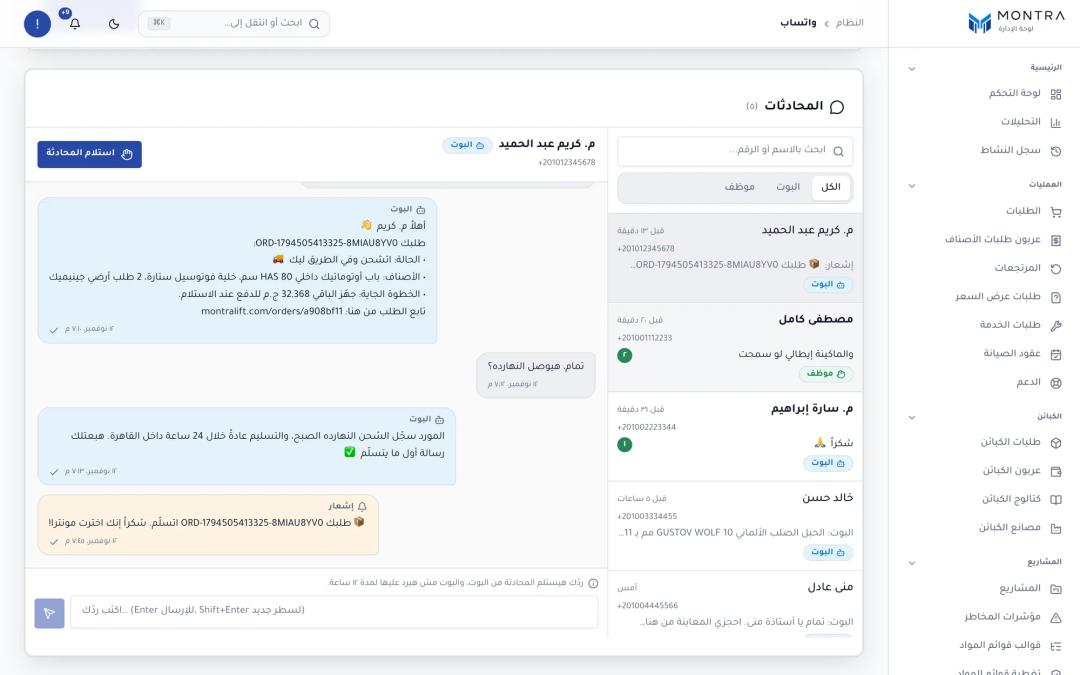 admin WhatsApp dashboard: conversation list, a bot/human mode toggle, and a thread with an order-status reply
Under the hood: the inbound path
WhatsApp ─► gateway ─► POST /whatsapp/webhook
                         │ 1. verify HMAC over raw body (else 401)
                         │ 2. INSERT inbound_event (unique provider key)
                         │    ok → 200    duplicate → 200    db down → 503
                         ▼
               per-chat queue (oldest first)
                 link code? → opt-out? → human mode? → "موظف"? → AI bot
                         ▼
                 outbox row (QUEUED) ─► paced sender ─► WhatsApp
Signature verification
The webhook has no user session, so the signature is the only authentication. WAHA signs the raw request body with HMAC-SHA512 and sends the hex digest in X-Webhook-Hmac. The check runs against the raw bytes, not re-serialized JSON, and every malformed input returns false instead of throwing:
export function verifyWebhookHmac(rawBody, header, secret): boolean {
  if (!secret || rawBody == null) return false;
  const sig = Array.isArray(header) ? header[0] : header;
  if (!sig || typeof sig !== 'string') return false;
  const given = sig.trim().toLowerCase();
  if (!/^[0-9a-f]+$/.test(given)) return false;

  const expected = createHmac('sha512', secret).update(rawBody).digest('hex');
  if (given.length !== expected.length) return false;
  return timingSafeEqual(Buffer.from(given), Buffer.from(expected));
}
The length check matters: timingSafeEqual throws on buffers of different lengths, which would turn a bad signature into a 500. On the Cloud API the idea is the same with a different recipe: Meta sends X-Hub-Signature-256, a SHA-256 signature keyed with your app secret.
Acknowledge only what is stored
The rule that saves messages: answer 200 only after the event is durably stored. If the database insert fails, the controller returns 503 and the gateway retries. Processing (the LLM call, the reply) happens after the response, so a slow model never causes a timeout and a duplicate delivery.
Retries mean duplicates, so every event has a unique key: the provider's message id, or, when there is none, sha256: plus a hash of the payload. A redelivered message hits the unique constraint and is acknowledged without new work. Meta's documentation makes the same point for the Cloud API: it retries failed webhooks for up to 36 hours, and your server should deduplicate.
Stored events are processed per chat in arrival order, so two quick messages never race. A failing event is retried up to five times (30 seconds, then 1, 2 and 4 minutes) and holds later messages of that chat behind it. A sweep every minute, and on boot, picks up anything a crash left half-done.
The outbox: one paced sender
Every outbound message, bot reply or notification, is a row in the database first. A single worker sends at most one per tick, and all the safety rules live in one tested function: a 4–7 second gap between sends, a per-minute cap (8 by default), a typing indicator scaled to message length, and for proactive messages, quiet hours from 23:00 to 08:00 Cairo time, a daily cap (150 by default), and expiry after 24 hours so a stale "shipped" never arrives two days late. Several notifications for the same chat within three minutes are merged into one message. Replies always go before notifications.
Order-status notifications
Order status in the marketplace changes in many places: admins, suppliers, sub-order roll-ups, payment review. Instead of hooking each one, a job scans recently updated orders of linked customers every minute and maps each to a milestone: confirmed, shipped, delivered, cancelled or delivery failed. A table keyed on (orderId, event) guarantees each milestone is announced once, even if the job runs twice.
Two rules keep it polite. Changes from before the customer linked WhatsApp are treated as history. And the system never cold-messages: a notification is only queued for a chat that has written to Montra first.
In Montra ERP the flow is simpler because the official API carries it. When a job changes state, a background job with five attempts and exponential backoff sends the matching template:
body: JSON.stringify({
  messaging_product: 'whatsapp',
  to,
  type: 'template',
  template: {
    name: `montra_job_${update}`,   // assigned | on_the_way | arrived | completed
    language: { code: locale },     // 'ar' or 'en'
    components: [{ type: 'body', parameters: params.map(text => ({ type: 'text', text })) }],
  },
}),
Errors are classified: 408, 429 and 5xx are retried; any other rejection from Meta is permanent and is not retried. Each company switches updates on per type in its settings. The "completed" template carries a signed link to a read-only job page with the technician's report and before/after photos.
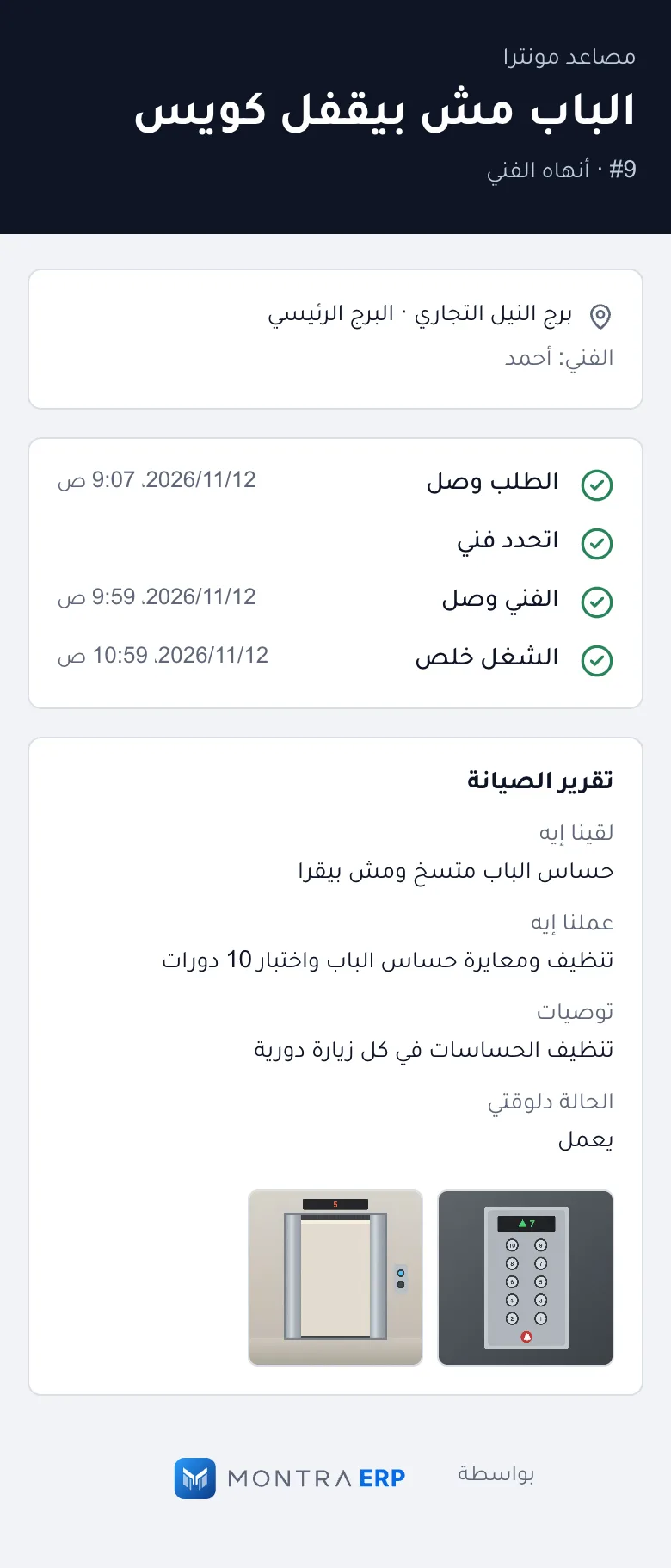 customer job status page /r/(token): job number, technician first name, status timeline, completion report with photos
The AI assistant: what it can and cannot do
The marketplace bot runs on our OpenAI-compatible LLM layer (gpt-4o-mini by default), with an Arabic knowledge base about the company, parts and common elevator faults. It can search parts, explain a part, list categories, share maintenance guides, build a ready-to-checkout cart link, and look up the sender's orders. It cannot add to cart, take payment or change an order.
Order lookup is where guardrails matter. A WhatsApp number proves nothing about who owns which account, so customers link explicitly: they press "Link WhatsApp" in their account, get an 8-character code (no look-alike characters like 0/O or 1/I), and send it to the Montra number. Codes expire after 15 minutes, and five wrong codes from one sender lock it out for the window.
The order tool is then bound to the chat that is talking. The model can pass an order number. It can never pass a user id:
async getMyOrders(chatId: string, args: any) {
  const customer = await this.link.customerForChat(chatId);
  if (!customer) return { linked: false, howToLink: HOW_TO_LINK_AR };

  const reference = typeof args?.reference === 'string' ? args.reference.trim().slice(0, 64) : '';
  const orders = await this.prisma.order.findMany({
    // userId comes from the linked chat, never from the model.
    where: { userId: customer.id, ...(reference ? { orderNumber: reference } : {}) },
    orderBy: { createdAt: 'desc' },
    take: 5,
  });
  // → reference, status label, total, next step, link
}
Even a fully jailbroken prompt cannot reach another customer's orders, because the query never takes an identity from the model.
The other guardrails are simple and visible. A message that is exactly "إيقاف" or "stop" opts the chat out. Typing "موظف" (staff) or "agent" hands the conversation to a human, and the bot stays silent in human mode until it times out (12 hours by default) or an admin hands it back. More than 20 AI replies in an hour to one chat triggers a handoff. The bot keeps the last eight messages plus a rolling summary, so long conversations stay coherent without sending the whole history to the model every time. Customers can also send a photo of a part; the bot reads JPEG, PNG and WebP, checked from the file bytes, not the declared type.
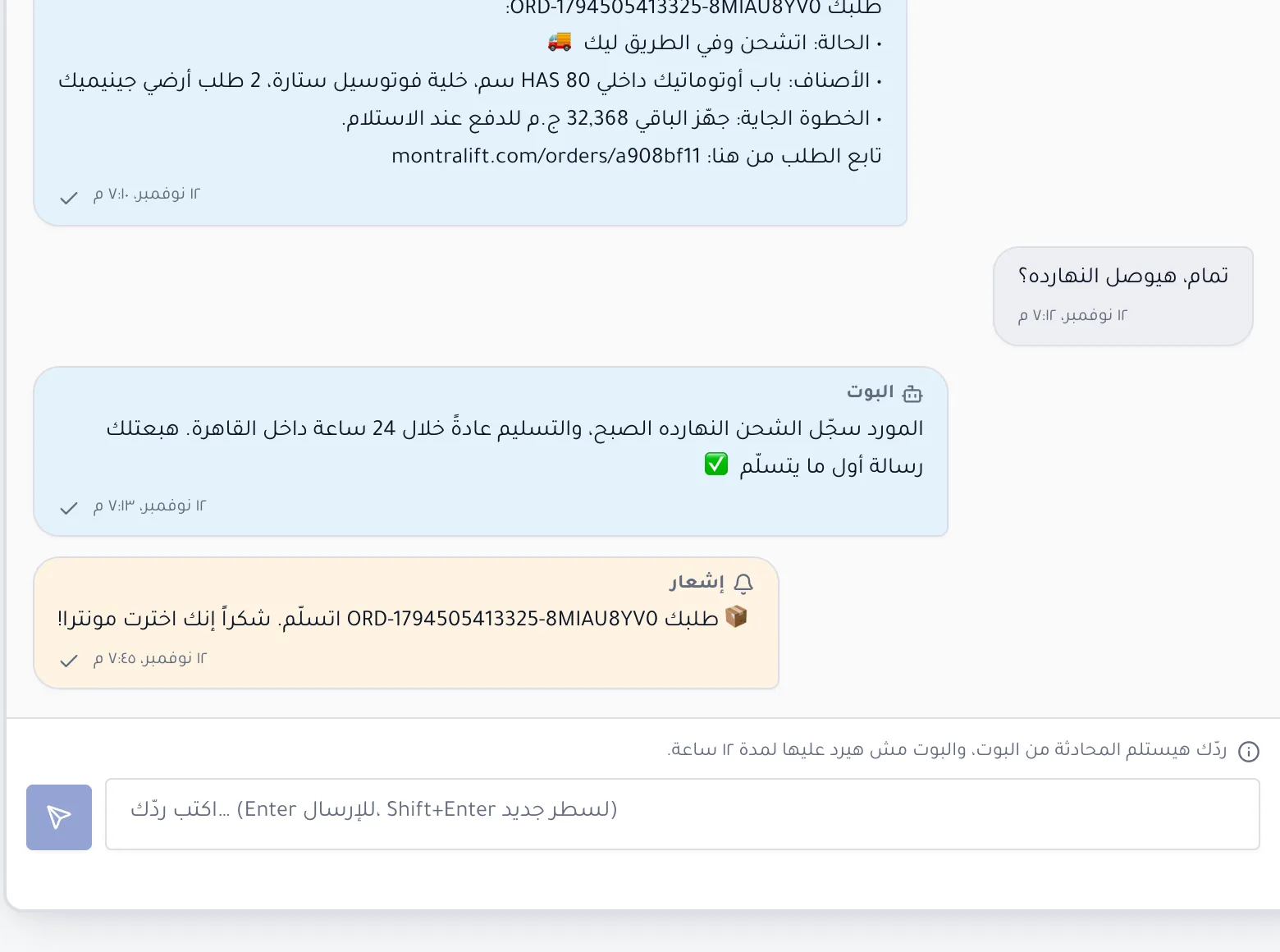 WhatsApp chat where a linked customer asks about an order and the bot replies with status, next step and order link
What we learned
- The bot is the easy part. Most of the code is delivery: durable inbound, de-duplication, ordering, pacing, retries and opt-out.
- Never let the model choose whose data to read. Bind tools to the authenticated channel.
- Decide the transport by who starts the conversation. Customers writing first with a human in the loop is a different risk profile from a business sending thousands of status updates.
- Notifications need expiry and merging. Three messages in a minute about the same order annoy people; a "shipped" message a day late confuses them.
Checklist: if you are integrating WhatsApp with your system
- Decide official Cloud API or gateway based on who initiates messages and how many, and read the current terms for your choice.
- Collect explicit opt-in that names your business, and honor an opt-out keyword.
- Verify every webhook signature against the raw body, with a constant-time comparison.
- Store the inbound event before returning 200; return 5xx when you cannot.
- De-duplicate on the provider message id, with a payload hash as fallback.
- Send everything through an outbox with pacing, caps, quiet hours and expiry.
- Make notifications idempotent per order and event.
- Bind every bot tool to the linked account; never accept a user id from the model.
- Give customers a one-word path to a human, and make human mode silence the bot.
- Budget per message using Meta's current rate card, including service messages after the free tier.
Frequently asked questions
Is it safe to use an unofficial WhatsApp API?
Gateways that run WhatsApp Web, such as WAHA, are not sanctioned by WhatsApp, and WhatsApp's terms allow it to suspend accounts that use automated access or bulk messaging. If you choose one, keep it conversational, opt-in only and strictly paced, and design so you can move to the official Cloud API. For business-initiated messages at scale, use the official API.
How much does the WhatsApp Business API cost?
At the time of writing (November 2026), Meta charges per delivered message, priced by category and the recipient's country. Since October 1, 2026, service messages are billable after 1,000 free per month per number. Meta updates rates several times a year, so use its official rate card.
Can a WhatsApp bot check order status?
Yes, if it has a tool that queries your order system. The safe way is to link the WhatsApp number to the customer account first, then make the tool use that link, not anything the AI writes, to decide which orders it can see.
Do I need templates for order notifications?
On the official Cloud API, yes, if the customer has not messaged you in the last 24 hours. Business-initiated messages outside that window must use templates approved in WhatsApp Manager. Order updates usually fit the utility category.
WhatsApp or SMS for order updates?
In Egypt and the Gulf, most customers read WhatsApp first, and WhatsApp allows replies, links and a conversation with your team. SMS still works as a fallback for numbers not on WhatsApp and for one-time codes.
Next step
If your team answers "where is my order?" by hand, start by listing the five or six events a customer should hear about and who should be able to reply. That list is most of the spec. For background on when WhatsApp-run operations stop scaling, read why WhatsApp ordering breaks when your business grows, or see how this fits into a larger system in our guide to custom ERP development in MENA. When you are ready, describe your project in a short brief and we will tell you which route fits.