An elevator installer orders four parts for a job that starts Sunday: a traction rope, a door operator, a controller board and a set of landing buttons. No single trader in the market has all four in stock at the best price, and the installer does not care. They want one order, one total, and the parts on site.
Short answer: split the customer's order into one sub-order per supplier behind the scenes, keep the customer on a single order number and a price that does not depend on who fulfils it, and pick suppliers with an explicit rule: fewest shipments, cheapest per item, or a hybrid. Then design rejection as a normal path: release the stock, exclude that supplier for this order, and re-route only the affected items.
The business problem
In a B2B parts market, stock is fragmented and prices for the same part differ between traders. That creates three tensions a marketplace has to settle in software:
- The customer wants one transaction. One order, one checkout total, one place to track it. They should not have to know that three traders are involved.
- Each supplier only has part of the order. Every split adds a shipment, and on Montra each shipment carries its own delivery fee. So the cheapest supplier for each line is not automatically the cheapest result for the customer.
- Suppliers can say no. Listed stock can be out of date or a part can turn out damaged. If a rejection drops the whole order back into someone's inbox, you have rebuilt the phone-and-WhatsApp workflow you were trying to replace.
There is also a privacy question founders discover late. The customer should not see which trader sent which box or at what cost, and a trader should not see the platform's margin or the other traders on the order.
Your options for assigning suppliers
Here is a small illustrative order (the numbers are made up for the example). The customer price for each line is fixed by the platform's pricing; the figures below are what each supplier charges the platform.
| Item | Supplier 1 | Supplier 2 | Supplier 3 |
|---|---|---|---|
| A. Traction rope | 9,500 EGP | none | 9,000 EGP |
| B. Door operator | 7,800 EGP | 7,200 EGP | none |
| C. Controller board | 6,200 EGP | none | none |
| D. Landing buttons | none | 2,300 EGP | 2,100 EGP |
How the common strategies split it:
| Strategy | Result | Supplier cost | Shipments |
|---|---|---|---|
| Best price per item | S3 gets A and D, S2 gets B, S1 gets C | 24,500 EGP | 3 |
| Most availability (fewest shipments) | S1 gets A, B, C; S3 gets D | 25,600 EGP | 2 |
| Hybrid | First sub-order to the supplier covering the most items (S1: A, B, C), leftovers priced item by item (D to S3) | 25,600 EGP | 2 |
Best price per item saves 1,100 EGP of supplier cost but adds a third shipment: one more delivery fee, one more truck, one more supplier who can fail. Most availability does the opposite. Hybrid starts like most availability and then gets price-sensitive for the leftovers. On a four-item order it often lands in the same place as most availability; the difference shows up on larger orders, where the leftovers are many and spread across traders.
There is no universally right answer. Trade buyers on a deadline usually value fewer, faster shipments; price-sensitive buyers may accept more boxes for a lower total. What matters is that the rule is explicit, configurable and the same for every order.
How we built it in Montra
Montra is our own B2B marketplace for elevator spare parts in Egypt. Installers, maintenance companies and building owners buy from many traders through one storefront, and large jobs go through a project flow that starts from a bill of materials (BOM).
We built three assignment strategies (best per item, most availability and hybrid) and compared them on realistic orders before settling the production behavior. What runs today:
- At checkout, a planner looks for one supplier who can fulfil the whole cart. If none can, it greedily picks the supplier covering the most remaining items, breaking ties on lower supplier cost, until every line is covered. The customer's price for each item acts as a ceiling, so a mis-keyed listing priced far above the market is never chosen and sold below cost.
- The customer's price does not change with the split. Item prices come from the pricing engine, not from whichever trader wins. Splitting changes the platform's margin, not the customer's bill. Shipping is billed per shipment, which is exactly why fewer shipments is the default preference.
- Follow-on and re-assigned sub-orders use an availability-weighted score: how many of the remaining items a supplier can take, blended with their quality score. The weights live in system settings (70% availability and 30% quality by default), so changing the balance does not need a deploy.
- Before any ranking, suppliers pass business gates. A trader whose unpaid commission has reached their credit limit is skipped until they settle; one below the minimum reliability score is left to manual assignment; listings not updated within 30 days (the default) get their score halved.
 trader dashboard "pending assignments" list showing a sub-order with only that trader's items, amount owed and cash to collect
What the customer sees: one order number and a "Shipments" card, numbered Shipment 1, Shipment 2, each with its own status. The supplier identity is stripped from the customer payload, and rejected or cancelled sub-orders are hidden so the customer only sees shipments that are actually on their way.
What each supplier sees: only their own sub-order. Their items, the amount the platform owes them (their own listing price), the cash to collect at the door and the delivery fee. They never see the platform's margin or margin percentage. That is enforced in a single view function, not left to each screen.
Under the hood: the split
customer order (1 order number, 1 checkout total)
        |
        v
  supplier planner -- gates: credit limit, reliability, stale stock
        |
        +--> sub-order #1 -> Supplier 1 [A, B, C]  -> Shipment 1
        +--> sub-order #2 -> Supplier 3 [D]        -> Shipment 2
                 |
                 +-- rejected? release stock, exclude S3,
                     re-route [D] to the next best supplier
The core of the grouping is a greedy set cover. Simplified:
const remaining = new Set(itemIds);
while (remaining.size > 0) {
  let best: { traderId: string; items: string[]; cost: Decimal } | null = null;
  for (const [traderId, stocked] of traderItems) {
    const items = [...stocked].filter((id) => remaining.has(id));
    if (items.length === 0) continue;
    const cost = costFor(traderId, items); // supplier price x quantity
    const better = !best || items.length > best.items.length ||
      (items.length === best.items.length && cost.lt(best.cost));
    if (better) best = { traderId, items, cost };
  }
  if (!best) break;            // nobody can take the rest: park it
  groups.push(best);
  best.items.forEach((id) => remaining.delete(id));
}
Two details matter more than the algorithm. A supplier only counts for an item if their stock covers the full quantity; splitting one line across two traders creates reconciliation work nobody wants. And when nobody can take the items, the order is not failed: they are parked on an unassigned sub-order, the admin is alerted, and a reconciliation job retries every 30 minutes.
When an admin reassigns a sub-order to a different trader, the price is recomputed with the new trader's cost and the move is refused if it would sell below cost. That guard came from a real lesson: a reassigned sub-order used to keep the original trader's price, which meant a wrong commission or a negative margin that only surfaced at delivery.
Under the hood: rejection and re-assignment
A trader rejects a sub-order with a required reason. Everything that follows is designed to be boring:
await prisma.$transaction(async (tx) => {
  await tx.$queryRaw`SELECT id FROM sub_orders WHERE id = ${id} FOR UPDATE`;
  const pending = await findPendingAssignment(tx, id, traderId);
  if (!pending) throw new BadRequestException("Already processed or expired");
  await markRejected(tx, id, pending, reason);   // sub-order + assignment row
  await releaseStock(tx, subOrder, traderId);    // reservation or real stock
});
const excluded = new Set([traderId, ...previousRejectersOf(orderId)]);
await createNextSubOrder(orderId, [...excluded]); // only the affected items
What we learned getting this right:
- Lock the row. Accept, reject and the 30-minute assignment timeout can race, so the sub-order and its pending assignment are locked and serialize.
- Exclude every past rejecter, not just the latest. The list is rebuilt from the order's whole assignment history, or item D bounces between the same two traders.
- Free the old links. An order item belongs to one sub-order; links to rejected ones are deleted first, or the unique constraint blocks the new sub-order.
- Create the replacement before recomputing order status. Otherwise an order whose only sub-order was rejected looks dead and gets cancelled.
- Make rejection cost something. Each rejection lowers the trader's reliability score by 5 points and a failed delivery by 8; each successful delivery restores 1. Cross the minimum and the trader drops out of automatic assignment. Otherwise the cheapest stale listing keeps winning and rejecting.
From a bill of materials to one quote
Project orders follow the same idea with more structure. A customer describes the job (buildings, floors, elevators, capacity, door and machine type, origin preference), and admins maintain BOM patterns, where each line has a quantity formula and a list of acceptable alternatives. Quantity formulas look like stops, ceil(shaftM / 5) * 2 or doorType == 'AUTOMATIC' ? 1 : 0. An alternative can require a spec, for example a machine with horsepower of at least =requiredHp, where the required horsepower comes from rated load (a 630 kg lift maps to 10 HP in our table).
Spec matching normalizes Arabic text before comparing: Arabic-Indic digits, alef and yaa forms, taa marbuta. Traders type specs the way they speak, and "١٠ حصان" must match 10 HP.
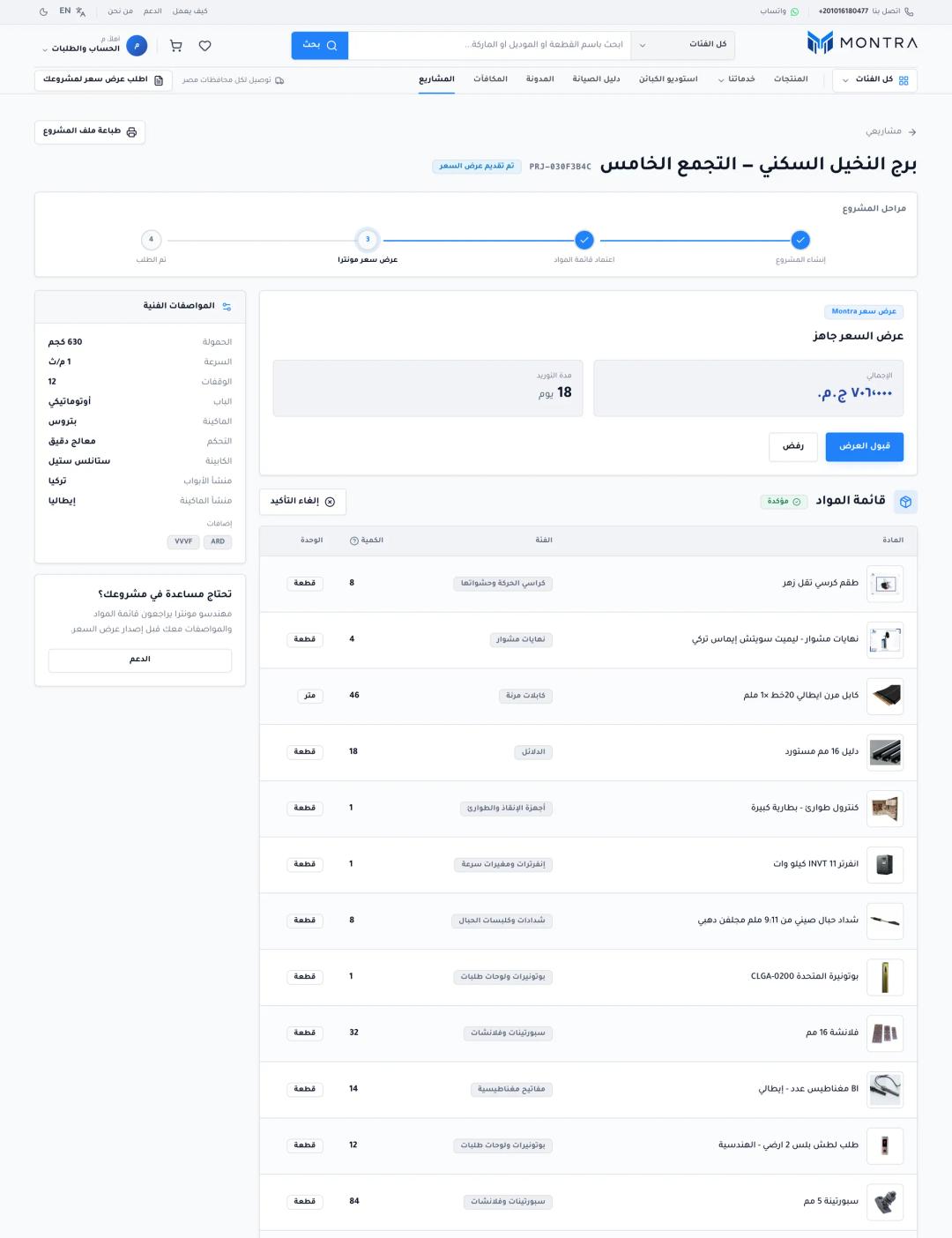 client project page showing the generated BOM lines and the published Montra quotation with price and delivery days
For each BOM line, availability takes the first candidate item a supplier stocks in full (cheapest listing first), otherwise flags it for follow-up. The system then builds offers: single-supplier offers when one trader covers the whole BOM, or a composite offer that splits it across the fewest suppliers using the same greedy cover as checkout. Admins review these internal offers and publish one Montra-branded quotation. The customer sees a price and a delivery time, never supplier identity or cost, and the BOM shows generic roles rather than brand and model until the project is awarded.
Accepting that quotation turns into one project order per supplier, all in one transaction. The project row is locked first and the quote status is re-read under the lock, so a double click or two open tabs cannot create two sets of orders, and an accept cannot race a re-publish. We keep a dedicated race test for this.
 admin BOM pattern coverage report showing covered percentage, dead alternatives and lines with no supplier
Admins also get a coverage report per pattern: catalog share reached, alternatives that match nothing, and lines with no supplier price. It catches a broken pattern before a customer does.
Security sidebar: formulas written by admins
BOM formulas used to run through new Function(...). Even if only admins write them, one compromised admin account then becomes remote code execution, and argument scoping does not stop constructor chains. We replaced it with a small closed interpreter that supports only literals, context variables, a few helpers (ceil, floor, round, min, max) and ordinary operators:
const FORBIDDEN = new Set(["__proto__", "constructor", "prototype"]);

function readMember(target: unknown, prop: string) {
  if (FORBIDDEN.has(prop)) throw new Error(`Access to '${prop}' is not allowed`);
  if (target === null || target === undefined) return undefined;
  if (typeof target !== "object") throw new Error("No property reads on primitives");
  return Object.prototype.hasOwnProperty.call(target, prop)
    ? (target as Record<string, unknown>)[prop]
    : undefined;
}
The public price calculator follows the same principle: it runs on the server, returns only a rounded range, falls back to "request a quote" when any amount is missing, and never sends the rate card to the browser.
Checklist: if you are building multi-supplier orders
- Decide which strategy is the default (fewest shipments, cheapest per item or hybrid) and make the weights a setting, not a code change.
- Keep the customer's item price independent of which supplier fulfils it, and treat it as a ceiling when picking suppliers.
- Only count a supplier for an item when their stock covers the full quantity.
- Gate suppliers before ranking: credit or commission exposure, reliability and stale listings.
- Give the customer one order number with numbered shipments; strip supplier identity from their view.
- Show each supplier only their items, what they are owed and what to collect. Enforce it in one place.
- Lock the sub-order row for accept, reject and timeout, and exclude every past rejecter when re-routing.
- Never fail an order because nobody has stock right now. Park it, alert someone and retry on a schedule.
- Recompute the price when an admin reassigns, and refuse an assignment that sells below cost.
- If admins can write formulas, evaluate them in a closed interpreter, never with
evalornew Function.
Frequently asked questions
How does a marketplace split one order across multiple suppliers?
It creates one sub-order per supplier behind a single customer order. A planner decides which supplier takes which items, usually minimizing the number of suppliers and breaking ties on cost, while the customer tracks one order number.
Is it better to choose the cheapest supplier per item or the fewest shipments?
It depends on your buyers and how shipping is charged. Cheapest per item lowers supplier cost but adds shipments, delivery fees and points of failure. For trade buyers on a deadline, fewer shipments usually wins.
What happens when a supplier rejects their part of the order?
The rejected sub-order's stock is released, that supplier is excluded from this order, and only the affected items are re-routed to the next best supplier. The rest of the order continues untouched. If nobody can take the items, they are parked for an admin and retried automatically.
Should the customer know which supplier sent each item?
In most B2B marketplaces, no. The customer sees one order and numbered shipments. Exposing supplier identity and cost invites buyers to go around the platform. Suppliers likewise should see only their own items and payout, not the margin.
How do you turn an elevator project's bill of materials into a quote?
Generate the BOM from the project specs using admin-maintained patterns with quantity formulas and acceptable alternatives. Match each line to catalog items and supplier stock, build single-supplier and composite offers, then publish one reviewed quotation with a price and delivery time.
Next step
If your marketplace still dispatches orders by hand, write down your assignment rule in one sentence and what should happen when a supplier says no. That page becomes the spec. For a working example of the full flow, read the Montra case study, our spare parts marketplace MVP checklist, and how we keep the money side correct in idempotency, ledgers and concurrency. When you are ready to scope your own, send us a project brief.