A customer in Riyadh has paid for a used gearbox part from a scrapyard. Forty minutes later the app still says "In delivery", the rider's phone is busy, and the customer is already typing a refund request.
Short answer: live tracking and in-app chat exist to answer one question, "is this actually happening?", without anyone picking up a phone. Building them well means three things: dispatching the job to the right people in real time, keeping a persistent connection alive through your proxy and the phone's power saving, and collecting rider location only when, and only for whom, it is needed.
Below: the business side first, then how we built it in Ajza, an automotive marketplace live in Saudi Arabia, with a short comparison to Montra ERP.
The business problem: silence feels like failure
On-demand services sell certainty. A customer who has paid is now waiting on a stranger, and every minute without news raises the chance they cancel, call support, or never order again. The cost shows up in a few places:
- Support load. Each "where is my order?" message is answered by phoning the rider, who is driving.
- Cancellations at the worst moment. A customer who cancels after the rider has picked up the part leaves you with transport cost, a returned item and a supplier who did the work.
- Disputes with no record. When the price, the part condition or the delivery time is agreed by phone, nobody can prove what was said.
A map with a moving marker and a chat thread holding the offer, the invoice and the "I'm outside" message remove most reasons to call.
What live tracking really costs
The map is the cheap part. The real costs sit elsewhere.
| Cost | What it means in practice |
|---|---|
| Battery | GPS plus a network call every few seconds drains a phone over a full shift. The update interval is a product decision. |
| Mobile data | Each ping is small, but constant pinging adds up for riders on prepaid plans. |
| Background permissions | Reporting with the screen off needs an Android foreground service with a visible notification, and both stores ask you to justify background location. |
| Store review | Google Play asks for a declaration form, an in-app disclosure shown before the permission prompt, and a short video of the feature. Apple's guidelines require that location use is directly relevant to the app and that you explain the purpose and obtain consent. |
| Server connections | Every customer watching a map holds an open connection your proxy and timeouts must allow. |
| Privacy | You store where a person was. You need rules on who sees it and when collection stops. |
At the time of writing (November 2026), apps targeting Android 14 or later must declare a location foreground service type with the matching FOREGROUND_SERVICE_LOCATION permission, and declare that use in the Play Console as well.
Chat or phone calls?
Calls are faster for one urgent question. Chat works when the rider cannot talk, keeps a record support can read in a dispute, and can carry a price offer or invoice the customer accepts with one tap. Make chat the default and keep calls for emergencies.
Rider privacy
A rider's location is personal data. Our rule: track only during a delivery the rider has started, show it only to that order's customer and rider, and stop on delivery or cancellation.
How we built it in Ajza
Ajza is a multi-sided automotive marketplace: parts e-commerce, on-demand car services, and a "Tashlih" flow where customers request used parts from scrapyards and independent representatives (riders) source and deliver them. Real-time features run across one NestJS backend, a Next.js admin and partner web app, and Flutter mobile apps for customers, stores and riders. Chat alone exists in four areas: store orders, store requests, rider orders, and admin support.
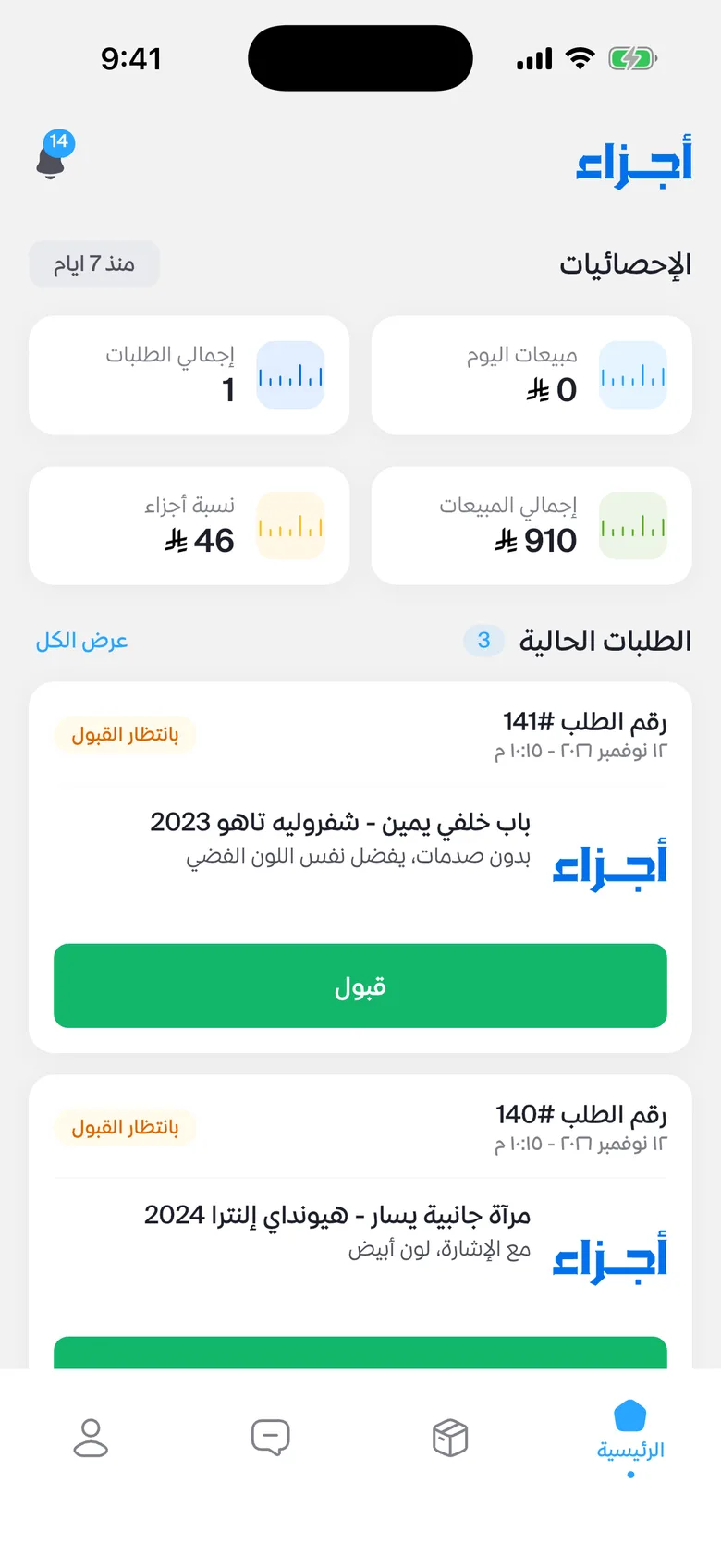 rider app job feed showing a new Tashlih request arriving and another one disappearing after a different rider accepted it
The Tashlih rider flow looks like this:
- A customer posts a part request. The backend broadcasts it to every connected rider at once.
- The first rider to accept takes it, and every other feed drops it with a reason.
- A chat opens. The rider sends a price offer and an invoice inside it, and the customer pays in the app.
- Delivery starts only after an accepted offer, an invoice and a paid payment. The rider delivers personally, which starts live tracking, or through a shipping company, submitting a tracking number the customer sees in the chat.
- The customer follows the rider on a map until delivery, then the chat closes with a system message.
If nobody accepts a request within 15 minutes, it expires automatically and disappears from every rider's feed.
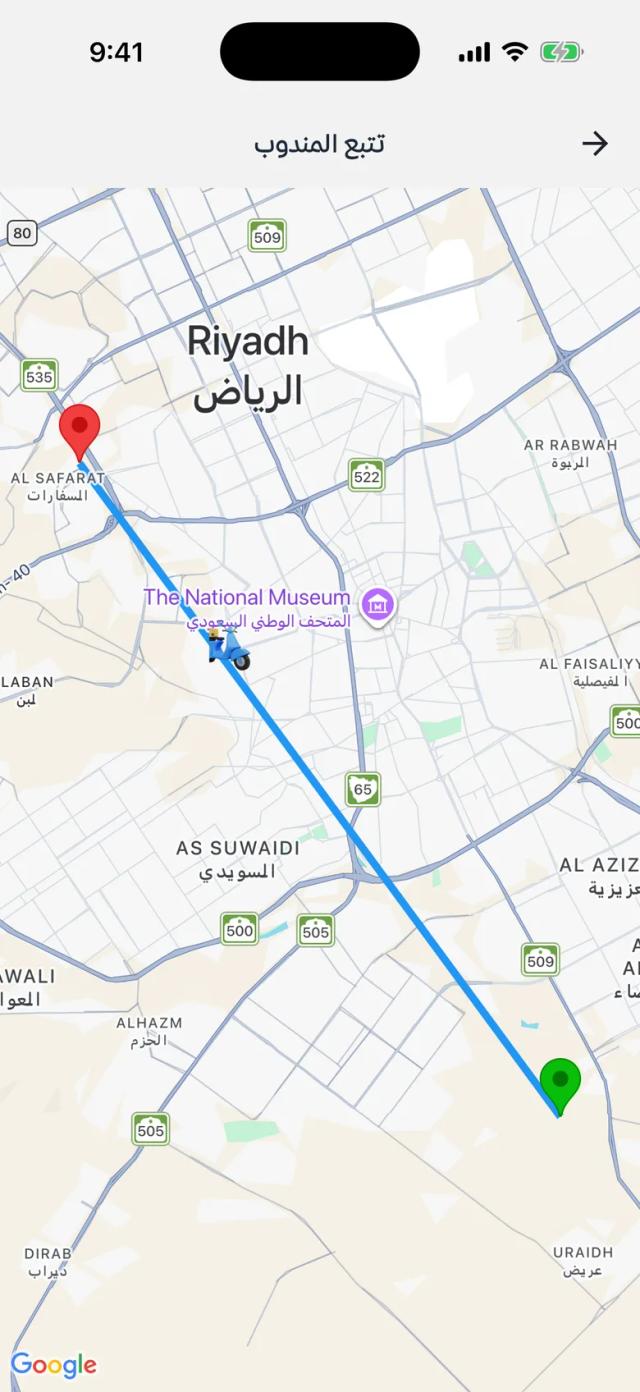 customer app live rider map with the route polyline, start and destination pins, and the rider marker moving
Under the hood: one socket, many rooms
All of this rides on Socket.IO, designed so delivery never depends on which screen the user has open.
Rider app ──POST /rep-orders/:id/track──▶ API ──save ping──▶ PostgreSQL
                                          │
                                          └─emit rep-location-update─▶ room rep-order:{id}
                                                                         │
Customer app ◀── WebSocket (via nginx /socket.io/) ◀───────────────────┘

New request ─▶ emit new-rep-order ─▶ room "representatives" (every rider)
Accept / expire / cancel ─▶ emit rep-order-removed {reason} ─▶ same room
Chat message ─▶ emit new-message ─▶ chat room + user:{a} + user:{b}
When a socket connects, the gateway verifies the access token in the handshake, loads the user, and rejects anyone suspended or inactive. It then joins the socket to a personal room user:{id}, and riders also join a shared representatives room. Nothing needs to be "subscribed" for a rider to hear about new jobs.
For anything that must reach a person, we emit to the topic room and the personal rooms in a single call:
async handleConnection(client) {
  const payload = this.jwt.verify(extractToken(client));
  const user = await this.users.findOne({ where: { id: payload.sub } });
  if (!user || user.status === 'suspended' || user.status === 'inactive') {
    return client.disconnect();
  }
  client.join(`user:${user.id}`);
  if (user.role === 'representative') client.join('representatives');
}

emitNewMessageToUsers(chatRoom: string, userIds: number[], message: object) {
  const rooms = [chatRoom, ...userIds.map((id) => `user:${id}`)];
  this.server.to(rooms).emit('new-message', message);
}
Socket.IO's documentation states that a socket in several of the target rooms receives the event once. So a customer with the chat open gets one copy, and a customer on the home screen still gets it. Messages are saved to PostgreSQL before they are emitted, and a push notification covers a closed app.
Dispatch: broadcast, remove, expire
Broadcasting a job is one emit to the representatives room. Taking it back is harder. Acceptance, cancellation and expiry each emit rep-order-removed with a reason (accepted, cancelled_by_customer, cancelled_by_rep, expired) so the rider app can show "another rider took this" instead of a confusing disappearance.
@Cron(CronExpression.EVERY_MINUTE)
async expirePendingRepOrders() {
  const cutoff = new Date(Date.now() - 15 * 60 * 1000);
  const expired = await this.orders.find({
    where: { status: 'pending', createdAt: LessThan(cutoff) },
    select: ['id'],
  });
  if (!expired.length) return;
  const ids = expired.map((o) => o.id);
  await this.orders.update(ids, { status: 'cancelled', cancelledAt: new Date() });
  ids.forEach((id) => this.events.emitRepOrderRemoved(id, 'expired'));
}
One detail from production: the rider chat used to be created lazily, on the first message. After accepting, the rider app had no chat to open and the rider sat on the order screen. We now create the chat in the same accept call and return its id, so the app navigates straight into the conversation and the customer's "rider accepted" notification can deep-link to it.
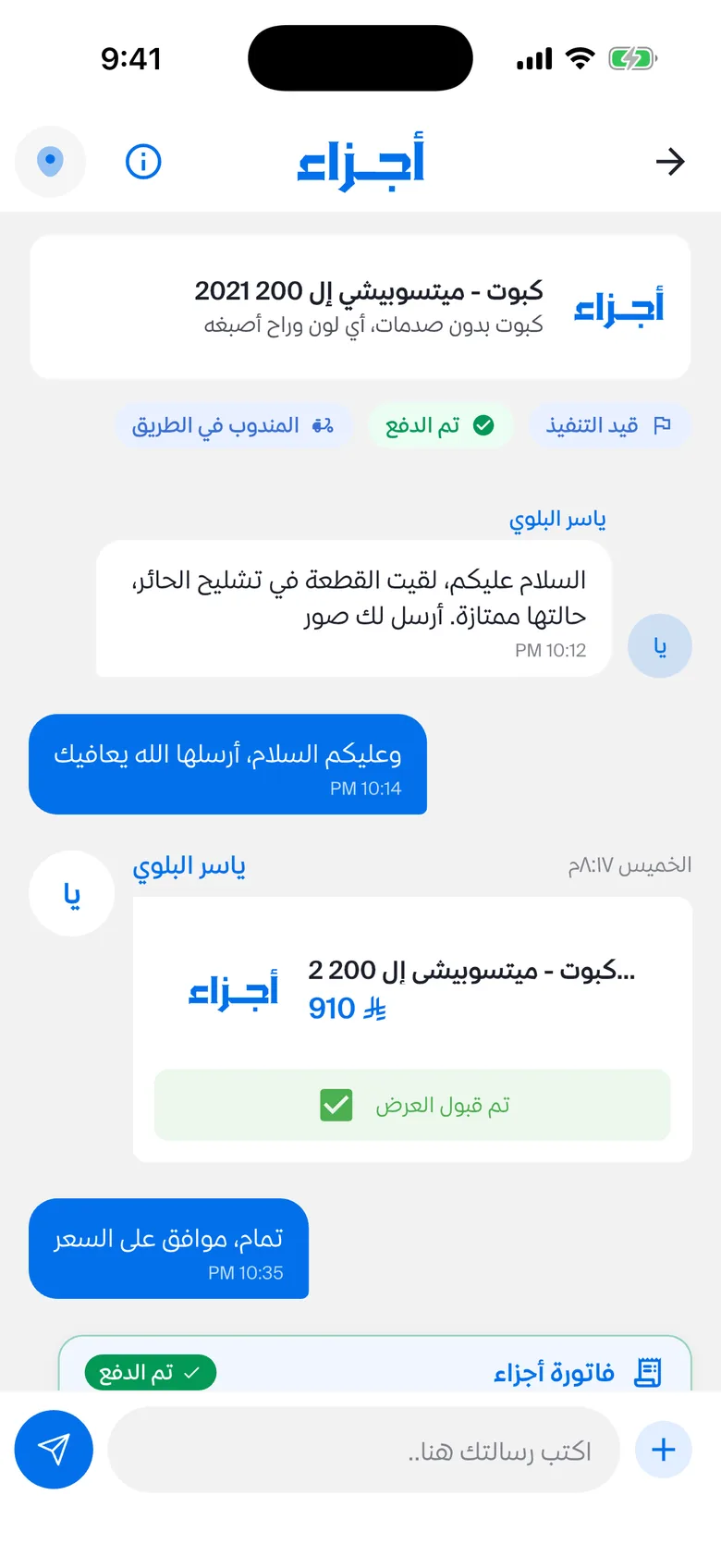 chat screen between customer and rider showing a price offer card, an invoice message and the "delivery started" system message
Keeping WebSockets alive behind nginx
The Flutter Socket.IO client we use on mobile connects over WebSocket only, with no long-polling fallback. That means real-time works in production only if every hop between the phone and the API upgrades the connection. In Ajza that hop is nginx:
location /socket.io/ {
    proxy_pass http://ajza_api;
    proxy_http_version 1.1;
    proxy_set_header Upgrade $http_upgrade;
    proxy_set_header Connection "upgrade";
    proxy_set_header X-Forwarded-For $proxy_add_x_forwarded_for;

    proxy_read_timeout 3600s;
    proxy_send_timeout 3600s;
    proxy_buffering off;
}
Without the Upgrade and Connection headers the mobile client cannot connect at all. Socket.IO's reverse-proxy guide also warns that proxy_read_timeout must exceed the ping interval plus ping timeout, or nginx closes idle connections. We set it to an hour so a customer watching a slow delivery is never cut off by the proxy. The socket path has its own location block, while login and OTP endpoints sit behind a stricter rate-limit zone than the rest of the API.
On the client, three habits matter:
- Re-join rooms on every connect. The socket service remembers requested rooms and re-joins them in the connect handler, so a reconnect after a tunnel restores every subscription.
- Refetch after reconnect, and on app resume. Phones kill sockets in the background. On resume we call
ensureConnected(), and screens listen to anonReconnectedstream to reload state they may have missed. - Snapshot first, then stream. The tracking screen first loads the last known position over REST, then subscribes to
rep-location-update. Each listener returns a disposer that runs when the screen closes, so reopening the map never stacks duplicate handlers.
The rider side: location without killing the phone
Tracking starts only when the rider confirms self-delivery and stops when the order is delivered or cancelled. Only one order streams at a time. On Android the rider app runs a foreground service of type location with a persistent notification; on iOS the same service runs a timer under the background location permission the rider grants. If the rider has not chosen "Allow all the time", the app tells them exactly which setting to change.
Each fix is a small POST to the order's track endpoint. If getting a fix fails, the service retries with exponential backoff (2, 4, then 8 seconds) before reporting an error. In release builds the rider reports every three minutes. For used parts carried across a city, that is enough to show progress, and it keeps battery and data use low for riders working a full day.
The server enforces the privacy rule: only the assigned rider can post pings for an order, and only that order's customer and rider can read the track history. Pings go to the order's room, not to a broadcast channel.
A second data point: Montra ERP
In Montra ERP, our field-service SaaS, dispatchers watch many technicians on one dashboard and the browser never sends real-time data upstream, so we used Server-Sent Events. Technicians post batched GPS fixes over plain HTTP (a fix every 25 meters, sent every 30 seconds while travelling to a job and every 2 minutes otherwise), and the API fans events out through Redis pub/sub so any API replica can deliver them to a connected dashboard. Each event carries an audience, and a technician only ever receives events addressed to them.
We load-tested that pipeline locally on a single API process: 200 simulated technicians for 3 minutes gave a p95 of 31 ms and p99 of 41 ms, with 0% errors and 7,200 GPS fixes stored. The full dispatch story is in our post on building technician dispatch and live tracking.
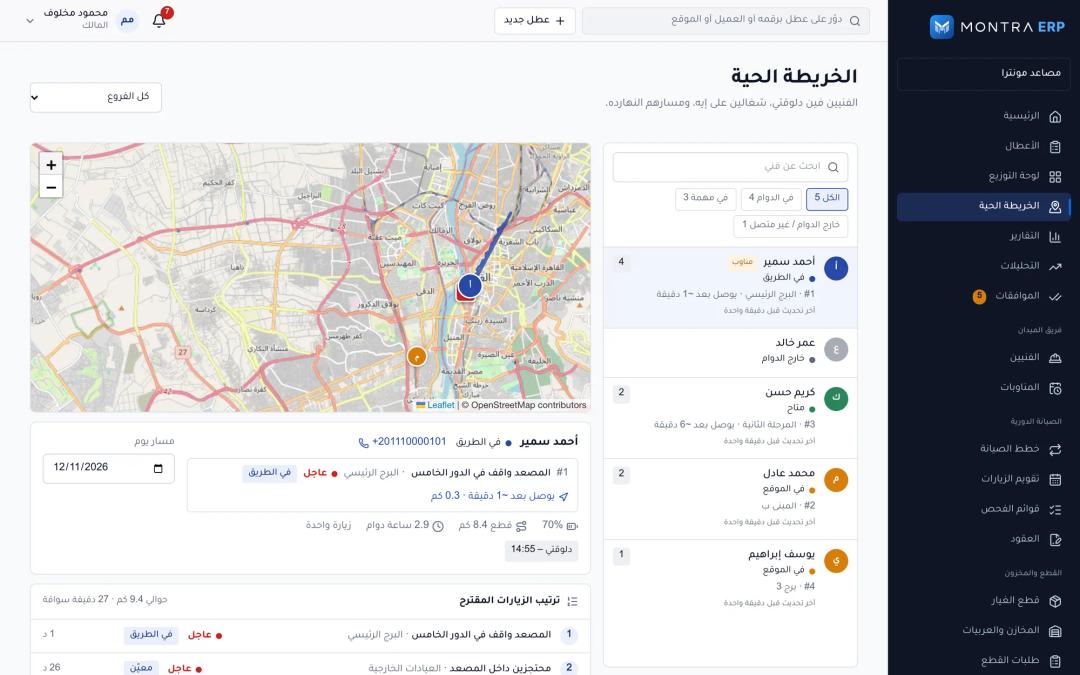 dispatcher live tracking map with several technicians moving toward their jobs
The common lesson across both projects: send location upstream over ordinary HTTP requests, which are easy to retry, authenticate and rate-limit, and keep the persistent channel for pushing changes down to the people watching.
Checklist: if you are adding live tracking and chat
- Decide the update interval for your use case before writing code. It drives battery, data and server load.
- Track only during a delivery, and restrict who can read the location to that order's participants. Enforce both in the backend.
- Prepare the Google Play background location declaration, in-app disclosure and demo video, and the iOS purpose strings, before your release date.
- Confirm your proxy upgrades WebSockets and that its read timeout exceeds the heartbeat. Test it from a real phone on mobile data, not only from a browser.
- Authenticate the socket at connect time and drop suspended accounts there.
- Deliver must-see events to a personal room, so they arrive regardless of which screen is open.
- Give every broadcast job an expiry and a "removed" event with a reason.
- Re-join rooms and refetch state after every reconnect and app resume.
- Persist chat messages before emitting them, and send a push notification when the app is closed.
Frequently asked questions
How does live order tracking work in a delivery app?
The rider's app reads GPS at a set interval and sends each position to the server, which saves it and pushes it to the customer's app over a persistent connection such as a WebSocket. The customer's map loads the last known position, then moves the marker on each update.
Does live location tracking drain the rider's battery?
It can, if the app requests high-accuracy fixes every few seconds all day. A business-appropriate interval and tracking only during deliveries keep it modest. In Ajza riders report every three minutes during a delivery.
Why do WebSockets fail in production but work locally?
Usually a reverse proxy or CDN in front of the API does not forward the Upgrade and Connection headers, or closes idle connections before the next heartbeat. Mobile Socket.IO clients that connect over WebSocket only cannot fall back to polling, so they fail completely. Configure the proxy location for the socket path and raise its read timeout.
Do I need Google Play approval for background location?
Yes, if your app accesses location in the background. Google Play requires a permissions declaration, a prominent in-app disclosure before the permission prompt, and a short video showing the feature. Apps targeting Android 14 or later must also declare a location foreground service type.
Should an on-demand app use in-app chat or phone calls?
Use chat as the default and keep calls for urgent cases. Chat keeps a written record for disputes and works while the rider is driving.
Next step
Before you talk to any vendor, write down three decisions: how often riders report location, who may see it, and what happens to a job nobody accepts. Then send us a project brief and we will tell you how we would build it and what it will take. For a broader view of the platform side, see our spare parts marketplace architecture guide.