At 9:40 on a Sunday morning an elevator stops between floors in a residential tower. The building manager calls the maintenance company, the dispatcher posts "who is near Nasr City?" in a WhatsApp group of forty technicians, and the next twenty minutes go to replies, voice notes and guesswork while a family waits in the cab.
Short answer: field service management software replaces that group chat with a system that knows where each technician is, what they are qualified for and how busy they are, then ranks who should take the job. It also generates preventive visits on schedule, records proof of every visit and keeps the customer informed without anyone typing a message.
The business problem: dispatch by group chat
Most elevator, HVAC and generator maintenance companies we talk to run their field operations on two tools: a WhatsApp group and an Excel sheet. That works with five technicians. Past twenty, it breaks in predictable places.
- Nobody knows who is free. The dispatcher asks in the group and assigns whoever answers first, which is often not the nearest or the most qualified person.
- Preventive visits slip. A maintenance contract usually promises a fixed number of visits per year per elevator or unit. When the schedule lives in a spreadsheet, a missed visit is only noticed when the client complains, and many contracts carry penalties or non-renewal clauses for exactly that.
- There is no proof of visit. "I went, the building was closed" is hard to verify. Without a timestamp, a location and photos, the company cannot defend itself in a dispute.
- The customer is in the dark. The building manager calls the office three times to ask "is someone coming?", and each call interrupts the dispatcher who is trying to solve the problem.
- Certificates expire quietly. Some work needs a technician with a valid certification. A spreadsheet will not stop you from sending someone whose certificate lapsed last month.
Each of these costs money: wasted driving hours, penalty clauses, lost renewals and an office team stuck on the phone.
Your options
| Option | Good for | Trade-offs |
|---|---|---|
| WhatsApp group + Excel | Under ~10 technicians, one city | No ranking, no proof, no history; depends on one dispatcher's memory |
| Generic task or CRM tool | Companies that mostly need a job list | No skills, certificates, meters or preventive plans; tracking usually bolted on |
| Off-the-shelf field service software | Teams that fit the vendor's workflow | Check Arabic support, local WhatsApp, data residency and per-user pricing as you grow |
| Custom build | Unusual workflows or a product you will sell | Higher upfront cost and you own the maintenance |
How we built it in Montra ERP
Montra ERP is a field-service and maintenance management SaaS we build and run ourselves. It started with elevator companies and now ships sector templates for seven sectors: elevators, HVAC, electrical, fire safety, generators, facilities and a general template. Picking a sector at sign-up pre-fills asset types, fault categories, checklists and preventive plans. The core product is identical across sectors.
This article covers the dispatch board, the work-order state machine, preventive plans, live tracking and customer updates. The product is multi-tenant: many maintenance companies share one database, and isolation is enforced by Postgres Row-Level Security. We wrote about that pattern in detail in multi-tenant SaaS with Postgres Row-Level Security.
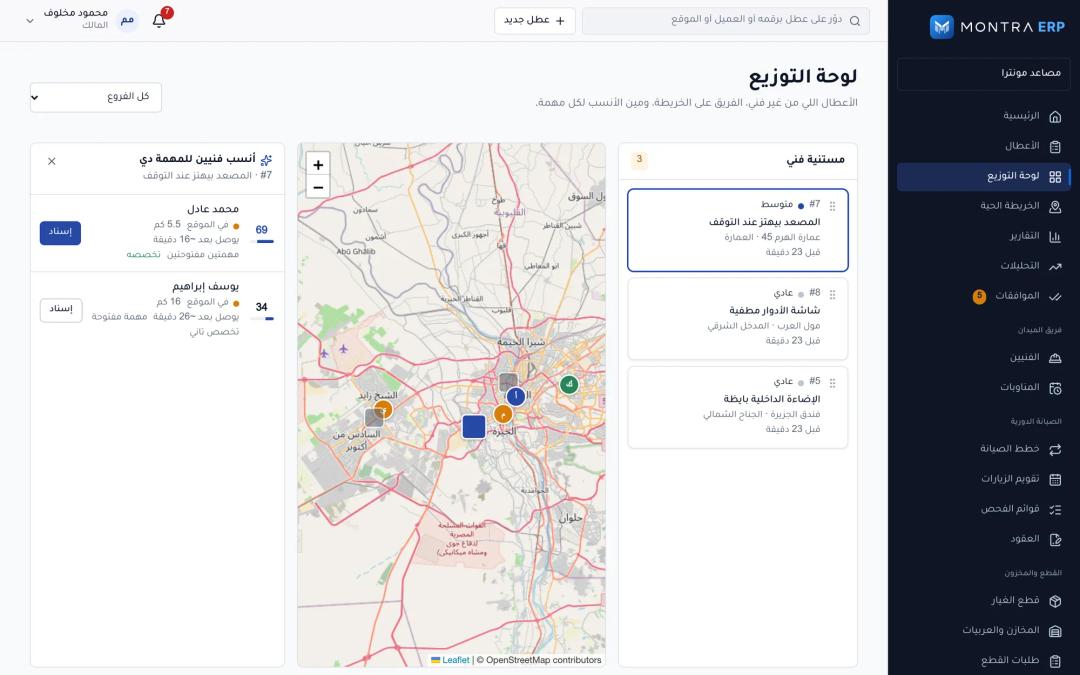 dispatch board with a new fault and the ranked technician suggestions (score, distance, ETA, open jobs)
Under the hood: the dispatch score
When a dispatcher opens a job, the API builds a snapshot of every active technician who covers that site's branch and can work on orders, then scores each one. The score is additive and deliberately simple, so a dispatcher can understand why someone is at the top:
- Skill match: 30 points. If the technician's skills include the job's category. When either side has no skills recorded, they get a neutral 18 so missing data does not sink them.
- Distance: up to 30 points, decaying linearly to 0 at 30 km. Distance is the great-circle (haversine) distance from the technician's last known position to the site. A position older than two hours is ignored and we fall back to the site of their current job. Unknown distance scores a neutral 10.
- Workload: up to 25 points, decaying to 0 at five open work orders.
- Available: 10 points when the technician's current activity is "available".
- Duty: 5 points for being on duty during working hours, or on call outside them.
- Blocked: score 0. A technician on leave or with an expired certificate is pushed to the bottom of the list with the reason shown.
Simplified from the service:
let score = 0;
score += skillMatch === true ? 30 : skillMatch === null ? 18 : 0;
score += distanceMeters === null
  ? 10
  : 30 * Math.max(0, 1 - distanceMeters / 30_000);
score += 25 * Math.max(0, 1 - openWorkOrders / 5);
if (activity === 'AVAILABLE') score += 10;
if (working ? onDuty : onCall) score += 5;
if (blocked) score = 0;

suggestions.sort((a, b) =>
  Number(Boolean(a.blocked)) - Number(Boolean(b.blocked)) ||
  b.score - a.score);
Each suggestion also carries an ETA. We do not call a routing API for a ranking list: we multiply the straight-line distance by 1.35 to approximate roads, then assume 28 km/h in the city and 50 km/h beyond 15 km. It is wrong by a few minutes and right about the order, which is what a dispatcher needs.
We chose a transparent additive score over an optimizer on purpose. Dispatchers override suggestions all the time for reasons the system cannot know ("he knows that building's guard"). A score they can read earns trust; a black box gets ignored.
The work-order state machine
Every job follows one set of transitions, defined once in a shared package used by the API, the web dashboard and the mobile app:
NEW ─assign─▶ ASSIGNED ─accept─▶ ACCEPTED ─start_travel─▶ EN_ROUTE
                 (reject with a reason sends it back to NEW)    │
                                                             arrive
                                                                ▼
IN_PROGRESS ◀─────────────── start_work ─────────────────── ON_SITE
   │   ▲
   │   └─ resume ◀─ AWAITING_PARTS / ON_HOLD (reason required)
   ▼
complete ─▶ COMPLETED ─approve─▶ CLOSED ─reopen─▶ ASSIGNED
               └─ return_work (reason) ─▶ IN_PROGRESS
Each transition declares who may perform it (technician, dispatcher or approver), whether it requires a reason, and whether it must send the technician's location. start_travel, arrive and complete all carry a GPS fix. On arrival, PostGIS computes the distance between the technician and the site and compares it with the site's geofence radius. We flag an arrival outside the geofence instead of blocking it, because a GPS fix inside a concrete basement is often 200 m off and a technician who cannot press "arrived" will stop using the app.
That event trail is the proof of visit: who accepted, when they left, where they were when they arrived, before and after photos (after photos are required by default), checklist answers and the time the job was completed.
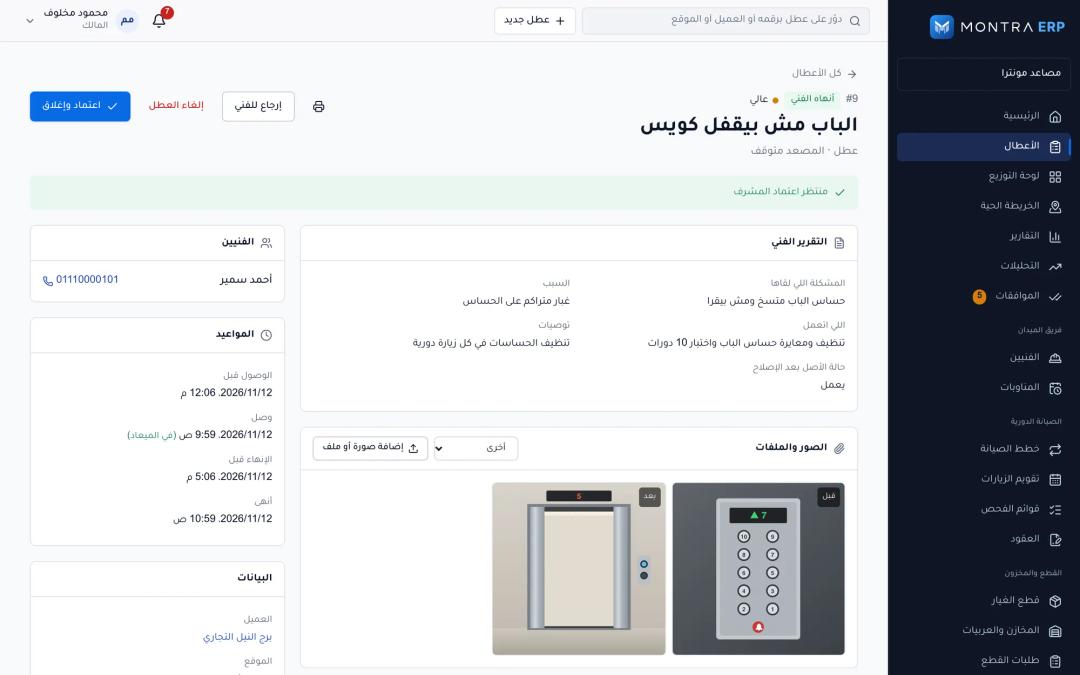 work order detail showing the timeline of status changes with arrival distance and photos
Preventive maintenance that does not miss visits
Preventive plans can be time-based (every N days, weeks, months or years) or meter-based (every N units on an asset meter, such as running hours on a generator). Each asset in a plan keeps its own schedule.
An hourly background job creates the work order a configurable number of lead days (seven by default) before the visit is due. Three rules came from real edge cases:
- One open visit at a time. If last month's visit is still open, we record this month's as skipped instead of stacking a second order on the same elevator.
- No pile of stale visits. If several periods passed without a visit being generated, it catches up to the latest due date and creates only that one.
- Contracts end. A plan linked to a cancelled or expired contract stops generating visits.
Meter-based plans trigger when a technician records a reading during a job and the meter has advanced by at least the plan's interval since the last visit.
A unique index on plan, asset and due date makes generation idempotent, so a retry can never create the same visit twice. The scheduler also takes a Postgres advisory lock, which matters once you run more than one API replica:
const lock = await tx.execute(
  sql`SELECT pg_try_advisory_xact_lock(${LOCK_ID}) AS ok`);
if (!lock.rows[0]?.ok) return; // another replica is running it
Background work runs on BullMQ when Redis is available, with repeatable schedules and an outbound delivery queue that retries five times with exponential backoff. Without Redis, on small self-hosted installs, the same jobs run on in-process timers. The advisory locks stay in place either way.
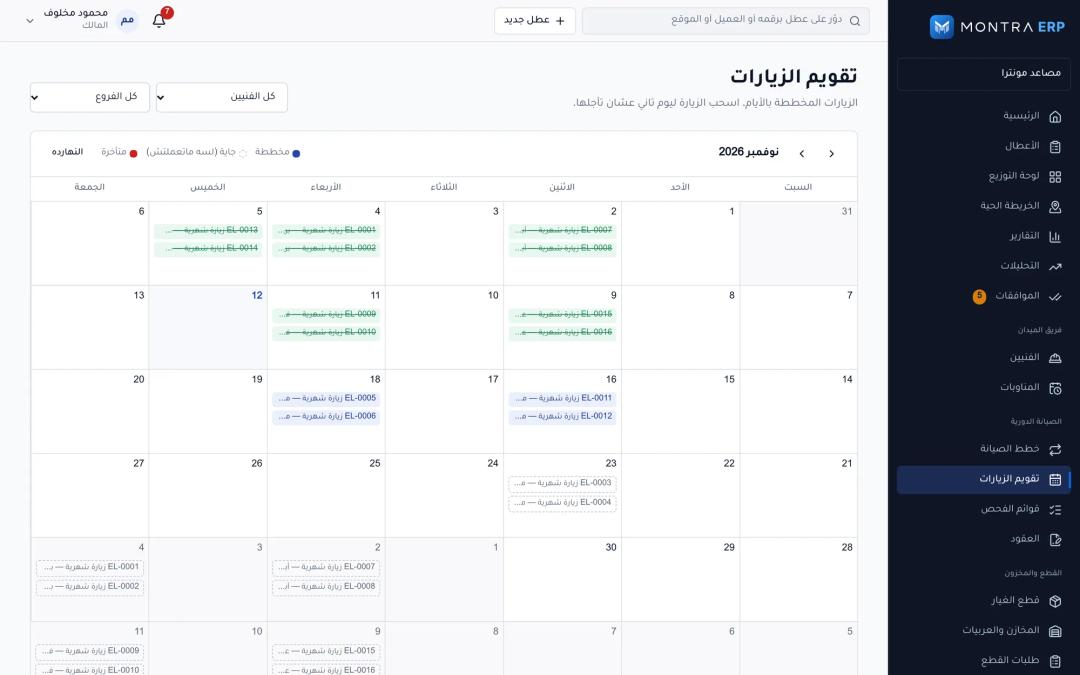 preventive maintenance calendar with generated, upcoming and skipped visits
Live tracking and the load test
The technician app records a GPS fix every 25 m while moving and sends a batch every 30 seconds. The API filters each batch before storing it:
- Fixes from the future or older than a week are dropped.
- In shift mode, only fixes inside a clocked-in shift are stored. In jobs-only mode, only fixes while the technician is travelling to or working on a job. Privacy is enforced on the server, not only in the app.
- The newest accepted fix is published as a live event.
phone ──batch/30s──▶ API ──insert──▶ location_pings (Postgres, RLS)
                       │
                       └─publish──▶ Redis pub/sub ──▶ every API replica
                                                         │
                                         SSE stream ◀────┘ (filtered by
                                         to office map     tenant, branch,
                                                           permission)
The office dashboard holds one server-sent events connection. Events fan out through Redis so any replica can deliver them, and each connection only receives events for its own company, branches and permissions. When drawing a route or computing distance travelled, we drop fixes with accuracy worse than 150 m, jumps faster than 60 m/s and jitter under 15 m.
Before trusting this in production we load-tested it with k6. Each virtual user is a technician who signs in, clocks in, accepts a job, starts travelling and sends batches of six fixes every 30 seconds. On 14 October 2026, against a local stack with a single API process, Postgres 16 and Redis:
| Run | p95 | p99 | Errors |
|---|---|---|---|
| 20 technicians × 60 s | 31 ms | 41 ms | 0% |
| 200 technicians × 3 min | 31 ms | 41 ms | 0% |
The 200-technician run sent 1,200 batches and stored 7,200 GPS fixes. At full design load, 200 technicians produce about 144,000 rows per hour into the location_pings table. That is the figure we designed the table and its indexes around: an append-only table with one index on technician and time (newest first) and one on company and time.
One lesson from the test itself: the API limits each client IP to 300 requests per minute, and 200 technicians on one load generator send 400. A naive run measures the limiter. The k6 script gives each technician its own X-Forwarded-For, which the API trusts only for the configured number of proxy hops.
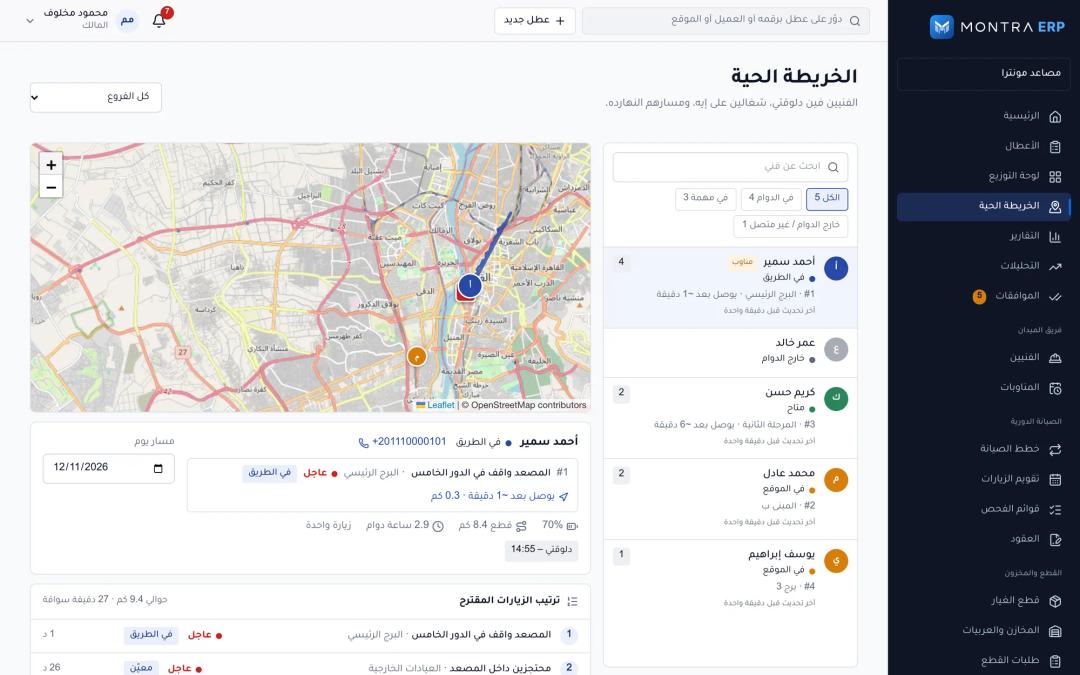 live tracking map with technicians, their status and the route of one technician en route
Keeping the customer informed
When a company turns it on, the customer gets a WhatsApp message at four moments: technician assigned, on the way, arrived and completed, plus a signed read-only link to their work order with the report and photos once it is finished. Messages go through the WhatsApp Cloud API. At the time of writing (November 2026), Meta only allows business-initiated messages outside a customer service window as pre-approved templates, so each of the four updates is a registered template in Arabic and English. Sending runs on the delivery queue with retries, and a rejection from Meta is treated as permanent so it is not retried forever.
Checklist: if you are choosing or building field service software
- Ask how technician suggestions are scored and whether a dispatcher can see why.
- Check that expired certificates and leave block assignment automatically.
- Confirm preventive visits are generated ahead of the due date and that an open visit does not create a duplicate.
- Make sure arrival records a location and timestamp, and that photos can be required before completion.
- Ask whether location tracking stops outside shifts or jobs, enforced on the server.
- Ask what happens to pings recorded offline and sent hours later.
- Ask for load test numbers for tracking, and how the vendor got past their own rate limiter.
- Check that customer WhatsApp updates use approved templates and retry on failure.
- Map your current workflow first; our guide on workflows to document before you build an ERP applies here too.
Frequently asked questions
What is field service management software?
Field service management software coordinates work done at customer sites: receiving requests, dispatching technicians, tracking them, recording what was done and billing or reporting on it. For maintenance companies it also schedules preventive visits under service contracts. It replaces group chats and spreadsheets with one record per job.
How does automated technician dispatch decide who to send?
Most systems combine skills, distance and current workload. In Montra ERP each technician gets a transparent score out of about 100: 30 for skill match, up to 30 for proximity, up to 25 for a light workload, plus points for being available and on duty. Technicians on leave or with expired certificates are blocked.
Is GPS tracking of technicians legal and fair?
It depends on local labor and privacy law, so check with counsel in your country. Good practice is to track only during shifts or active jobs, tell technicians exactly when tracking is on, and enforce that rule on the server so a misconfigured phone cannot over-collect.
Can preventive maintenance be scheduled by running hours instead of dates?
Yes. Generators and some HVAC equipment are better served by meter-based plans: a visit is created when the recorded meter has advanced by a set amount since the last visit. Many companies combine both, a calendar plan for compliance and a meter plan for heavy-use assets.
How many technicians can a live tracking system handle?
It depends on ping frequency and infrastructure. In our local load test a single API process handled 200 technicians sending batches every 30 seconds at 31 ms p95 with zero errors. Ask any vendor for their own numbers and the test setup behind them.
Next step
If your maintenance team still runs on a group chat, start by writing down how a fault moves from the first phone call to a closed job, and which visits your contracts promise each year. Then send us a project brief and we will tell you whether Montra ERP fits as it is or what a tailored build would involve.