A customer in Riyadh pays for a car part with mada, the bank page loads slowly, and they close the app before it redirects back. The money has left their account. Does your system know the order is paid?
Short answer: in Saudi Arabia the gateway choice matters less than what you build around it. Use the gateway's hosted payment page, treat the app redirect as a hint, confirm every payment with the gateway server-to-server (webhook plus a status query), finalize each payment exactly once, and check amount and currency before you grant anything.
We have integrated three different Saudi payment setups in products that are live today: Network International's N-Genius in the Ajza automotive marketplace, PayTabs and Tabby in the Takaful Golden membership app, and Moyasar (with Paymob for Egypt) for subscription billing in MONTRA ERP. This post is what those integrations taught us. If you want a comparison of gateways and fees, our Arabic guide to choosing a payment gateway in Saudi Arabia covers that. This one is about what happens after you sign.
The business problem
Online payment in the Kingdom has a few local realities that shape every integration:
- mada is the default card. It is the national debit scheme, accredited by the Saudi Central Bank (SAMA) and operated by Saudi Payments. A checkout that handles Visa and Mastercard well but treats mada as an afterthought loses a large share of shoppers.
- Apple Pay is expected, on mada cards as well as credit cards.
- Buy now, pay later is common for baskets above a few hundred riyals, with Tabby and Tamara the familiar names.
- The payment happens in someone else's page. For most merchants the card form is hosted by the gateway, inside a WebView in your app or a redirect on your site, and you only find out what happened afterwards.
That last point is where money goes wrong. A paid order that your system still shows as unpaid means a customer calling support with a bank SMS in hand. An unpaid order that your system marks as paid means goods shipped for free. Both happen when the app trusts the browser instead of the gateway.
None of this shows up in a demo. It shows up in the first week of real traffic, as refunds and chargebacks.
The decisions you actually make
| Decision | Options | What we recommend |
|---|---|---|
| Where the card form lives | Hosted payment page, embedded fields, fully custom form | Hosted page. Card data never touches your servers, which keeps your PCI scope small. |
| How you learn the outcome | App redirect, webhook, status query | Webhook and status query together. The redirect only tells the app when to start checking. |
| One gateway or several | Single gateway, gateway per market, gateway plus BNPL | One card gateway per market, plus BNPL if your basket size justifies it. |
| What a payment pays for | One payments table per feature, or one payment record that can pay many kinds of things | One payment model. New revenue lines reuse the same verified flow. |
| Who decides "paid" | The mobile app, or the backend | Always the backend, after the gateway confirms. |
Ask any vendor building your checkout two questions: "What happens if the customer pays and closes the app before the redirect?" and "What happens if the gateway sends the same webhook twice?" The answers tell you most of what you need to know.
How we built it in Ajza
Ajza is a multi-sided automotive marketplace live in Saudi Arabia: parts orders, quotation requests to stores, service bookings, third-party parts and on-demand repair. Customers pay by card (mada, Visa, Mastercard), Apple Pay, an in-app wallet or cash on delivery. Card and Apple Pay payments go through N-Genius Online from Network International, which lists mada, Visa, Mastercard and Apple Pay for Saudi merchants.
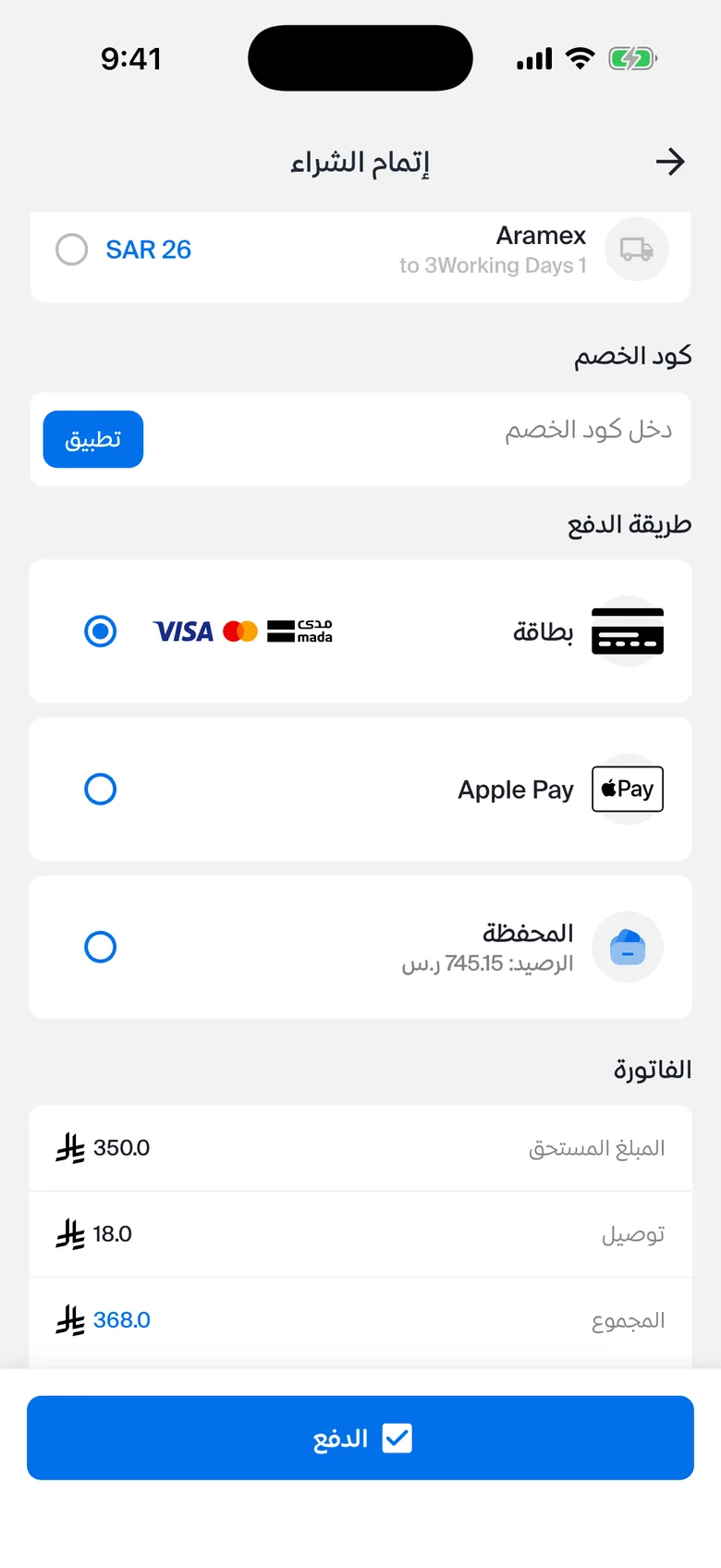 customer app checkout with the payment method picker showing card (mada/Visa/Mastercard icons), Apple Pay and wallet
The flow:
- The app asks the backend to start a payment for a specific order, booking or request.
- The backend creates a payment record, then creates an order with N-Genius and gets back a hosted payment page URL.
- The app opens that page in a WebView and watches the URL.
- When the WebView reaches our return URL, the app closes it and asks the backend to verify.
- The backend checks with the gateway. Separately, N-Genius sends a webhook. Whichever arrives first finalizes the payment; the second is a no-op.
- After the database commit, the shipment with the courier is created in the background.
One payment model covers all five kinds of thing a customer can pay for. A single Payment row points at an order, a store request, a service booking, an external parts order or a repair order. Verification, webhook handling and finalization are written once, and each kind only adds its own small "what happens when this is paid" step.
Under the hood: what the code handles
Regional stack and the PURCHASE action
N-Genius runs separate stacks per region, and Saudi merchant keys authenticate against the KSA host. On KSA outlets, the SALE action returns 422 saleNotAllowed, so the integration uses PURCHASE, which authorizes and captures in one step. Amounts are sent in halalas (minor units) as integers.
const payload = {
  // KSA outlets reject 'SALE' with 422 saleNotAllowed.
  // 'PURCHASE' is single-step authorize + capture.
  action: 'PURCHASE',
  amount: { currencyCode: 'SAR', value: Math.round(amount * 100) },
  merchantOrderReference: payment.referenceNumber,
  merchantAttributes: {
    redirectUrl: returnUrl,
    cancelUrl: `${returnUrl}&cancel=1`,
    skipConfirmationPage: true,
  },
};
The access token is cached for its lifetime (55 minutes by default) and refreshed 30 seconds before it expires, so a checkout never waits on an auth call that is about to fail.
Two independent confirmations
The return page is not proof of payment. A redirect can be lost, delayed or reached by a user who cancelled. So the app calls a verify endpoint, which asks N-Genius for the order state. Meanwhile N-Genius also calls our webhook. Both paths end in the same finalize function.
 App WebView ──► hosted page ──► return URL (?cancel=1 = cancelled)
      │                                   │
      │                          app calls POST /payments/verify
      │                                   │
      │                          backend ──► GET order state (N-Genius)
      ▼                                   │
 N-Genius ──► webhook ──► backend         │
                     \                    /
                      ► finalizePayment (once, in a DB transaction)
                              │
                              └─► after commit: create shipment (non-blocking)
On the app side, the verify call is retried every 2 seconds for up to 15 attempts, so a slow bank page or a slow webhook doesn't leave the customer staring at a failure screen.
Authenticating the webhook
The N-Genius KSA portal lets the merchant define a custom header name and value that is sent with every webhook. The backend compares it with the configured secret using a constant-time comparison:
const expected = Buffer.from(webhookSecret, 'utf8');
const incoming = Buffer.from(headerValue.trim(), 'utf8');
if (expected.length !== incoming.length) return false;
return crypto.timingSafeEqual(expected, incoming);
Finalize once, inside a transaction
The finalize step returns early if the payment is already COMPLETED. Otherwise it marks the payment complete and promotes the linked order, booking or request in the same database transaction, so you never get a paid payment with an unpaid order. Side effects that call third parties, such as creating the courier shipment, run after the commit and log failures without undoing the payment. An admin can retry a shipment; nobody should have to un-charge a customer because a courier API timed out.
Removing a payment method safely
The method list once included STC Pay. When it was removed, the migration first rewrote existing rows that used it, then rebuilt the PostgreSQL enum without the value. Dropping an enum value that old rows still reference fails the migration; rewriting first keeps history readable.
How we built it in Takaful Golden
Takaful Golden is a membership discount-card app for a Saudi medical network. Members pay annual dues through PayTabs' hosted page, and the newer clinic-offers store lets them buy medical services with Tabby.
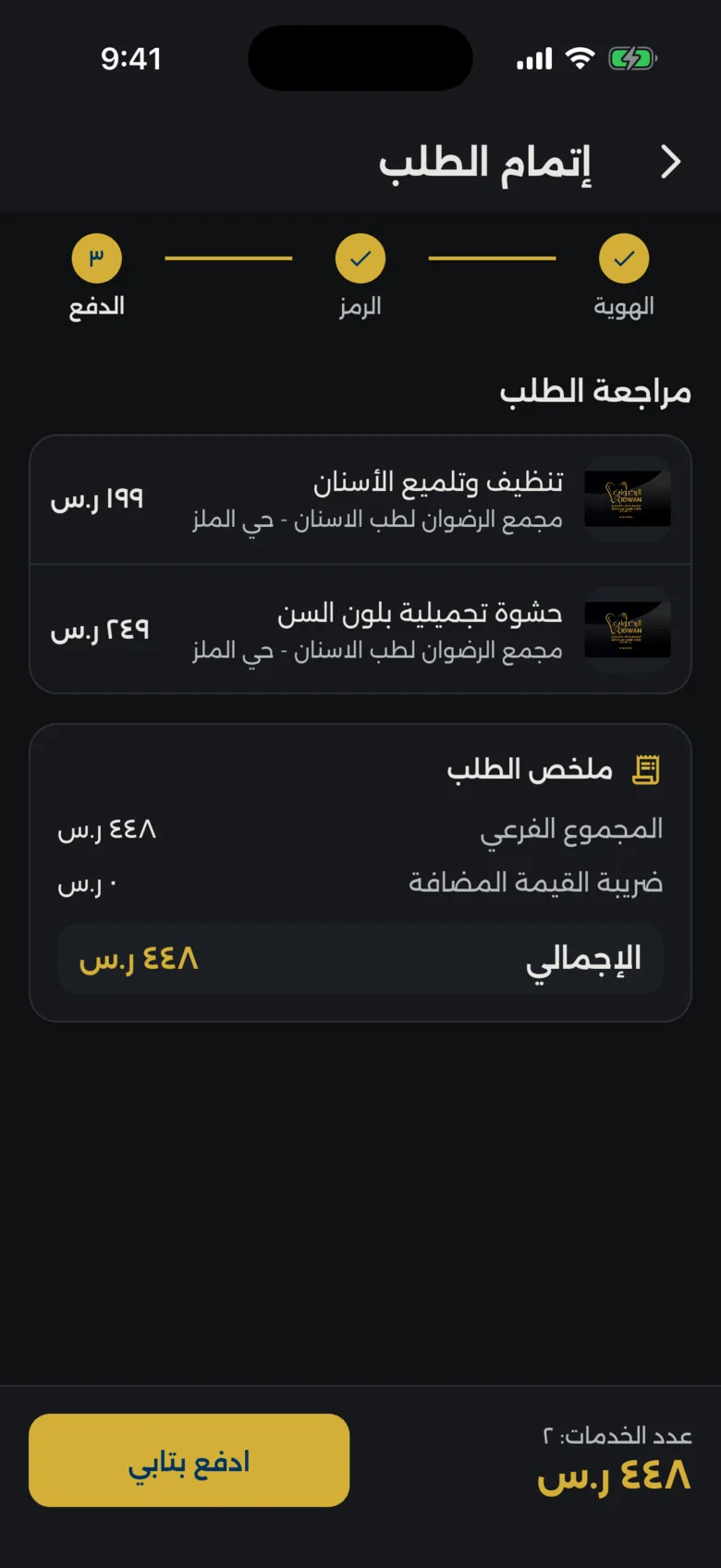 clinic offers checkout: identity step done, Tabby eligibility message and the pay button
For PayTabs, the app opens the payment URL in a WebView and waits for the gateway's response page. It reads the Result parameter only to decide whether to ask the backend for confirmation; a cancel skips the call. A 5-minute timeout closes the WebView if nothing comes back, so the user is never stuck on a blank page.
The Tabby store flow follows one rule written into the API contract: the order status endpoint, not the WebView, decides the outcome.
- Before the pay button is enabled, the app calls an eligibility endpoint. If Tabby declines the basket, the button stays disabled and the message is shown. Tabby's own docs describe the same pattern: a background pre-scoring check, then a full session only for eligible customers.
- Checkout returns an order ID and the Tabby payment URL. Retrying with the same items returns the same unpaid order instead of creating a duplicate.
- While Tabby is open, the app polls the order every 3 seconds. Polling pauses when the app goes to the background and resumes, with an immediate check, when it returns.
- If the session expires mid-payment (a 401), polling stops and the user is asked to verify again. Retrying would only fail again, so the app doesn't spin on "checking payment" forever.
- Every write request carries an
X-Idempotency-Keyheader.
if (isPaid || status == PaymentStatus.paid) {
  _timer?.cancel();
  if (_shouldClearCart(order)) await _cart.clearIfPaid(true);
  emit(PaymentState(phase: PaymentPhase.paid, order: order));
}
Two details came from real use. The cart is cleared only when is_paid is true, never on redirect. And paying an old unpaid order from "My orders" clears the cart only if that order contains exactly the cart's items, so it doesn't wipe a basket the user is building for something else.
Tax is calculated server-side once nationality is known: 0% VAT for Saudi citizens and 15% for others in this store's contract. The app never computes prices.
How we built it in MONTRA ERP
MONTRA ERP is a maintenance-operations SaaS sold in Egypt and Saudi Arabia. Companies pay for a plan and billing cycle. Saudi tenants pay in SAR through a Moyasar hosted invoice; Egyptian tenants pay in EGP through Paymob. The provider is picked from the company's country behind one PaymentProvider interface, so the billing logic doesn't care which gateway is underneath.
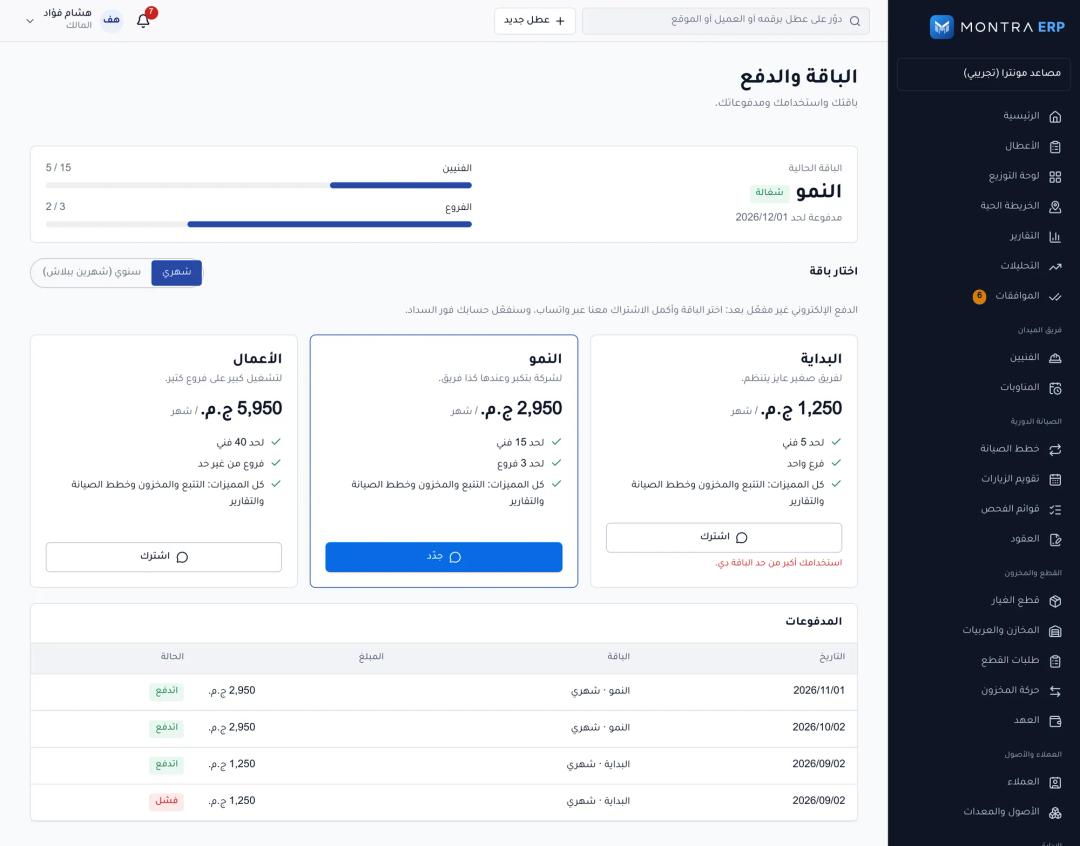 billing page showing current plan, usage against limits and payment history
The webhooks are verified differently because the providers sign differently. Paymob sends an HMAC-SHA512 computed over a fixed, ordered list of fields; we recompute it and compare with timingSafeEqual. Moyasar includes the secret_token you configure in the dashboard in the webhook body. We check it, then fetch the invoice from the Moyasar API before trusting the status.
Settlement then does three things that matter for money:
- It locks the payment row (
SELECT ... FOR UPDATE) and returns if the payment is already paid, so duplicate webhooks do nothing. - It rejects the payment if the confirmed amount or currency differs from what we asked for.
- It extends the subscription from the later of today and the current end date, so paying early never loses days.
For the general patterns behind this, see our post on handling money correctly with idempotency and ledgers.
Checklist: before you go live with a Saudi gateway
- Test mada cards specifically, including Apple Pay with a mada card, on the live configuration, not only the sandbox.
- Confirm which transaction action and region your merchant account supports before writing code.
- Store amounts in minor units (halalas) as integers.
- Never mark a payment paid from the app redirect. Confirm with the gateway server-to-server.
- Handle both the webhook and a status query, and make finalization safe to run twice.
- Authenticate every webhook with the provider's mechanism (signature, shared header or secret token) and compare in constant time.
- Check amount and currency on confirmation.
- Keep third-party side effects (shipping, emails) out of the payment transaction and make them retryable.
- In mobile apps, handle backgrounding, expired sessions and a user who closes the WebView.
- Calculate VAT and totals on the server only.
Frequently asked questions
Which payment methods does a Saudi online store need?
At minimum mada, Visa and Mastercard, plus Apple Pay. Many stores also add a BNPL option such as Tabby or Tamara for larger baskets, and some keep cash on delivery for specific categories. Check with your gateway that each method is enabled on your live merchant account.
Is a webhook enough to confirm a payment?
A webhook is the main signal, but webhooks can arrive late or be retried. We pair it with a status query the app triggers after the redirect. Both paths end in the same finalize step, which ignores a payment that is already completed.
Why does N-Genius return 422 saleNotAllowed in Saudi Arabia?
On the KSA outlets we integrated, the SALE action is rejected with that error. The PURCHASE action, which authorizes and captures in one step, is the supported single-step action there. Confirm with Network International for your own outlet configuration.
Should I build my own card form or use a hosted payment page?
For most businesses a hosted page is the right default. Card data goes straight to the gateway, your compliance burden stays small, and mada and Apple Pay support comes from the provider. Build custom fields only if you have a specific design need and the team to maintain the extra security scope.
How long does it take to integrate a Saudi payment gateway?
The API calls are a small part of the work. Most of the time goes into merchant onboarding, verification paths, webhook handling, edge cases in the mobile app and testing live cards. Plan for the full flow, not only the "pay" button.
Next step
If you're adding payments to a Saudi product, or a payment flow you already have is producing "paid but not paid" tickets, send us a project brief. We'll tell you which of the points above apply to your setup, and you can see how we price this kind of work on the services page.