A building owner wants a passenger lift cabin with walnut side walls, a mirror on the back wall, a stainless handrail and a backlit ceiling. Before anyone can quote it, a sales engineer has to turn that sentence into drawings, a factory has to price the drawings, and the customer usually changes their mind twice along the way.
Short answer: a 3D product configurator replaces that loop with one shared, unambiguous design. The customer builds the product in the browser, the server prices it from a rate card the browser never sees, engineering rules flag designs that cannot be built, and the finished design goes to the factory as a structured build spec. It pays off when your product is custom but rule-bound.
The business problem
Custom-made products, like lift cabins, kitchens, fitted furniture and shop signage, share the same costly sales process:
- The spec lives in conversation. "Gold handrail" can mean three profiles and two heights. Every ambiguity becomes either a phone call or a remake.
- Quotes drift. Each revision is priced by hand, so two similar cabins get two prices and margin leaks on the one nobody rechecked.
- Impossible designs are found late. A mirror over the button panel or a door too tall for the ceiling surfaces after the deposit, when fixing it costs most.
- Browsers never become buyers. A customer who cannot see the result and cannot get a price without a meeting rarely comes back.
A configurator turns the design into data. Data cannot be misread, it can be priced by one function, and rules can run on it while the customer is still designing. And because a real price arrives in seconds, the people who order are the ones who already decided.
Do you need a 3D configurator? Your options
| Option | Good for | Trade-off |
|---|---|---|
| Quote form plus PDF catalog | Low volume, few options | Slow, still ambiguous, pricing stays manual |
| 2D configurator (pickers, images, rules, price) | Products whose look is simple | Customers struggle to picture combinations |
| Off-the-shelf configurator SaaS | Standard products, quick start | Your pricing logic and factory flow live in someone else's model |
| Custom 3D configurator | Custom products with real engineering limits and a factory handoff | Highest build cost; needs an owner for catalog and rules |
When not to build one: if your product has a handful of variants, if price is negotiated per customer anyway, or if nobody can own the catalog and rules after launch. A configurator with stale finishes or wrong rules is worse than a good quote form.
How we built it in Montra Studio
Montra Studio is the elevator cabin designer inside Montra, our own B2B marketplace for the elevator industry in Egypt. It is live at montralift.com/studio. A customer picks a lift type (passenger, bed, freight or home), a size, and then designs every surface: wall panels and joints, mid-rails, feature panels, shaped mirrors, the handrail style, ceiling lights and drop, floor inlay, car door details, corner trims, the button panel and even the landing outside the car.
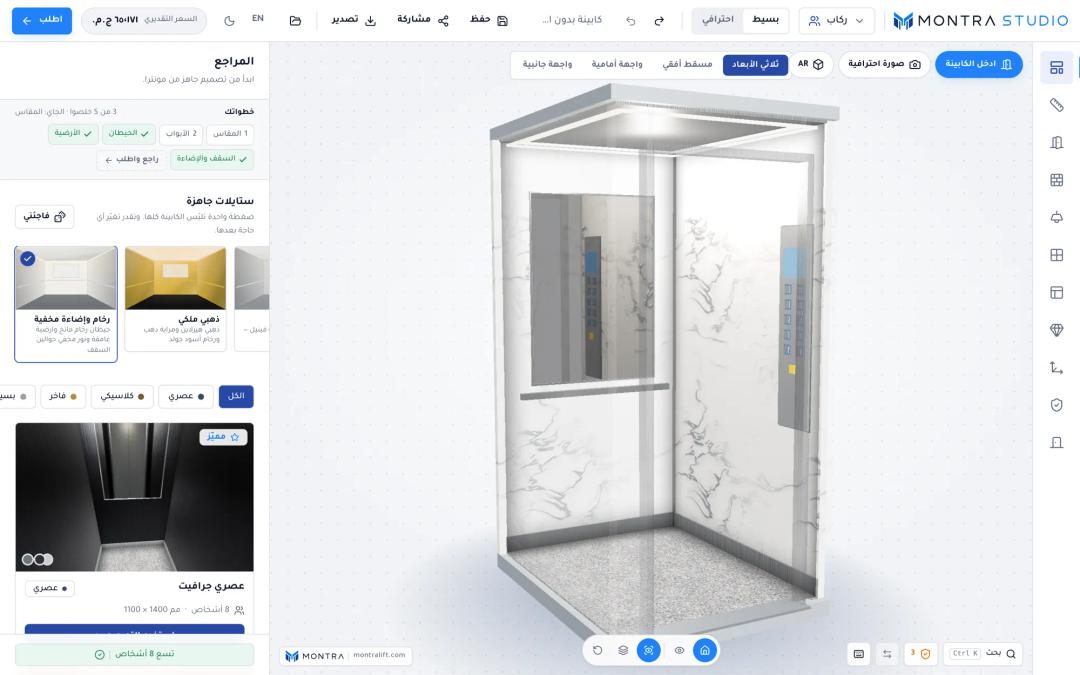 the configurator with a finished cabin in the 3D view, tool rail on one side and the live price in the top bar
Three things happen continuously while they design:
- Standards check. EN 81-20 and EN 81-70 based checks, each with a plain explanation and, where possible, a one-click fix.
- Live price. About 600 ms after the last edit, the browser asks the server for a price. The answer is one locked total with a breakdown that adds up exactly.
- Build spec. Every choice is stored as structured data for the factory, and also renders as a printable A4 sheet with elevations, a 3D image, an inside view and every option by name.
When they order, the server re-checks the design, re-prices it, takes a deposit into escrow, and offers the job to cabin factories in a fixed order.
Under the hood: state, rendering and materials
State. The whole design lives in one Zustand store, persisted to localStorage so a half-finished cabin survives a reload (the design only, never server answers or undo history). Multi-part edits such as "make it compliant", which may change size, doors and fixtures together, apply as one undo step.
The quote request is debounced and guarded against out-of-order answers: a slow response for an old design must never overwrite the current price.
scheduleQuote: () => {
  if (quoteTimer) clearTimeout(quoteTimer);
  quoteRun += 1;
  set({ quote: null, quoteLoading: get().validate().ok });
  quoteTimer = setTimeout(() => void get().refreshQuote(), QUOTE_DEBOUNCE_MS);
},

refreshQuote: async () => {
  const run = ++quoteRun;
  const quote = await api.quoteCabin(get().buildInput());
  if (run !== quoteRun) return; // a newer edit already asked
  set({ quote, quoteLoading: false });
},
Rendering. We use plain three.js (0.186) rather than a React 3D layer, loaded with a dynamic import so the studio shell renders before the 3D code arrives. The scene renders on demand: a frame is drawn only when the camera moves or the design changes, so an idle studio costs no GPU time. Pixel ratio is capped at 1.75 and antialiasing is skipped on high-density screens, where it costs a lot and shows little.
Low-end devices. Machines without a usable GPU run WebGL on a CPU rasterizer such as SwiftShader or llvmpipe, where each extra shader variant can freeze the page for seconds. The studio reads the renderer name and takes a "lite path" there: no relief maps, no mirror reflection pass, no realistic thumbnails, single-sample photos without shadows. On phones, the 3D view keeps a fixed height and only the panel below it scrolls, so each change stays visible.
Materials. Marble, granite, travertine, wood, brushed and patterned metal, fabric, leather, solid colors and glass are generated in the browser from a small spec (family, parameters and a seed) using periodic noise, so they tile without seams at any cabin size. Textures are cached by spec and swatches are prepared in idle time. An uploaded photo texture still wins when an admin provides one, and a material lab page previews any finish tiled three by three at real scale, so a seam is caught before customers see it.
 material lab page showing one marble finish as a large swatch and tiled 3×3 at real scale
What the EN 81-20 check actually validates
EN 81-20 is the European standard for the safety of new, permanently installed passenger and goods passenger lifts. At the time of writing (November 2026), standards catalogs list EN ISO 8100-1:2026 as its revision, while some national bodies still list EN 81-20:2020 as valid, so check with your national standards body for a real project.
The studio treats its checks as guidance, not certification: the installer's notified body certifies the lift. What it checks:
- Load versus floor area. The car area is compared with the standard's table of rated load against maximum available car area, interpolating between rows. A car with more floor than its rated load allows is an error for passenger, bed and home lifts and a warning for freight. A car too small for its passenger count is a warning. Passengers are derived as rated load divided by 75 kg, rounded down.
- Door headroom. Every door must leave at least 100 mm under the cabin ceiling.
- Per-type limits. Car size, door count, door width and height, and allowed door openings for each lift type.
- Accessibility (EN 81-70). Doors at least 800 mm clear, a car of at least 1100 × 1400 mm, a side-wall handrail at 900 mm (±25 mm), the button panel 400 mm from a corner, a mirror facing the door when a wheelchair cannot turn, and floor-to-wall contrast. These become requirements when the "Accessible lift" toggle is on.
Warnings inform; only an error disables the order button. The server does not trust the browser on what the factory builds from: it enforces per-type size and door limits on every quote and save, and on ordering re-runs the fixture layout check (handrails, mirrors and panels clear of doors, the button panel and glass) with the studio's clearances, so a crafted request cannot freeze an unbuildable layout.
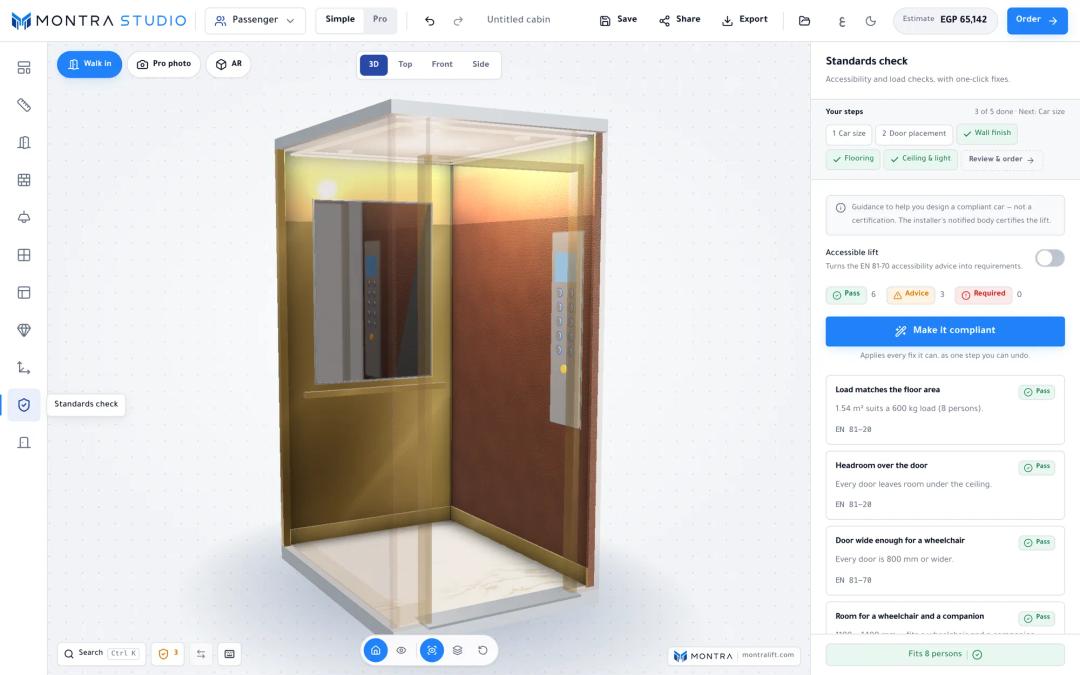 standards check panel with one EN 81-70 warning, one passing EN 81-20 load check, and the "make it compliant" button
Under the hood: pricing that stays on the server
The catalog sent to the browser carries no prices. The server prices each design against every active factory that can build it, skipping any without pricing, out of size range, at capacity, or missing a chosen option. A factory's cost is a base price, a volume rate, an extra-door charge and one line per option, multiplied by wall, ceiling or floor area, door count, volume, or flat.
Factories are scored on price, reliability, lead time, spare capacity and rating, with weights in platform settings. The best ones within a price spread form an ordered chain (by default up to four, within 15%), and the customer price is built from the most expensive member:
const priceSetter = chain.reduce(
  (worst, c) => (c.cost.gt(worst.cost) ? c : worst), chain[0]);
const total = round2(priceSetter.cost.mul(1 + commissionRate / 100));
That choice lets the order move down the chain if a factory refuses, without the price changing or the margin going negative. Before the quote leaves the server, factory ids, costs and scores are stripped, and lines are grossed up to sum exactly to the total, since a breakdown that does not add up reads as a hidden fee.
From design to factory
On submit, the server locks the draft design row in a transaction so a double click cannot create two orders, re-quotes, and freezes a snapshot of lift type, load, dimensions, doors, button panel, full layout, price lines and lead time. Later catalog edits cannot change a placed order.
Studio design ──quote (debounced)──▶ market pricing (no prices in browser)
      │
   submit ──▶ layout check ──▶ re-quote ──▶ frozen snapshot + factory chain
      │
 deposit receipt ──▶ admin confirms ──▶ offer to factory 1 ──(refuse / 24h)──▶ factory 2 …
      │
 factory delivers ──▶ admin settles deposit (minus platform dues) to factory
The deposit (40% by default) is paid by bank transfer to the platform and held in escrow through manufacturing; we covered the payment side in B2B payments in Egypt with InstaPay and escrow. Once confirmed, the job goes to the first factory in the chain; a refusal or 24 hours of silence moves it on and costs that factory reliability points. Before accepting, a factory sees the full design and delivery area, never the customer's identity, the margin or the rest of the chain. The routing pattern is the same one we use for spare-parts orders, described in multi-supplier order splitting.
Outputs from one drawing engine. The on-screen elevations, the printable spec sheet, the SVG and the AutoCAD DXF (R12, millimeters) all come from the same set of 2D drawing primitives, so a drawing cannot disagree with the document the factory receives.
 printable A4 build spec with the 3D image, elevations with dimensions and the options table
Walk-in, photos and AR. Customers can walk into the cabin at eye height, render a supersampled photo at 2x or 4K, and see the cabin at true size in their room. AR uses each platform's native path: a USDZ in AR Quick Look on iPhone and iPad, a GLB through Google's model-viewer (WebXR or Scene Viewer) on Android, and a QR code on desktop that opens the shared design on a phone straight into AR. Both files are exported from the live scene in real-world meters, and the exporters load only when asked.
Checklist: before you commission a configurator
- Write down your product rules as numbers (minimums, maximums, clearances) before any 3D work. If you cannot, you are not ready.
- Decide which rules block an order and which only warn. Too strict and customers cannot sketch; too lenient and factories get impossible jobs.
- Keep prices on the server and re-price on submit. Never trust a price the browser sends.
- Freeze a snapshot of the design and price on the order, so catalog edits cannot rewrite history.
- Plan for weak devices: render on demand, cap pixel ratio, and have a lite path for machines without a GPU.
- Make the factory handoff structured data, with the printable sheet as a view of that data, and give someone ownership of the catalog after launch.
Frequently asked questions
How much does a 3D product configurator cost to build?
Cost depends mostly on product rules and integrations, not the 3D view. Engineering rules, server-side pricing, saved designs, exports and the ordering flow are where the effort goes. See our services page for price bands.
Can a 3D configurator run on cheap phones and laptops?
Yes, if it is built for it: render only when something changes, cap the pixel ratio, load the 3D code lazily, and give software-rendered machines a simpler path.
Is a configurator's standards check the same as certification?
No. A configurator can apply published rules, such as load-to-area limits or accessibility dimensions, so the design is likely to pass. Certification is done by the lift installer and a notified body against the full standard and the actual installation.
Should prices be calculated in the browser?
No. Anything in the browser can be read, so a rate card there is public. Compute the price on the server and recompute it when the order is placed.
Do I need AR in a product configurator?
Only if scale matters to the buying decision. For a lift cabin, true size in a real room helps; for many products a good 3D view is enough. Native AR on iOS and Android needs no app.
Next step
If you sell custom products and your quotes still start with a phone call, list the rules your factory applies to every order and the questions customers ask most. That list is the real spec for a configurator. Send it to us through the project brief and we will tell you whether a 2D configurator, a 3D one, or a better quote form is the right first step.